 Alexandra
At POEditor, we ship improvements continuously to help localization teams work faster and with fewer errors. Here’s a full rundown of the latest POEditor updates, from AI-ready integrations to quality-of-life fixes across the platform.
Major updates
POEditor MCP server
We launched the POEditor MCP server so you can connect any AI tool directly to your localization projects. It lets you manage translation projects, retrieve localization data and run common tasks from within your AI assistant (no custom API scripts required).
Dark mode
Dark mode is now available in POEditor. For long translation and localization sessions, it’s a meaningful quality-of-life improvement. Enable it under your account’s Preferences.
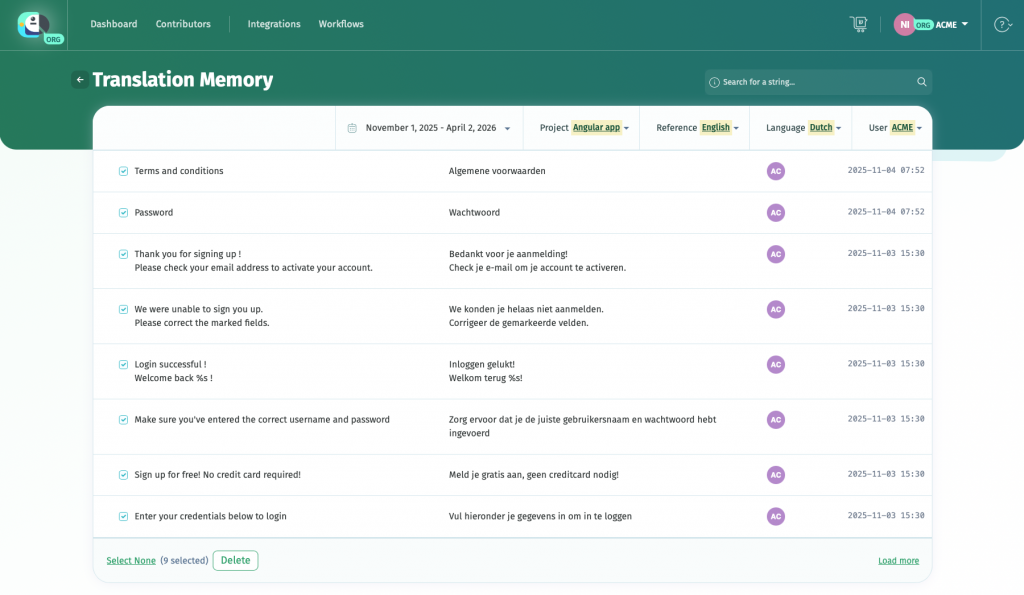
Redesigned Translation Memory page
Based on user feedback, we rebuilt the Translation Memory interface. The new centralized page — accessible from Settings > Translation Memory > Manage — makes it easier to browse, filter, and act on stored translations. Available filters: date range, project, source language, and username.
QA Checks improvements
The QA Checks page now gives you finer control over the review process:
- Run QA checks against glossary terms
- Choose which error types to detect (and which to ignore)
- Filter which strings to include in a check
Bulk team assignation
Teams can now be assigned to all languages and projects at once using the Add team button on the top-level Contributors page. Previously, teams had to be added project by project and language by language — a significant time-saver for larger organizations.
Smaller updates worth knowing
- Direct Terms access: Owners, admins, and organization managers can now open the Terms page directly from any language page via the top menu.
- New keyboard shortcut: Press Shift+/ on any language page to display a full list of Advanced Search operators.
- Action floater on language pages: A floating menu gives contributors faster access to translation actions: Toggle Fuzzy, Proofread, Delete Translations and more.
- Terms page filters: The Terms page now has the same filtering options as language pages: Date ASC/DESC, Last Commented and Terms A-Z/Z-A.
- Convert account to organization: The new Convert account option turns your existing account into an organization, transferring all projects, subscriptions, integrations, API keys, glossaries and teams in a single step.
These POEditor updates are part of our ongoing work to make localization faster and less error-prone. More updates are on the way, and if there’s a feature you’d like to see, please reach out to us at info@poeditor.com.