Available for Custom Workflows, the Quality Evaluation step uses AI to assess your translations and assign a score based on their quality. You can use the evaluation results to choose how the workflow continues.
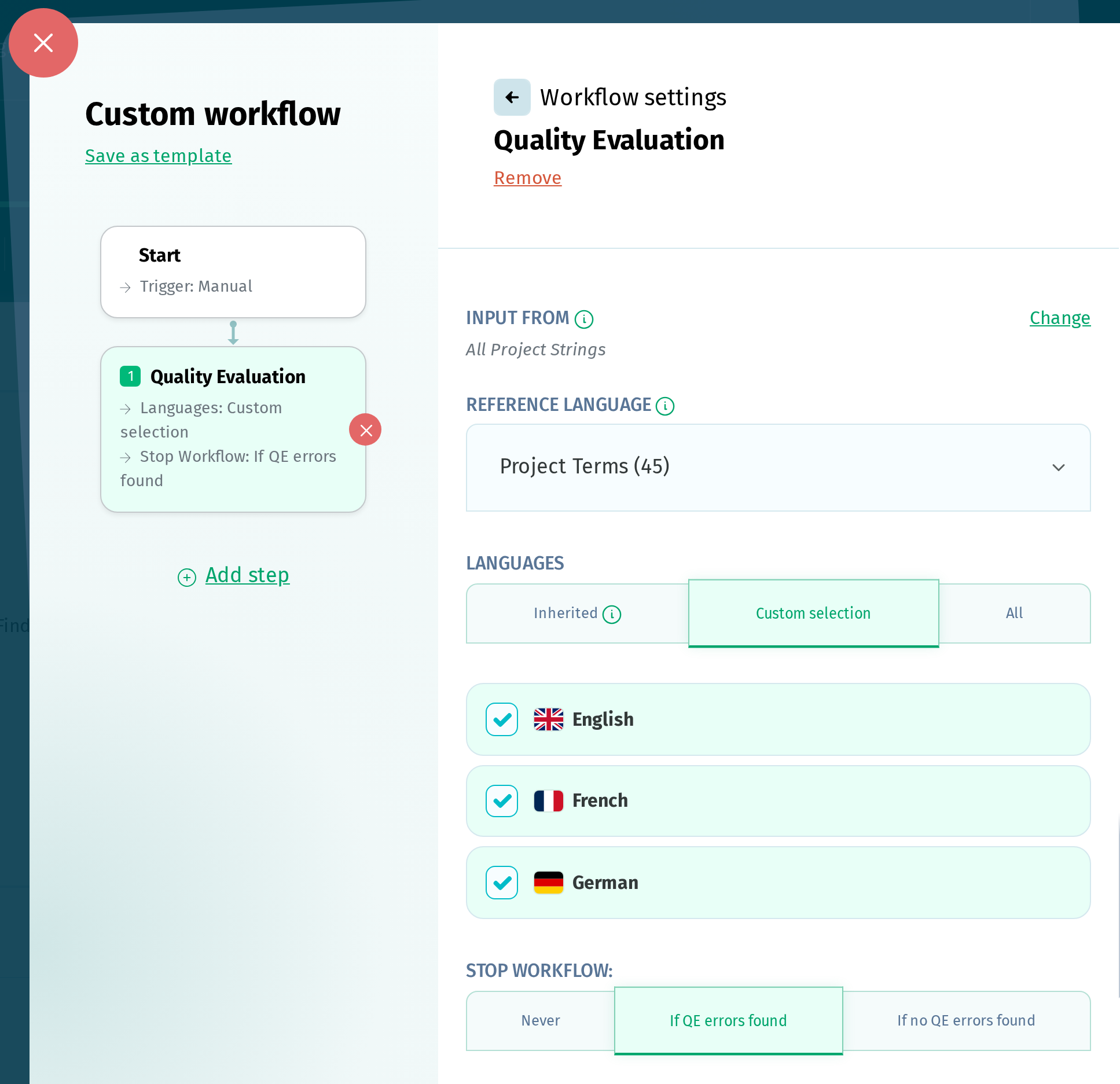
When used as the first step in a workflow, it can run on the following triggers:
- New terms
- Reference language updated
- Scheduled
- Manual
If a Default Reference Language is set on the project, it is automatically used for the evaluation. You can also choose the Project Terms, the language inherited from the previous step, or any other language in the project. If your terms are keys or string IDs, a project language is a better choice for the reference.
For the evaluation, you can choose:
- the languages inherited from the previous step
- a custom selection of languages
- all the project languages
Fail threshold is the minimum score a translation needs to pass the evaluation, and it defaults to 100.
You can then set what happens based on the evaluation results:
- never stop the workflow
- stop the workflow if QE errors found
- stop the workflow if no QE errors found
Translations scoring below the Fail threshold are grouped under Failed Translations, along with the reasons for their scores. Translations scoring at or above it are grouped under Passed Translations. Either output can be used as the input for a following step.
The step skips translations in the reference language, translations that have already been evaluated, proofread translations, empty translations, and non-translatable terms. When the step stops the workflow, all following steps are skipped.