 POEditor
Django comes with an ORM, an admin site, authentication, and a template engine, so you can get an application up and running quickly. As the project grows, though, supporting users in different languages requires more than translating a few strings.
Internationalization (i18n) prepares the code for multiple languages and locales. Localization (l10n) provides the translations and formats dates, numbers, and other locale-specific content for each language.
In this guide, we’ll start with a Django TO-DO app whose text is hardcoded in English. We’ll mark its strings for translation, translate them into French in POEditor, and configure the app to serve both languages.
What Django translates out of the box
Django installs its own message catalogs along with the framework. There are dozens of language directories under django/conf/locale/, most of them carrying a compiled catalog, plus a set inside each contrib app. Together, these catalogs cover the password validator messages, authentication views, form and field errors, the admin, and locale-specific date and number formats. pip install django already put them on disk.
Django serves those catalogs for a language the project has declared and activated. A fresh project declares nothing, so every response comes back in English whatever the browser asks for. A few settings and one middleware line are enough to enable language selection.
Django translates its own messages, but it does not know anything about the strings in your application. “Create list”, “Signed in as demo”, “Task added.” and every other string your team wrote stay English after that, because no catalog on disk contains them. Marking those strings, extracting them and getting translations back is the rest of this guide.
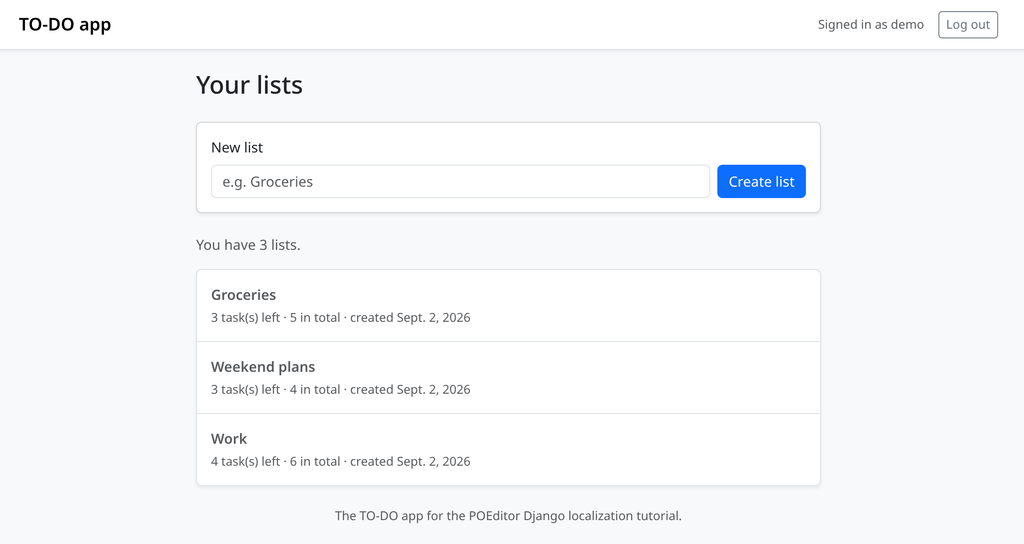
The example is a small Django to-do app. You register with a username and a password, you are logged in straight away, and you create lists whose tasks you can add, edit, complete and delete. It includes page titles, form labels, buttons, filter pills, flash messages and counts—enough interface text to make a useful translation catalog.
Before you start
- Python 3.12 or newer, which is what Django 6.1 requires.
- Django 6.1. Everything here works the same way back to Django 5.2 LTS.
- The GNU gettext tools, which makemessages and compilemessages call out to. sudo apt install gettext on Debian and Ubuntu, brew install gettext on macOS, and on Windows the precompiled gettext binaries with their bin directory added to PATH.
- A POEditor account for the translation round trip.
Set the project up and start it:
python -m venv .venv
source .venv/bin/activate
pip install django
python manage.py migrate
python manage.py runserver
Open the address the development server prints, register as demo, and create a couple of lists so there is something on the page to translate.
Configuring Django’s i18n settings
Add an internationalization block to the settings module:
# todosite/settings.py
from django.utils.translation import gettext_lazy as _

# Turns on Django's translation and formatting machinery.
USE_I18N = True

# The fallback language, and the language the source strings are written in.
LANGUAGE_CODE = "en"

# The languages the app offers. The names are marked for translation too, so
# the switcher reads "English / French" in English and "Anglais / Français"
# in French.
LANGUAGES = [
    ("en", _("English")),
    ("fr", _("French")),
]

# Where makemessages writes the catalogs and where gettext looks for them.
LOCALE_PATHS = [BASE_DIR / "locale"]
USE_I18N is already True in a fresh project, so the line above is there for anyone who greps the settings for it. LANGUAGE_CODE defaults to en-us; setting it to en lines it up with the code in LANGUAGES and with the locale directory you are about to create.
LANGUAGES is an allowlist. Django activates a language only if it appears there. A browser sending Accept-Language: de gets LANGUAGE_CODE rather than German, and a language cookie holding an unlisted code is ignored the same way.
Then add the locale middleware:
# todosite/settings.py
MIDDLEWARE = [
    "django.middleware.security.SecurityMiddleware",
    "django.contrib.sessions.middleware.SessionMiddleware",
    # Works out the active language for every request.
    "django.middleware.locale.LocaleMiddleware",
    "django.middleware.common.CommonMiddleware",
    "django.middleware.csrf.CsrfViewMiddleware",
    "django.contrib.auth.middleware.AuthenticationMiddleware",
    "django.contrib.messages.middleware.MessageMiddleware",
    "django.middleware.clickjacking.XFrameOptionsMiddleware",
]
The position matters. LocaleMiddleware goes after SessionMiddleware and before CommonMiddleware, because CommonMiddleware needs an active language to resolve the requested URL. Put it at the end of the list and language-dependent URL resolution breaks.
LOCALE_PATHS points at one directory at the project root. This is the tree the next few sections fill in:
locale/
├─ en/
│  └─ LC_MESSAGES/
│     ├─ django.po
│     └─ django.mo
└─ fr/
  └─ LC_MESSAGES/
      ├─ django.po
      └─ django.mo
Django also reads a locale/ directory inside each installed app, which is the right layout for a reusable package. One project-level directory puts the whole application’s text in one file per language, which is what you hand to a translation service.
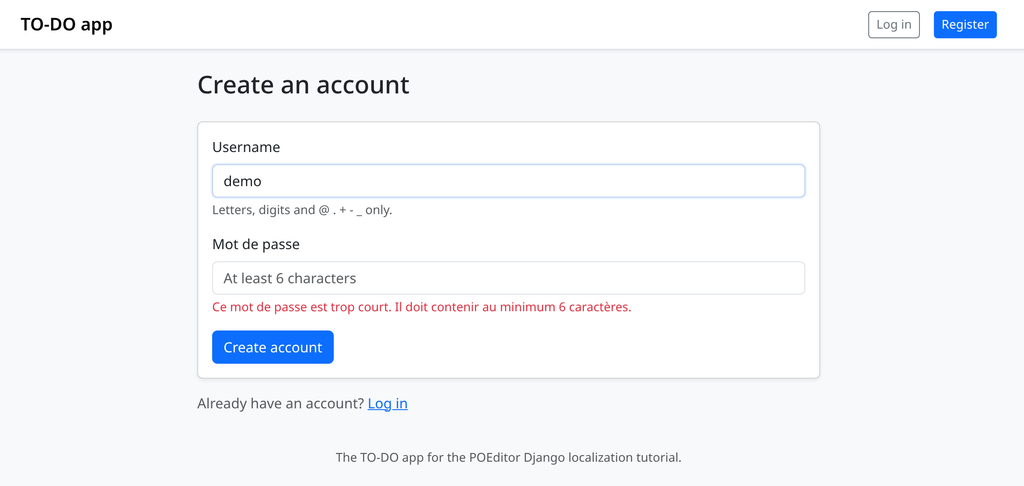
Those settings are enough to start using Django’s own catalogs. Restart the server, set your browser’s preferred language to French, and register with a four-character password. Django’s validator answers in French:
Ce mot de passe est trop court. Il doit contenir au minimum 6 caractères.
The username label, the help text under it and the “Create account” button are still English, because they are strings from this project and this project has no French catalog yet. The password label reads “Mot de passe”: Password is also a string in Django’s own catalog, and the lookup falls through to it. A project catalog wins wherever it has an entry, and Django’s own catalogs fill the gaps.
gettext vs. gettext_lazy
Django resolves a translatable string at one of three moments, and the moment decides which function the string needs.
Import time. A model field’s verbose_name, a form field’s label, an AppConfig.verbose_name, a value in settings.py. Python evaluates these once, when it imports the module, before any request exists.
Request time. A flash message or a page title built inside a view. The code runs with a language already active for that request.
Render time. A string in a template. The template engine resolves it while building the response.
A string resolved at import time cannot know which language the visitor wants, because no visitor has arrived. gettext() looks up the active language and returns a str on the spot, so calling it at import time bakes in the language from LANGUAGE_CODE for the lifetime of the process. gettext_lazy() returns a proxy object instead. The lookup happens when something asks the proxy for its text, which is at render time, once per request.
The rule is simple:
gettext_lazyfor anything evaluated at import: settings, model fields andMeta, form labels, help text, error messages, choices.gettextinside anything that runs per request: view bodies, model methods,clean()hooks, signal handlers.
A lazy string is a proxy rather than a str, which matters in two cases. isinstance(value, str) is False, so json.dumps() on a dict containing one raises TypeError: Object of type __proxy__ is not JSON serializable. And concatenating a lazy string with + resolves it immediately, fixing the language at whatever was active when the concatenation ran. format_lazy() combines a lazy string with other values and stays lazy:
# any module that builds a label at import time
from django.utils.text import format_lazy
from django.utils.translation import gettext_lazy as _

LABEL = format_lazy("{} / {}", _("English"), _("French"))
Translating templates
Most of the app’s text lives in templates, so start there. Each template that needs the translation tags loads them first. In base.html the load tag is already there for static:
{# todo/templates/todo/base.html (before) #}
{% load static %}<!doctype html>
<html lang="en" data-bs-theme="light">
<head>
<meta charset="utf-8">
<title>{{ title }} · TO-DO app</title>
Add i18n to it, and wrap the literals in {% translate %}:
{# todo/templates/todo/base.html #}
{% load i18n static %}<!doctype html>
<html lang="{{ LANGUAGE_CODE }}" data-bs-theme="light">
<head>
<meta charset="utf-8">
<title>{{ title }} · {% translate "TO-DO app" %}</title>{% load i18n %} applies to the one template file it appears in. A child template that pulls in a parent with {% extends %} still needs its own load tag before it can use the tags.
A string with a value inside it needs {% blocktranslate %}. The navbar line reads:
{# todo/templates/todo/base.html (before) #}
<span class="text-body-secondary small">
  Signed in as {{ user.username }}
</span>
The rewrite binds the variable with with and renames it to something short:
{# todo/templates/todo/base.html #}
<span class="text-body-secondary small">
  {% blocktranslate trimmed with username=user.username %}Signed in as {{ username }}{% endblocktranslate %}
</span>
The with binding is what makes the string work. Leave {{ user.username }} inside the block and Django renders it as an empty string with no error, because {% blocktranslate %} resolves plain names from its own bindings and nothing else. Bound this way, the extracted msgid becomes Signed in as %(username)s, a sentence a translator can rearrange. trimmed strips the newlines and indentation from the block, which keeps the msgid on one line instead of carrying the template’s whitespace into the catalog.
Other block tags inside {% blocktranslate %} raise TemplateSyntaxError: 'blocktranslate' doesn't allow other block tags, so no {% if %} and no {% for %}. When a sentence needs a URL, resolve it first with {% url ... as var %} and bind var, or split the sentence:
{# todo/templates/registration/register.html #}
<p class="text-body-secondary">
  {% translate "Already have an account?" %}
  <a href="{% url 'todo:login' %}">{% translate "Log in" %}</a>
</p>
{% trans %} and {% blocktrans %} are registered names for these same two tags, so existing code and older tutorials will show them. The longer spellings are the current ones.
Translating views, models and forms
Views run at request time
Here is the flash message the registration view sends, as the app ships:
# todo/views.py (before)
if form.is_valid():
    user = form.save()
    login(request, user)
    messages.success(
        request, f"Welcome, {user.username}! Your account is ready."
    )
    return redirect("todo:index")
makemessages extracts strings by scanning the source with xgettext. There is no literal here for it to find, since the sentence only exists once Python evaluates the f-string. The entry never reaches the catalog and the message stays English in every language.
The rewrite keeps the whole sentence in one call and interpolates afterwards:
# todo/views.py
from django.utils.translation import gettext

if form.is_valid():
    user = form.save()
    login(request, user)
    messages.success(
        request,
        gettext("Welcome, %(username)s! Your account is ready.")
        % {"username": user.username},
    )
    return redirect("todo:index")
Use named placeholders such as %(username)s rather than bare %s. A translator can move a named placeholder anywhere in the sentence, French word order included, and a mistyped name raises KeyError at the point of failure instead of quietly formatting the wrong value into the string.
Models and forms run at import time
Model metadata is built while Django imports the app, so every string in it needs the lazy call from the previous section:
# todo/models.py (before)
class TodoList(models.Model):
    name = models.CharField("name", max_length=100)
    created_at = models.DateTimeField("created at", auto_now_add=True)

    class Meta:
        verbose_name = "to-do list"
        verbose_name_plural = "to-do lists"
The same class with the strings marked, using the _ alias Django’s own code uses for gettext_lazy:
# todo/models.py
from django.utils.translation import gettext_lazy as _


class TodoList(models.Model):
    name = models.CharField(_("name"), max_length=100)
    created_at = models.DateTimeField(_("created at"), auto_now_add=True)

    class Meta:
        verbose_name = _("to-do list")
        verbose_name_plural = _("to-do lists")
Forms are the same case. Labels, placeholders and error messages are all built when the class body executes:
# todo/forms.py
from django.utils.translation import gettext_lazy as _


class RegisterForm(forms.ModelForm):
    password = forms.CharField(
        label=_("Password"),
        strip=False,
        widget=forms.PasswordInput(
            attrs={
                "class": "form-control",
                "placeholder": _("At least 6 characters"),
            }
        ),
        error_messages={"required": _("Please choose a password.")},
    )
Aliasing gettext_lazy to _ is a Django convention, and makemessages recognizes _ along with the full function names. It is a convention rather than a requirement, and it hides which of the two functions you called, so this guide reserves _ for modules that are lazy throughout, like models.py, forms.py, apps.py and settings.py, and spells the function out in views.
What to leave alone
Not every string in the code is text a user reads:
- URL pattern names.
path("lists/<int:pk>/",views.list_detail, name="list_detail")is looked up byreverse()and{% url %}. Translating the name breaks both. - Field and parameter identifiers.
fields = ["name"],request.GET.get("show", "all"), and the filter keys"all","open"and"done"that end up in the query string. Only the labels beside them are user-facing. - Model field names. In done
= models.BooleanField(_("done"),default=False),doneis the column name and the marked string is its label. - Anything only the team reads. CSS classes, template paths,
related_namevalues, log lines and exception messages aimed at developers.
Which strings count as user-facing is a decision every project makes, and it is cheaper to settle before the first catalog exists. Our article on internationalization best practices covers that decision along with the others worth making early.
Plurals and context
A msgid on its own cannot express two things: how a sentence changes with a count, and which of several meanings a word carries. The app fakes both.
Counts
There are three home-made plurals in the code. The lists page branches on the count in the template:
{# todo/templates/todo/index.html (before) #}
<p class="text-body-secondary">
  {% if todo_lists|length == 1 %}
    You have {{ todo_lists|length }} list.
  {% else %}
    You have {{ todo_lists|length }} lists.
  {% endif %}
</p>
Each list row sidesteps the count with a bracketed hedge, {{ todo_list.open_count }} task(s) left. And the same branch appears again in Python, where the list detail view builds its own label:
# todo/views.py (before)
if open_count == 1:
    open_label = f"{open_count} task open"
else:
    open_label = f"{open_count} tasks open"
All three hardcode two assumptions: that a language has exactly two plural forms, and that the split falls at one. Japanese has one form. Arabic has six categories. Polish picks its form from the last two digits. And French, in the plural rules Django uses, puts zero in the same form as one, so “0 task left” takes the singular there and no if count == 1 branch will ever produce it.
In a template, {% blocktranslate %} with count sends the number to gettext, and {% plural %} separates the two English forms:
{# todo/templates/todo/index.html #}
{% blocktranslate trimmed count counter=todo_lists|length %}
  You have {{ counter }} list.
{% plural %}
  You have {{ counter }} lists.
{% endblocktranslate %}
In Python, ngettext() takes the singular, the plural and the number, in that order, and returns the form the active language needs. The message written when a list is deleted uses the same branch as open_label above:
# todo/views.py
from django.utils.translation import gettext, ngettext

messages.success(
    request,
    gettext('List "%(name)s" deleted.') % {"name": name}
    + " "
    + ngettext(
        "%(count)d task went with it.",
        "%(count)d tasks went with it.",
        deleted,
    )
    % {"count": deleted},
)
You still write two English forms, because that is what English has. How many forms the translation needs, and which number selects which, is recorded in the catalog’s Plural-Forms header. Django writes this for English:
"Plural-Forms: nplurals=2; plural=(n != 1);\n"And this for French:
"Plural-Forms: nplurals=3; plural=(n == 0 || n == 1) ? 0 : n != 0 && n % "
"1000000 == 0 ? 1 : 2;\n"
Three forms against two, from the same two-form call in the code. The catalog is where that expression belongs.
Meaning
The word Done appears three times on one list page: as a filter pill above the tasks, as a status badge on a finished task, and as the button that finishes an unfinished one.
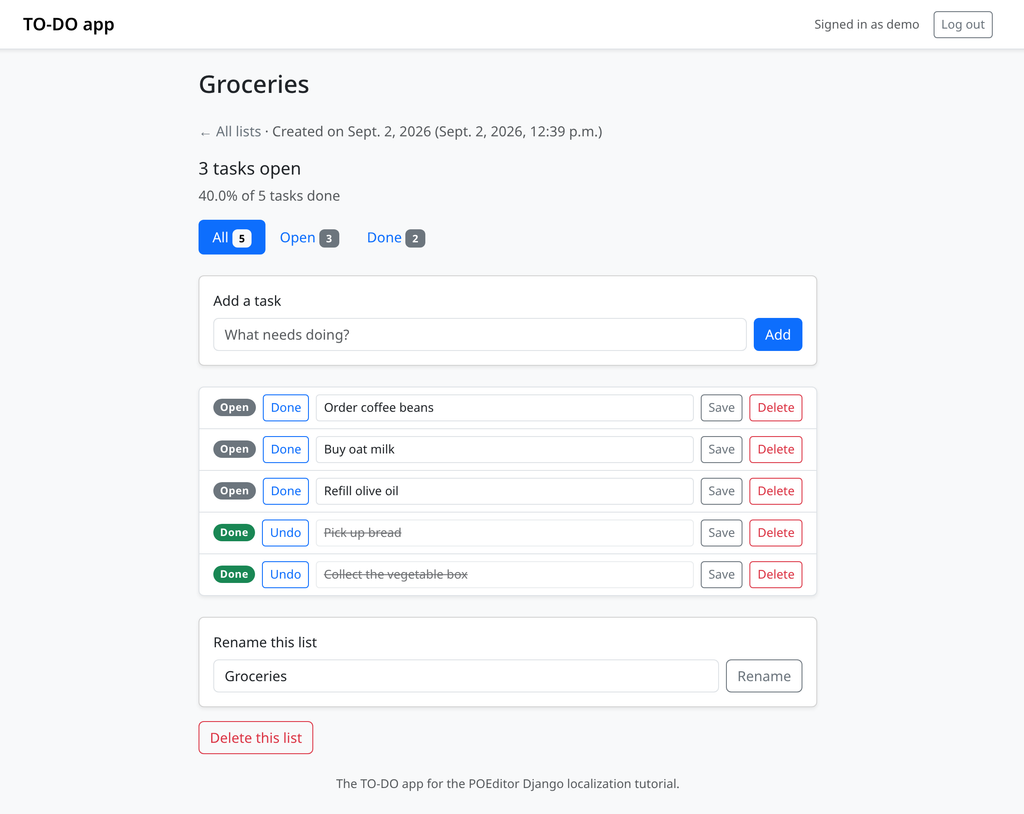
Three separate literals in the source, and gettext collapses them into a single msgid. A translator sees one entry called “Done” and has to guess. French wants the plural adjective Terminées for the filter over several tasks, the singular Terminée for one task’s badge, and the verb Terminer for the button.
pgettext() attaches a context to a string in Python:
# todo/views.py
from django.utils.translation import pgettext

filters = [
    ("all", pgettext("task filter", "All"), total_count),
    ("open", pgettext("task filter", "Open"), open_count),
    ("done", pgettext("task filter", "Done"), total_count - open_count),
]
The template tag takes a context argument for the same purpose:
{# todo/templates/todo/list_detail.html #}
<span class="badge rounded-pill {% if task.done %}text-bg-success{% else %}text-bg-secondary{% endif %}">
  {% if task.done %}
    {% translate "Done" context "task status" %}
  {% else %}
    {% translate "Open" context "task status" %}
  {% endif %}
</span>
The button keeps a bare {% translate "Done" %}, which leaves three distinct entries in the catalog:
# locale/en/LC_MESSAGES/django.po
#: todo/templates/todo/list_detail.html:94
msgctxt "task status"
msgid "Done"
msgstr ""

#: todo/templates/todo/list_detail.html:105
msgid "Done"
msgstr ""

#: todo/views.py:153
msgctxt "task filter"
msgid "Done"
msgstr ""
A context is part of the string’s identity. Renaming “task filter” to “filter” creates a new entry and orphans the translation attached to the old one, so settle on your context labels before translation starts.
When a string needs both, npgettext() takes the context first, then the singular, the plural and the number. That is how open_label ends up in the finished app:
# todo/views.py
from django.utils.translation import npgettext

open_label = npgettext(
    "task counter",
    "%(count)d task open",
    "%(count)d tasks open",
    open_count,
) % {"count": open_count}
Extracting strings with makemessages
With the strings marked, generate the catalogs from the project root, the directory holding manage.py:
django-admin makemessages -l en -l fr --ignore=.venvmakemessages scans the .py, .html and .txt files under the current directory for marked strings, then writes or updates locale/<language code>/LC_MESSAGES/django.po for each language you named. Run it again later and it merges the new state into the existing files, keeping the translations that are still current.
If you have used gettext outside Django you will look for the .pot template and not find one. Django generates a .pot internally and merges it into each language’s .po in the same run, leaving the per-language files as the only artifacts. --keep-pot writes the intermediate file to locale/django.pot if you want it, which is useful when a tool in your pipeline expects a template.
Without --ignore, makemessages walks into .venv and extracts every marked string in Django itself. compilemessages has no default ignore list either, so it needs the same flag later. Pass --ignore=.venv to both, along with anything else in the tree you do not own.
Here is a cut of the generated English catalog:
# locale/en/LC_MESSAGES/django.po
"Plural-Forms: nplurals=2; plural=(n != 1);\n"

#: todo/forms.py:14 todo/forms.py:74
msgid "Password"
msgstr ""

#: todo/templates/todo/index.html:35
#, python-format
msgid "You have %(counter)s list."
msgid_plural "You have %(counter)s lists."
msgstr[0] ""
msgstr[1] ""

#: todo/views.py:153
msgctxt "task filter"
msgid "Done"
msgstr ""
The #: lines are source references, regenerated on every run, and they are what lets a translator ask where a string appears. #, python-format tells gettext tools to check the placeholders. Plural entries get numbered msgstr[n] slots, one per form the language declares.
This is the standard Gettext format. The same .po entries, msgctxt values and msgstr[n] slots carry translations for a plain Python app using gettext and for a Drupal site, and POEditor reads all of them the same way.
The whole app comes to 82 source strings. Confirm the count with msgfmt --statistics -o /dev/null locale/en/LC_MESSAGES/django.po, which reports how many messages are translated and how many are not.
The --no-obsolete flag deletes entries whose source string is gone instead of keeping them commented out at the end of the file with #~ markers. Those entries are gettext’s safety net for a string you might restore, and they are noise once you are sure it is gone for good.
Translating the catalog in POEditor
A .po file in the repository works while there is one developer and one language. It stops working the moment a translator who does not use git is involved. POEditor reads and writes standard Gettext files, so nothing in the Django project changes.
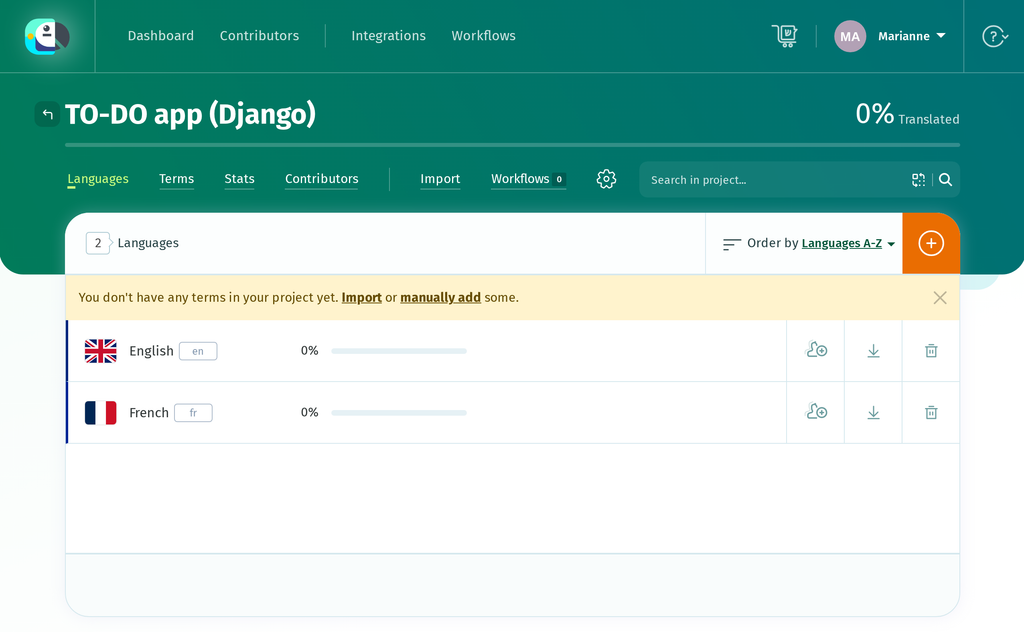
Log in and create a project for the app. A project needs its languages before it can hold anything, so add two: English as the source, French as the target.
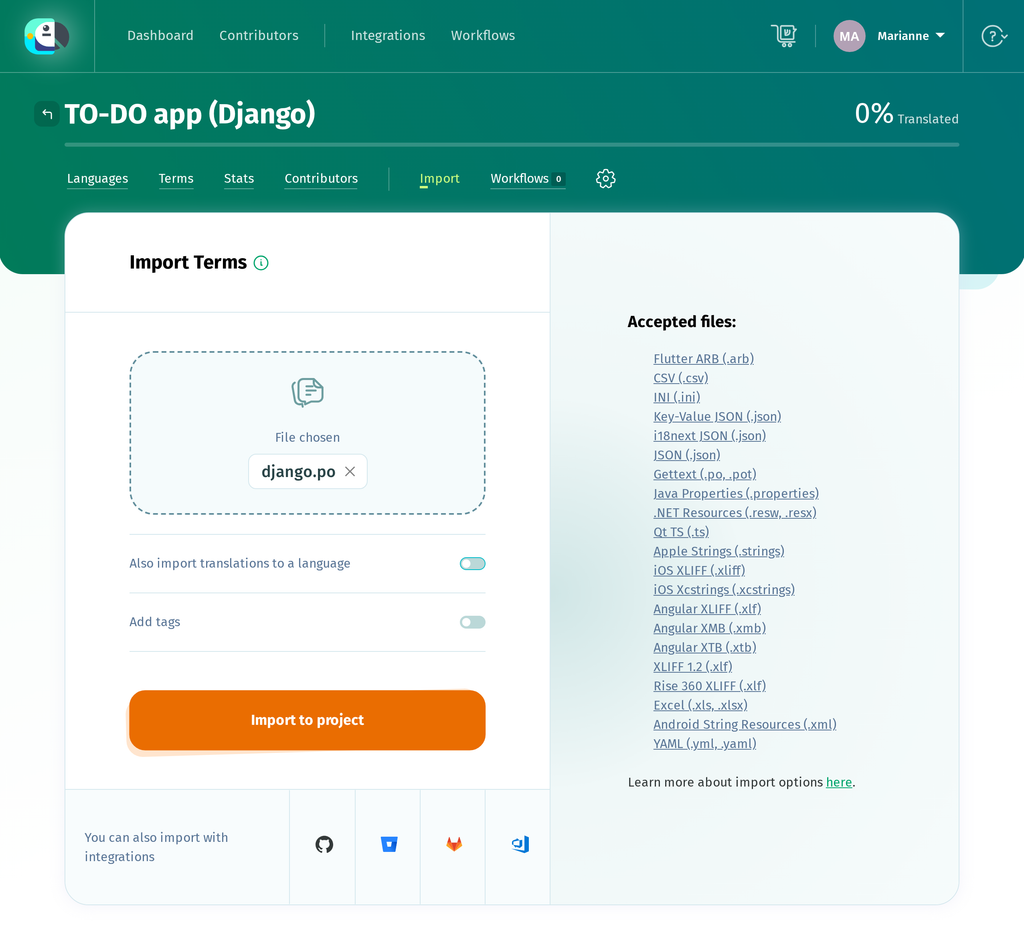
Open Import and choose locale/en/LC_MESSAGES/django.po. The page imports terms, so leave Also import translations to a language off: a freshly extracted catalog has terms and no translations yet. Press Import to project, and POEditor reports 82 terms found: 82 terms added. The metadata entry at the top of the file is not a term, so the number matches the 82 strings makemessages extracted.
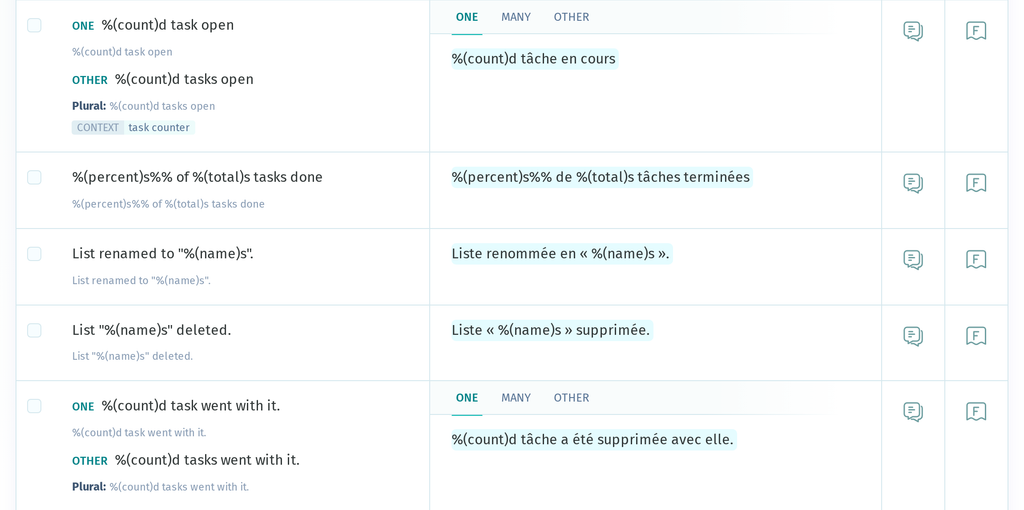
msgctxt values arrive as a CONTEXT label on the term, so the three “Done” entries stay separate, and plural entries keep both of their forms.
Next, under Project settings → Edit Details, set the Default Reference Language to English, so a translator sees the source string beside the field they are filling in. Press Save project details; changing the dropdown does not save on its own.
Importing terms creates the term list without creating any English translations, so English sits at 0% with nothing to show as a reference. Open the English language page and use Copy terms to translations, which fills every empty box with its own term and leaves existing translations alone. It fills the singular of a plural entry and leaves the other forms blank, so type those in.
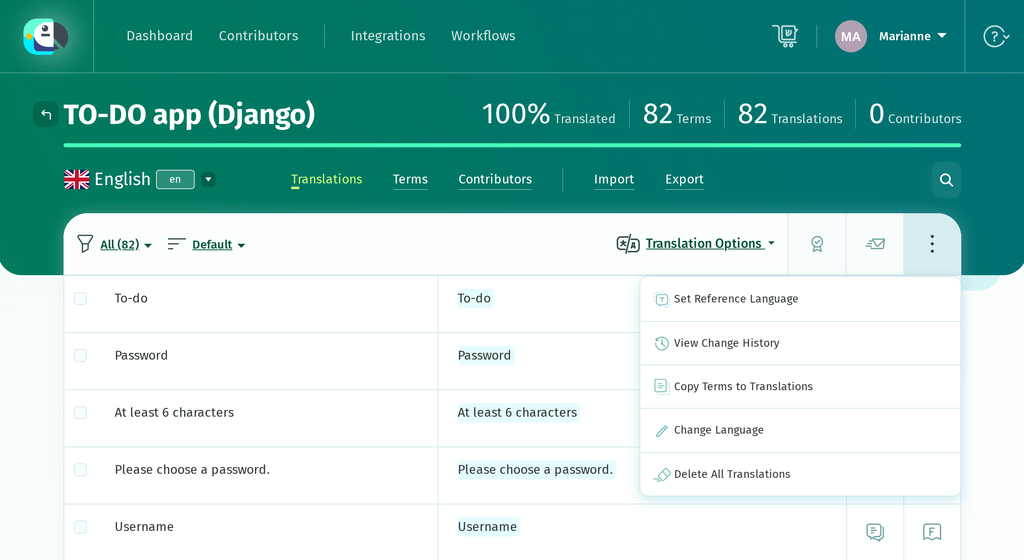
Before translating by hand, note that POEditor can auto-translate the imported strings first, using Google Translate, DeepL, Azure AI Translator, or an AI provider such as OpenAI or Claude, so a translator starts from a draft rather than a blank page. This is optional, and available on every plan including Free.
Now open French and work down the list. Translations save as you go, and two details are worth checking here:
- A pluralized term gets a tab per plural form, labelled with CLDR categories. French shows ONE, MANY and OTHER, matching the three forms its
Plural-Formsheader declares. - A term with a context shows that context next to it, so the filter “Done” and the status “Done” are visibly two jobs.
POEditor’s QA checks cover placeholders, including the %(name)s style Django uses, and flag a translation that drops one as soon as it is saved. Without the QA check, the same mistake would surface as a KeyError when that page is rendered.
When French is far enough along, go to Export, choose Gettext PO (.po), press Export File, and save the download over locale/fr/LC_MESSAGES/django.po.
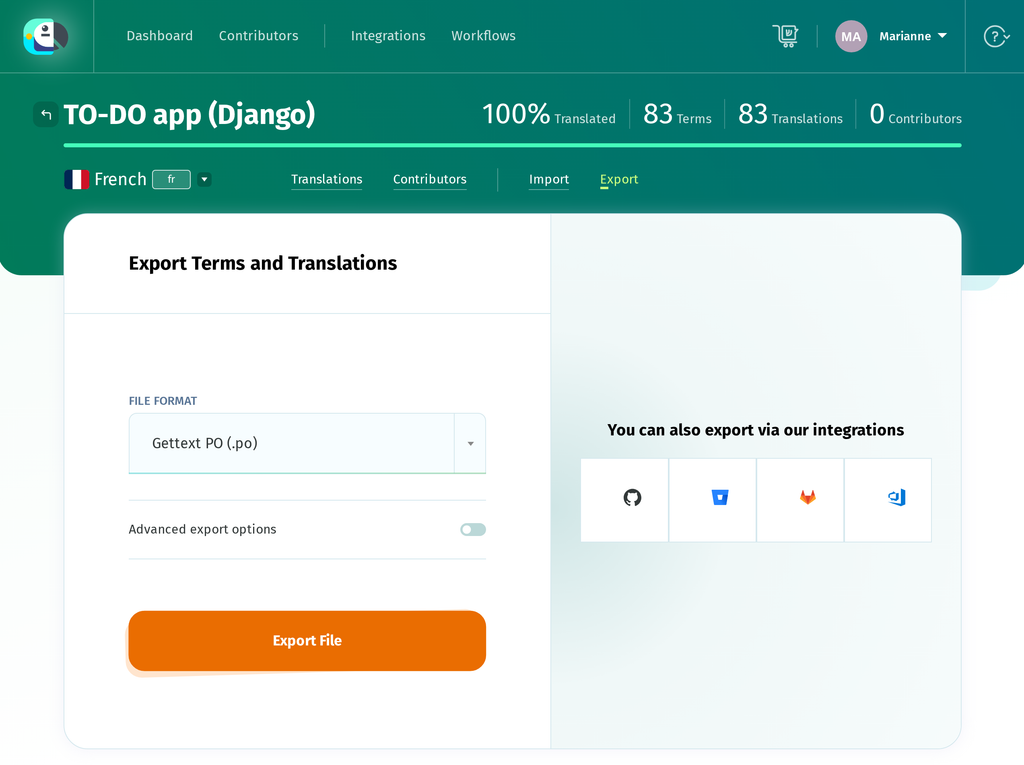
Quick tip: open the exported file and check that its Plural-Forms header contains a plural= expression alongside nplurals=. A header missing the expression fails to compile.
Compiling translations and switching languages
Django reads the binary .mo file, never the .po. Compile the catalogs:
python manage.py compilemessages --ignore=.venvIt names each file it processes:
processing file django.po in /path/to/project/locale/en/LC_MESSAGES
processing file django.po in /path/to/project/locale/fr/LC_MESSAGES
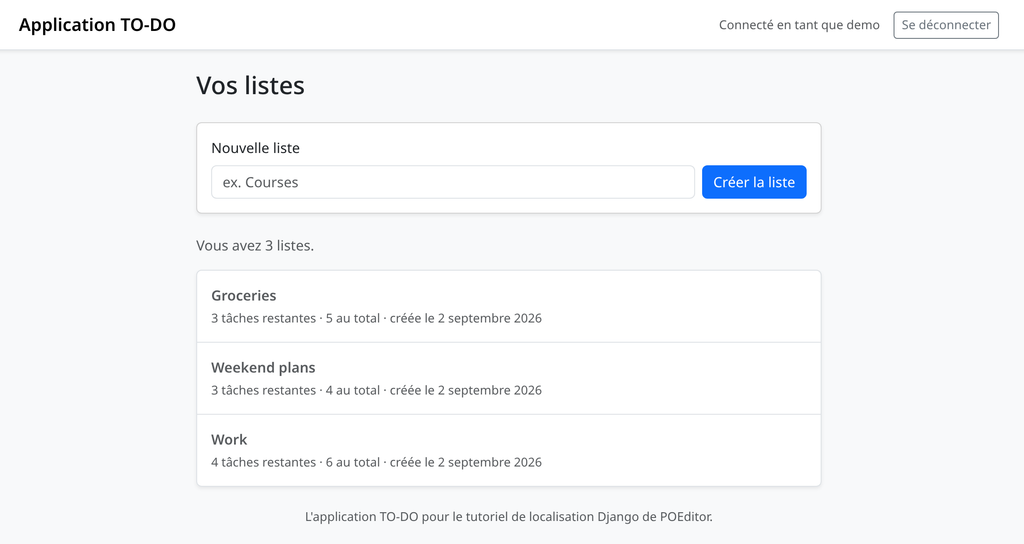
That writes django.mo beside each django.po. Restart the server, because catalogs are loaded and cached per process. This step repeats after every catalog change, including every export out of POEditor, which makes it a good candidate for a build step.
If you’d rather skip compilemessages, POEditor’s Export screen can produce the compiled catalog directly: choose Gettext MO (.mo) as the file format and download it straight into LC_MESSAGES/, naming it django.mo to match the domain. Keep the compilemessages step if compiling is already part of a build or CI process.
How Django picks the language
LocaleMiddleware decides the active language per request, in this order:
- A language prefix in the URL path, and only when the URLconf is wrapped in
i18n_patterns(the next section). - The
django_languagecookie, whose name comes from theLANGUAGE_COOKIE_NAMEsetting. - The
Accept-Languagerequest header, first entry that matches an entry inLANGUAGES. LANGUAGE_CODE.
Older tutorials add a session lookup between the URL prefix and the cookie. That step was removed in Django 4.0, which is why it is absent here and why a django_language key in the session does nothing.
Let the visitor choose
Django’s set_language view writes the cookie. Route it by including django.conf.urls.i18n, which puts the view at i18n/setlang/:
# todosite/urls.py
from django.urls import include, path

urlpatterns = [
    # Django's own i18n URLs, which is where set_language lives.
    path("i18n/", include("django.conf.urls.i18n")),
    path("", include("todo.urls")),
]
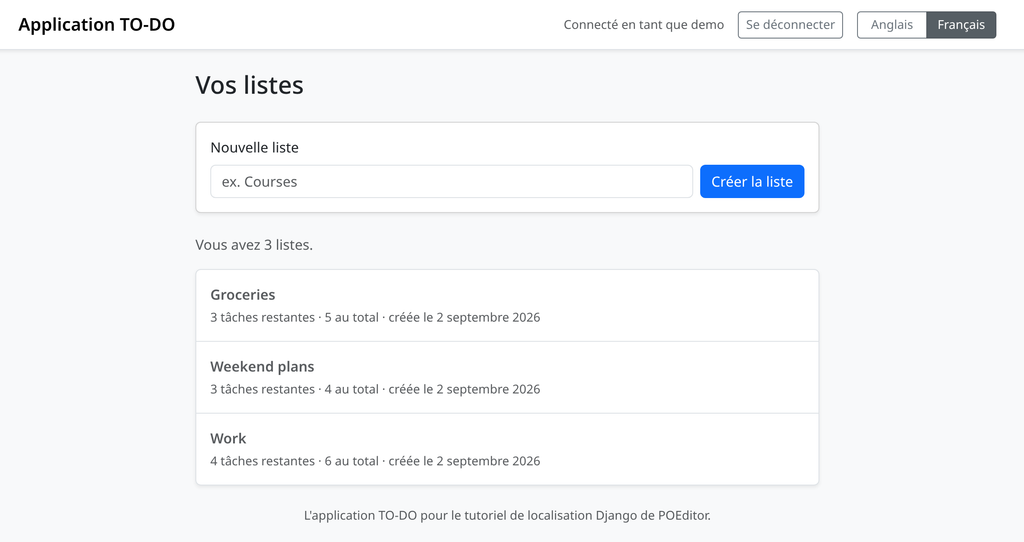
Add django.template.context_processors.i18n to the template context processors, which puts LANGUAGES, LANGUAGE_CODE and LANGUAGE_BIDI in every context. Then post to the view from the navbar:
{# todo/templates/todo/base.html #}
<form action="{% url 'set_language' %}" method="post" class="m-0">
  {% csrf_token %}
  <input type="hidden" name="next" value="{{ request.get_full_path }}">
  <div class="btn-group btn-group-sm" role="group" id="lang-switcher"
      aria-label="{% translate 'Language' %}">
    {% for code, name in LANGUAGES %}
      <button type="submit" name="language" value="{{ code }}"
              class="btn {% if code == LANGUAGE_CODE %}btn-secondary active{% else %}btn-outline-secondary{% endif %}">
        {{ name }}
      </button>
    {% endfor %}
  </div>
</form>
The view acts only on POST. It sets the django_language cookie to the submitted code and redirects to next, and LocaleMiddleware reads that cookie on the following request. A code outside LANGUAGES gets no further than the cookie, since the middleware will not activate it. The cookie is why the choice survives the next request and the next session.
Code that runs without a request
Management commands, queued jobs and outgoing email have no request, so no middleware has activated a language for them. Pick one explicitly with django.utils.translation.activate(), or scope it to a block with the override() context manager, which restores the previous language on exit:
# any command, task or email builder
from django.utils import translation
from django.utils.translation import gettext

with translation.override(user.preferred_language):
    subject = gettext("Your weekly summary")
When a translation does not appear
Work down this list:
- The string was never extracted. Check for a
#:reference to its file in the.po. - The catalog was never compiled, or was compiled before the last export. Re-run
compilemessagesand restart. - The language is missing from
LANGUAGES, so Django will not activate it. LocaleMiddlewareis missing, or sits afterCommonMiddleware.- The entry is marked
#,fuzzy.Django ignores fuzzy entries at runtime.
Translating URLs with i18n_patterns
Wrapping the root URLconf in i18n_patterns puts the language code at the front of every path in it:
# todosite/urls.py
from django.conf.urls.i18n import i18n_patterns
from django.urls import include, path

urlpatterns = [
    path("i18n/", include("django.conf.urls.i18n")),
]

urlpatterns += i18n_patterns(
    path("", include("todo.urls")),
    prefix_default_language=False,
)
/lists/3/ becomes /en/lists/3/ and /fr/lists/3/, and the prefix is the first thing LocaleMiddleware looks at. prefix_default_language=False leaves the default language unprefixed, so en keeps /lists/3/ and only French gains a prefix. Use it when you are adding languages to a site whose URLs are already published.
The pattern strings themselves can be translated. path() accepts a lazy string, and makemessages extracts it like any other marked string:
# todo/urls.py
from django.urls import path
from django.utils.translation import gettext_lazy as _

from . import views

app_name = "todo"

urlpatterns = [
    path(_("lists/<int:pk>/"), views.list_detail, name="list_detail"),
]
Translate that msgid to listes/<int:pk>/ and a French visitor browses /fr/listes/3/. Keep the converter syntax intact in the translation, since it is still the pattern Django matches against.
reverse() and {% url %} resolve against the active language, so the same view name produces a different path depending on the language in effect. This is where a half-migrated project breaks: a hardcoded /lists/3/ in a template works in English and 404s in French, while {% url 'todo:list_detail' pk %} works in both.
Distinct URLs per language are worth having for public content, where each language gets its own indexable address. Behind a login they add a prefix that nobody links to and no search engine sees. The TO-DO app is entirely behind a login, so it keeps unprefixed URLs and lets the cookie carry the choice.
Dates, numbers and time zones
The app prints dates with an explicit format string, which produces US conventions for every visitor:
{# todo/templates/todo/index.html (before) #}
created {{ todo_list.created_at|date:"N j, Y" }}
Name a format instead of writing one, and the format comes from the active locale’s format module:
{# todo/templates/todo/index.html #}
{% blocktranslate trimmed with when=todo_list.created_at|date:"DATE_FORMAT" %}created {{ when }}{% endblocktranslate %}
The same template and the same datetime now render Sept. 2, 2026 in English and 2 septembre 2026 in French. DATETIME_FORMAT, SHORT_DATE_FORMAT and TIME_FORMAT work the same way.
Numbers follow the locale too. Turn on digit grouping in settings:
# todosite/settings.py
USE_THOUSAND_SEPARATOR = True
USE_THOUSAND_SEPARATOR defaults to False, and it controls the grouping only. Decimal separators follow the active locale whether or not it is on. English renders 1,234 and 33.3; French renders 1 234, with a non-breaking space, and 33,3. In a template, {% load l10n %} gives you the localize filter for making it explicit on one value. In Python, django.utils.formats.number_format does the same job:
# todo/views.py
from django.utils.formats import number_format
from django.utils.translation import gettext

progress_label = gettext("%(percent)s%% of %(total)s tasks done") % {
    "percent": number_format(todo_list.percent_done, decimal_pos=1),
    "total": number_format(total_count),
}
The doubled %% is how a literal percent sign survives Python’s interpolation, and it reaches the catalog doubled, as %(percent)s%% of %(total)s tasks done. A French translation of that entry has to keep both signs.
If you find a tutorial telling you to set USE_L10N, it predates Django 5.0, which removed the setting; locale-aware formatting is always on now.
USE_TZ is True in a new project, so Django stores datetimes in UTC and converts them to the current time zone for display. {% load tz %} provides {% localtime %}, {% timezone %} and the localtime filter for per-template control, and {% load l10n %} provides {% localize off %} for the places where you need a raw value, such as a number going into a form field or a data attribute.
Updating translations as the app changes
After the initial setup, the cycle repeats whenever you add or change a string:
edit code  ->  makemessages  ->  import to POEditor  ->  translate
                                                            |
  app  <-  restart  <-  compilemessages  <-  export .po  <-'
Re-run makemessages whenever strings change, and read the diff before committing it. New entries with empty msgstr are the ones that need translating, and a big diff of nothing but #: line numbers means somebody edited code above a string rather than the string itself.
Watch for fuzzy entries. When a msgid changes slightly, gettext matches it to the closest old entry, copies that translation across and marks the pair #, fuzzy. Django ignores fuzzy entries at runtime, so the string falls back to English until a human reviews it. The result is that an existing translation can disappear from the live app without raising an error; the sentence simply falls back to English.
This is a good candidate for a CI check: run makemessages as a build step and fail the build if it produces a diff nobody committed. That turns a forgotten translation call into a red build instead of a French-speaking user quietly seeing English.
Both ends of the round trip can be automated. The POEditor API covers the same two steps, and automating your localization workflow with the API walks through a complete script. Uploading a freshly extracted catalog:
curl -X POST https://api.poeditor.com/v2/projects/upload \
  -F api_token="YOUR_API_TOKEN" \
  -F id="YOUR_PROJECT_ID" \
  -F updating="terms" \
  -F file=@"locale/en/LC_MESSAGES/django.po"
updating="terms" syncs the term list without touching translations, and the projects/export method returns a temporary download URL for the finished French .po. POEditor also integrates with GitHub, GitLab, Bitbucket and Azure DevOps, which removes the scripts entirely. In either case, run the export and compilemessages as part of your build, so a deploy cannot ship a stale .mo.
Wrapping up
The workflow is straightforward: strings marked with the call that suits where they live, plurals and contexts in the catalog instead of in if branches, django.po generated by makemessages, French translated in POEditor, django.mo compiled from the export, and a switcher that writes the cookie LocaleMiddleware reads. Adding German from here means adding a language in POEditor, translating, exporting locale/de/LC_MESSAGES/django.po and compiling. There is no Python or template work left to do per language.
To try it on your own app: mark a dozen user-facing strings, run makemessages, import the .po into a POEditor project, translate a few entries, then export, compile and switch. A project this size fits inside POEditor’s free plan, which allows up to 1,000 strings.
Frequently asked questions
What does Django translate out of the box, and what doesn’t it cover?
Django installs its own message catalogs with the framework, under django/conf/locale/ and inside each contrib app. They cover the admin, authentication views, form and field errors, password validator messages, and locale-specific date and number formats, and Django serves them once a language is declared in LANGUAGES and activated. Strings written in your own project are in none of those catalogs, so they stay English until they are marked, extracted and translated.
How do I mark strings for translation in Django templates and views?
Templates load the tags with {% load i18n %}, then use {% translate “Create list” %} for a plain string and {% blocktranslate %} for a sentence containing a variable, bound with with. In Python, views use gettext(), while code evaluated at import time, such as models, forms and settings, uses gettext_lazy(). An f-string isn’t extracted, so the whole sentence needs to be inside the gettext call.
What is the difference between gettext and gettext_lazy in Django?
gettext() looks up the active language and returns a string immediately, which suits code that runs per request, such as view bodies. gettext_lazy() returns a proxy resolved when the text is used, so it is the one for anything evaluated at import time: model fields and Meta, form labels, help text and settings. A lazy string is not a str, so it is not JSON serializable, and joining it with + resolves it early.
How do I handle plural translations in Django?
In a template, {% blocktranslate count counter=todo_lists|length %} sends the number to gettext, with {% plural %} separating the two English forms. In Python, ngettext() takes the singular, the plural and the number. You write two English forms because that is what English has; how many forms the translation uses comes from the Plural-Forms header in each catalog, and French declares three.
How do I add translation context for ambiguous strings in Django?
Use pgettext(“task filter”, “Done”) in Python, or {% translate “Done” context “task status” %} in a template. The context is stored as the entry’s msgctxt. This keeps the filter, status badge and button versions of “Done” separate in the catalog, so they can be translated differently. Renaming a context creates a new entry and orphans the old translation. npgettext() covers context and plural forms together.
How does Django decide which language to serve a visitor?
LocaleMiddleware determines the active language on every request in this order: a language prefix in the URL path, but only when the URLconf is wrapped in i18n_patterns; then the django_language cookie; then the first Accept-Language entry that matches; then LANGUAGE_CODE. Only languages listed in LANGUAGES can be activated. The session lookup described in older tutorials was removed in Django 4.0.
How do I translate URLs in Django with i18n_patterns?
Wrapping the root URLconf in i18n_patterns() puts the language code at the front of every path in it, and prefix_default_language=False leaves the default language unprefixed. The pattern strings themselves can be translated as well, since path() accepts a lazy string that makemessages extracts like any other. reverse() and {% url %} resolve against the active language, so hardcoded paths are what break in a translated URLconf.
Can I manage a Django project’s .po files in POEditor?
Yes. makemessages writes standard Gettext catalogs, so locale/en/LC_MESSAGES/django.po can be imported into POEditor as it is, keeping msgctxt contexts and plural forms intact. Translations can be exported back as a .po file, or as a compiled .mo that goes straight into LC_MESSAGES/. The POEditor API and the Git integrations can run both ends of that round trip automatically.