 POEditor

Ruby on Rails is a web framework for Ruby that follows the principle of convention over configuration. A new application comes with its database layer, routing, views and asset handling already set up, so there’s less to configure before you can start building.
As soon as an app serves people in more than one country, they expect to read it in their own language, with dates and numbers written the way they’re used to. Internationalization (i18n) is the work that makes the code ready for that, and localization (l10n) supplies the translations and formats for each language.
In this guide, we’ll translate a Rails TO-DO app into French using Rails’ built-in I18n API, YAML locale files, the rails-i18n gem and POEditor, while keeping English as the default language.
What Rails I18n already does
The TO-DO app runs on Rails 8.1 and Ruby 4.0, with a SQLite database. You register with a username and password, create lists, add tasks, mark them as done and filter a list by open or completed tasks. Labels, buttons and flash messages are hardcoded in English in the ERB views and controllers. Counts use Rails’ pluralize helper or custom singular and plural conditions, and dates are formatted with strftime in the US style.
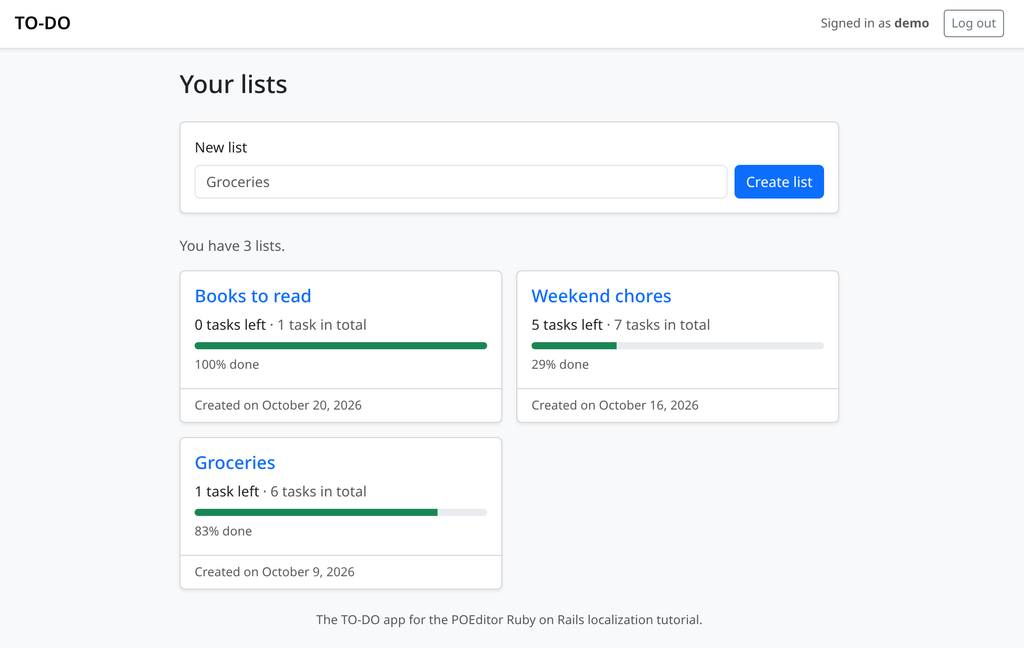
To follow along you need Ruby 4.0.9, the version the Gemfile asks for. Run bundle install and bin/rails db:prepare, which creates the database along with a demo account whose password is demo1234, then start the app with bin/rails server and open the address it prints.
Rails ships with the i18n gem and reads its translations from every .yml and .rb file under config/locales, subfolders included. Some of the TO-DO app’s text is already translated through Rails’ built-in locale files: validation messages such as “Name can’t be blank” come from Rails’ English translations. Rails’ English locale files also hold the month and day names that the l helper uses for dates, which the app switches to later. Rails only ships this data in English, so for French you add the rails-i18n gem, which supplies French validation messages, month names, number formats and the French plural rule.
Add the gem to the Gemfile and run bundle install:
# Gemfile
gem "rails-i18n", "8.1.0"
Then tell Rails which languages the app supports and which one it uses by default:
# config/application.rb
module TodoApp
  class Application < Rails::Application
    # ...

    # The languages the app is translated into; English is the default.
    config.i18n.available_locales = [ :en, :fr ]
    config.i18n.default_locale = :en
  end
end
available_locales also limits what rails-i18n loads. The gem contains data for over a hundred locales, but with this setting it only adds English and French to the app. Restart bin/rails server after these two changes, because Rails doesn’t reload the Gemfile or config/application.rb while it runs.
Moving view text into en.yml
A Rails translation is stored under a key in a YAML file and retrieved with the t helper. You can write the full key, as in t("lists.index.title"), but views usually use the shorter form with a leading dot, known as lazy lookup. In app/views/lists/index.html.erb, t(".title") looks up lists.index.title, because the key is built from the template’s folder and file name. Partials drop the underscore, so t(".tasks_left") in lists/_list.html.erb reads lists.list.tasks_left, and the layout’s strings live under layouts.application.
Here is the lists page with its strings replaced:
<%# app/views/lists/index.html.erb %>
<% content_for :title, t(".title") %>

<div class="card shadow-sm mb-4">
  <div class="card-body">
    <%= form_with model: @new_list, url: lists_path, id: "new-list-form", class: "row g-2 align-items-start" do |form| %>
      <div class="col-12 col-sm">
        <%= form.label :name, t(".new_list"), class: "form-label" %>
        <%= form.text_field :name, placeholder: t(".placeholder"),
              class: class_names("form-control", "is-invalid": @new_list.errors.include?(:name)) %>
        <%= field_errors @new_list, :name %>
      </div>
      <div class="col-12 col-sm-auto align-self-sm-end">
        <%= form.submit t(".create"), class: "btn btn-primary w-100" %>
      </div>
    <% end %>
  </div>
</div>

<% if @lists.empty? %>
  <p class="text-body-secondary"><%= t(".empty") %></p>
<% else %>
  <p class="text-body-secondary"><%= t(".count", count: @lists.size) %></p>
  ...
<% end %>
rails new creates config/locales/en.yml with a single hello key. Replace it with the app’s own strings, nested by folder, template and key:
# config/locales/en.yml
en:
  layouts:
    application:
      menu: "Menu"
      signed_in_as_html: "Signed in as <strong>%{username}</strong>"
      log_out: "Log out"
      log_in: "Log in"
      register: "Register"
  lists:
    index:
      title: "Your lists"
      new_list: "New list"
      placeholder: "Groceries"
      create: "Create list"
      empty: "You don't have any lists yet. Create your first one above."
Values that change at runtime go in as %{name} placeholders and are passed to t as options, for example t(".signed_in_as_html", username: current_user.username) in the navbar. A key that ends in _html is marked as safe HTML, so the <strong> tag reaches the page as markup, while Rails still escapes the username you pass in. Without the suffix, the tag would be escaped and shown as text.
Because every string has its own key, the same English word can be translated differently in different places. The TO-DO app shows “Done” both as a filter tab above the tasks and as a badge on each completed task. In French, the tab refers to several tasks and the badge to one, so lists.show.filters.done becomes Terminées and tasks.task.done becomes Terminée.
Translating flash messages and model attributes
Lazy lookup also works in controllers, where the key is built from the controller and the action. t(".created") in ListsController#create reads lists.create.created:
# app/controllers/lists_controller.rb
def create
  @new_list = current_user.lists.new(list_params)

  if @new_list.save
    redirect_to @new_list, notice: t(".created", name: @new_list.name)
  else
    load_lists
    render :index, status: :unprocessable_content
  end
end
The original app built some of these messages by joining strings, as in "Task \"" + @task.text + "\" marked as done.". A translator can’t change the word order when a sentence is split across three pieces of code, so put each message in a single string with a placeholder:
# app/controllers/tasks_controller.rb
def toggle
  @task.mark_done!(params.expect(:done) == "1")

  message = @task.done? ? t(".done", text: @task.text) : t(".open", text: @task.text)
  redirect_to list_path(@list, show: filter_param), notice: message
end

# config/locales/en.yml
  tasks:
    toggle:
      done: "Task \"%{text}\" marked as done."
      open: "Task \"%{text}\" marked as open."
Validation messages need a different kind of key. Rails builds “Text can’t be blank” from the attribute’s name and a message, and it looks for the name under activerecord.attributes before falling back to a humanized column name. The tasks.text column, for instance, reads better as “Task”:
# config/locales/en.yml
  activerecord:
    attributes:
      list:
        name: "Name"
      task:
        text: "Task"
      user:
        username: "Username"
        password: "Password"
        password_confirmation: "Password confirmation"
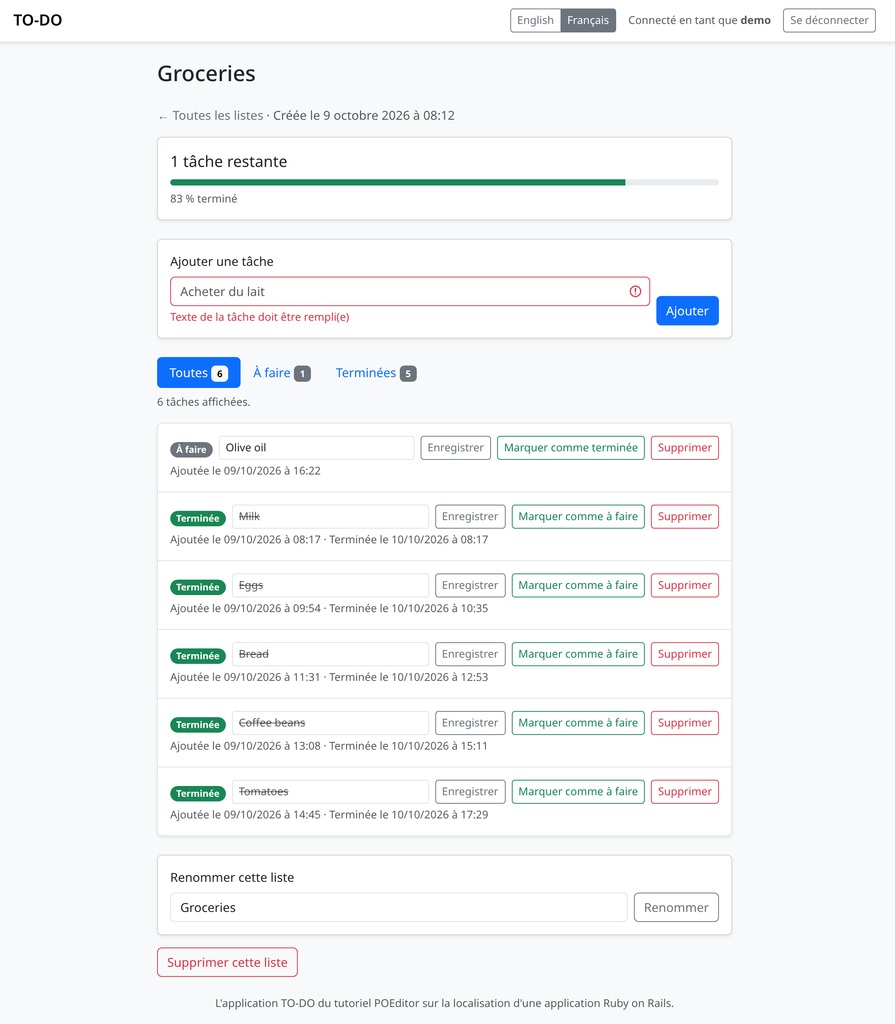
The same names label the username and password fields of the registration form, because form.label :username without any text of its own looks up the model’s attribute name. You don’t translate the messages themselves: once the page is in French, rails-i18n supplies doit être rempli(e), and with Texte de la tâche as the French name of task.text, an empty task shows “Texte de la tâche doit être rempli(e)”.
rails-i18n doesn’t cover every message Rails has, though. has_secure_password rejects a password longer than 72 bytes with the message errors.messages.password_too_long, and rails-i18n 8.1.0 has no French translation for it, so in development a French page shows “Translation missing” there, and in production the English message. Copy the English message into en.yml, and it goes to POEditor with the rest of the strings:
# config/locales/en.yml
  # Rails' own message for a password over 72 bytes, which rails-i18n has no French version of yet.
  errors:
    messages:
      password_too_long: "is too long"
Plurals with the count option
The original app counted tasks with pluralize(list.open_count, "task"), which builds the plural word from Rails’ English inflection rules. In a translated app, pass the number to t as the count option and add an entry for each plural form under the existing lists key in en.yml:
<%# app/views/lists/_list.html.erb %>
<p class="card-text mb-2">
<%= t(".tasks_left", count: list.open_count) %>
<span class="text-body-secondary">
·
<%= t(".tasks_total", count: list.total_count) %>
</span>
</p>
# config/locales/en.yml
lists:
list:
tasks_left:
one: "%{count} task left"
other: "%{count} tasks left"
tasks_total:
one: "%{count} task in total"
other: "%{count} tasks in total"count both chooses the form and fills in %{count}. Which form it chooses depends on the language’s plural rule. Rails on its own applies the English rule to every language, one for exactly 1 and other for everything else, but French uses the singular for 0 as well, and rails-i18n adds that rule. With rails-i18n installed, a finished list reads “0 tâche restante” instead of “0 tâches restantes”. The “You have 3 lists.” line on the lists page works the same way, with one and other entries under lists.index.count.
The list page has a sentence under its filter tabs that changes with both the filter and the number of tasks, “Showing 5 completed tasks.” for example. The original app picked it with a case statement and a singular or plural branch for each filter. Now each filter has a plural key, and the view builds the key name from the current filter:
<%# app/views/lists/show.html.erb %>
<p class="text-body-secondary small mb-3"><%= t(".showing.#{@filter}", count: @tasks.size) %></p>
Dates, times and percentages
The l helper formats a date or time with a named format from the locale files, and it fills in month and day names in the current language. A list card shows the day the list was created, and each task shows when it was added:
<%# app/views/lists/_list.html.erb %>
<%= t(".created_on", date: l(list.created_at.to_date, format: :long)) %>

<%# app/views/tasks/_task.html.erb %>
<%= t(".added_on", time: l(task.created_at, format: :short)) %>
A Date uses the formats under date.formats, while a Time uses time.formats, which is why the list card converts created_at with to_date. Rails’ own English long date format is %B %d, %Y, which pads the day to “October 09, 2026”, and its time formats use a 24-hour clock. To keep the app’s original output, override the formats in en.yml. The app’s locale files load after the ones in Rails and rails-i18n, so the same key replaces theirs:
# config/locales/en.yml
  date:
    formats:
      # October 9, 2026 (strftime: %B month name, %-d day, %Y year)
      long: "%B %-d, %Y"

  time:
    formats:
      # October 9, 2026 at 8:12 AM (strftime: %-I hour on a 12-hour clock, %M minutes, %p AM or PM)
      long: "%B %-d, %Y at %-I:%M %p"
      # 10/09/2026 at 4:22 PM (strftime: %m month, %d day, %Y year)
      short: "%m/%d/%Y at %-I:%M %p"
These formats are stored in en.yml like any other translation, so they can be translated along with the rest of the file. In French, the format is %-d %B %Y, with the day before the month. The comments explain the strftime codes to whoever translates them, and they travel with the file into POEditor. %B becomes octobre in French because l takes the month names from rails-i18n.
The progress text under each list, “83% done”, comes from a translation with a %{percent} placeholder, so the translator decides where the number and the percent sign go. French typography puts a space before the percent sign, which makes the French translation %{percent} % terminé.
Setting the locale from the URL
Rails keeps the current language in I18n.locale, and the app has to set it at the start of every request. The Rails guides recommend putting the locale in the URL, so each page has a language-specific address and shared links open in the same language for everyone. Wrap the routes in an optional locale segment:
# config/routes.rb
Rails.application.routes.draw do
  # English pages have no prefix (/lists/1), French ones start with /fr (/fr/lists/1).
  scope "(:locale)", locale: /en|fr/ do
    root "lists#index"

    resource :registration, only: %i[new create]
    resource :session, only: %i[new create destroy]

    resources :lists, only: %i[index show create update destroy] do
      resources :tasks, only: %i[create update destroy] do
        patch :toggle, on: :member
      end
    end
  end

  get "up" => "rails/health#show", as: :rails_health_check
end
Then set the locale in ApplicationController with an around_action, which switches the language for the rest of the request and restores the previous one afterwards:
# app/controllers/application_controller.rb
class ApplicationController < ActionController::Base
  allow_browser versions: :modern
  # ...

  # Runs before require_login, so everything after it, including require_login's redirect, uses the request's language.
  around_action :switch_locale
  before_action :require_login

  helper_method :current_user

  private

  # The language comes from the locale in the URL; a missing or unsupported one means English.
  def switch_locale(&action)
    locale = params[:locale] if I18n.locale_available?(params[:locale])
    I18n.with_locale(locale || I18n.default_locale, &action)
  end

  # Keeps the /fr prefix on every link and redirect the app generates.
  def default_url_options
    { locale: (I18n.locale unless I18n.locale == I18n.default_locale) }
  end

  # ...
end
The route constraint only accepts en and fr in the path, but params[:locale] can also come from the query string, and by default I18n.with_locale raises I18n::InvalidLocale for a language that isn’t in available_locales. The locale_available? check turns an address like /?locale=de into a normal English page instead of an error. default_url_options adds the locale to every URL helper, so once a visitor is on a French page, list_path(list) returns /fr/lists/1 and they stay in French. Returning nil for English keeps the English URLs without a prefix.
The language switcher in the navbar links to the current page in each language. Each language name is written in that language, so the names aren’t translated. The partial’s only translated string is its aria-label, which goes under the layouts: key in en.yml:
<%# app/views/layouts/_language_switcher.html.erb %>
<nav class="btn-group btn-group-sm" aria-label="<%= t(".label") %>">
  <% { en: "English", fr: "Français" }.each do |locale, name| %>
    <%= link_to name, switch_locale_path(locale), lang: locale, hreflang: locale,
          class: class_names("btn", locale == I18n.locale ? "btn-secondary" : "btn-outline-secondary"),
          aria: { current: ("true" if locale == I18n.locale) } %>
  <% end %>
</nav>

# config/locales/en.yml
  layouts:
    language_switcher:
      label: "Language"
The links come from a helper. On an ordinary page, url_for(locale: locale) rebuilds the current URL with the other locale, and the list page’s task filter is passed along so it survives the switch. When a form fails validation, Rails renders the page in response to the POST, and a link can’t repeat a POST, so the helper links to the page that holds the form instead:
# app/helpers/application_helper.rb
# The current page in another language, with the same task filter. A page
# shown after a form failed is the answer to a POST, which a link can't
# repeat, so it links to the page that holds the form instead.
def switch_locale_path(locale)
  locale = nil if locale == I18n.default_locale

  if request.get?
    url_for(locale: locale, show: @show)
  elsif @list
    list_path(@list, locale: locale, show: @show)
  elsif current_user
    root_path(locale: locale)
  else
    url_for(action: :new, locale: locale)
  end
end
In the layout, render the switcher in the navbar with <%= render "layouts/language_switcher" %>, and change <html lang="en"> to <html lang="<%= I18n.locale %>">, so browsers and screen readers know which language the page is in.
Before French has any translations, /fr shows each missing string in a view as the last part of its key, title-cased, such as “Title” for lists.index.title, inside a span with a translation_missing class and a title naming the key it looked for. In a submit button’s label, a placeholder or the browser tab’s title, that markup appears as text, and where a view writes t straight into an HTML attribute, such as the switcher’s aria-label, it ends the attribute early, so fragments like Label"> show up on the page. This happens in development. In production, a missing French key shows the English text instead, because the production.rb that rails new generates sets config.i18n.fallbacks = true.
Translating en.yml in POEditor
In POEditor, create a project for the app from the + button on the Dashboard and name it TO-DO app (Rails). Add English and French as its languages.
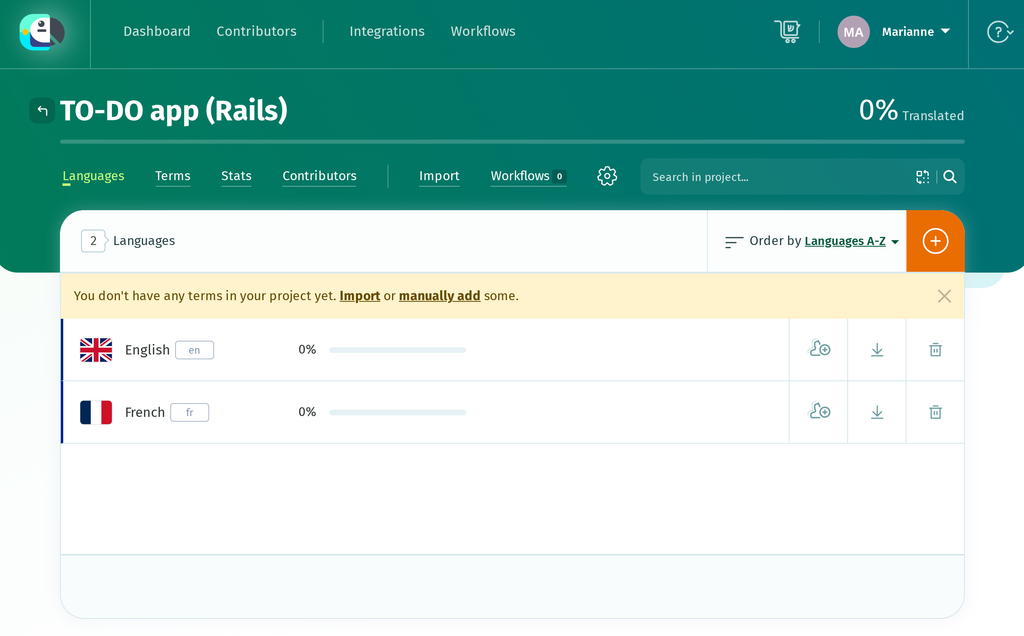
Open Import and choose config/locales/en.yml on the Import Terms page. On a project’s first import, Also import translations to a language is already switched on, so leave it on and choose English from the list under it. POEditor recognizes YAML from the .yml extension, and Import to project starts the import.
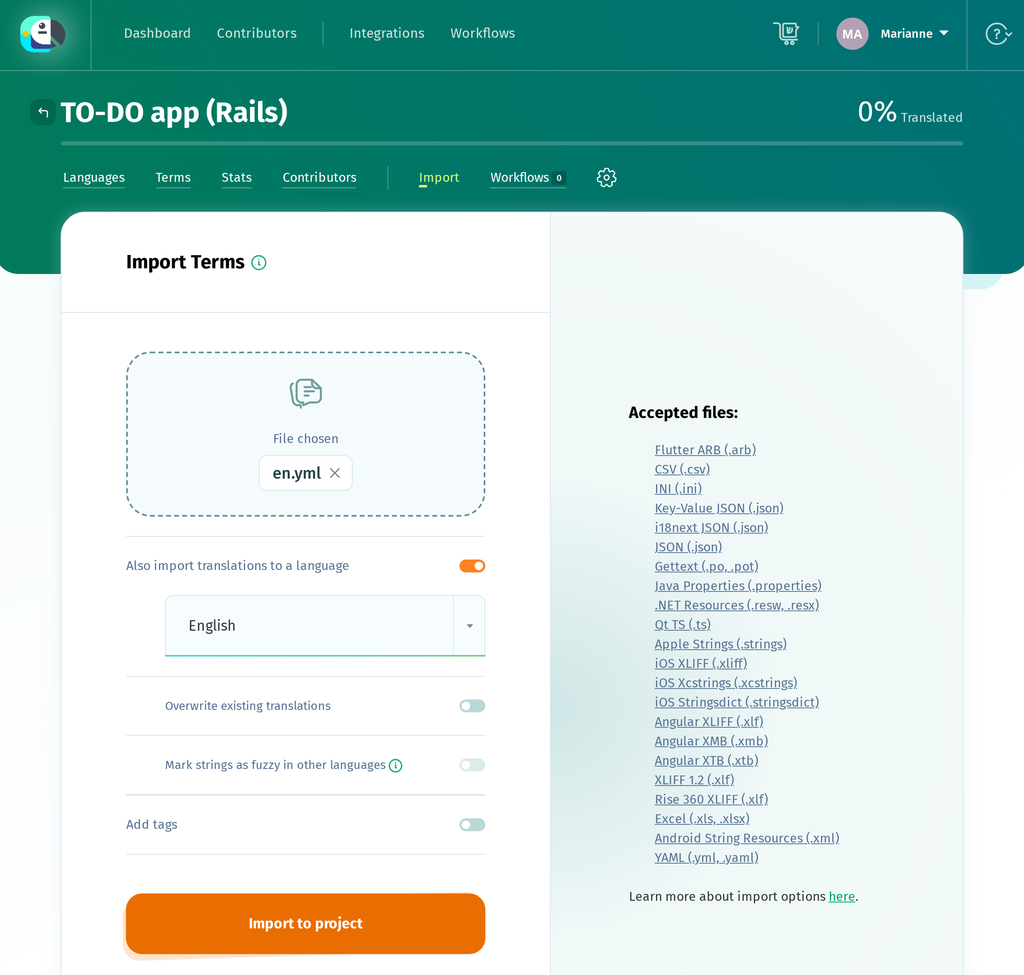
POEditor drops the en: root, turns each last key into a term and the path above it into the term’s context, so lists.index.title arrives as the term title with the context "lists"."index". Plural keys, the ones whose children are one and other, become a single plural term each, and a comment above a key, such as the ones above the date formats, becomes that term’s comment. A comment above a parent key, such as the one above errors:, doesn’t appear on any term, but POEditor keeps it and writes it back into the YAML export.
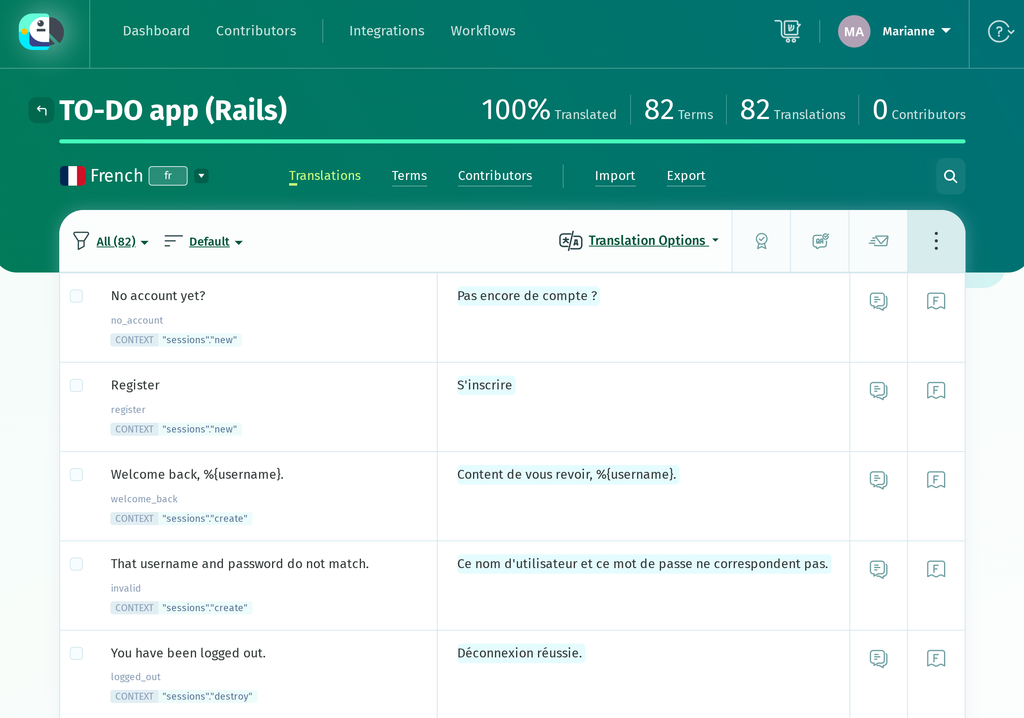
The TO-DO app’s en.yml gives 82 terms, with English at 100%. Since the terms are keys, translators need to see the English text alongside them. The import doesn’t set this automatically. Go back to the project page, click the gear icon to open the project settings, click Edit Details, set DEFAULT REFERENCE LANGUAGE to English and click Save project details.
Now open French and translate. Each row shows the English text, with the key and its context in smaller type below it. Keep placeholders such as %{name} and %{count} as they are, though you can move them within the sentence. If a translation drops or changes one, QA Checks flag it when you save. A plural term lists its English forms, and its translation box has a tab for each French plural form: ONE, MANY and OTHER.
French uses the MANY form for exact multiples of a million, as in “1 000 000 de tâches”. The rails-i18n French rule only has one and other, so Rails doesn’t use that form unless you add your own French plural rule, in a .rb file in config/locales that sets i18n.plural.rule. Fill it in anyway: until every form has a translation, POEditor treats the term as untranslated.
If you’d like a first draft to review, Automatic Translation can pre-fill the French terms with Google Translate, DeepL or Azure AI Translator, and you can use AI translation from providers such as OpenAI or Anthropic’s Claude once you add your own API key.
Automatic Translation only fills the singular form of a plural term, so complete MANY and OTHER yourself if you use it, while AI translation fills every form. Whichever you use, check the date and time formats it translates, since those have to stay valid strftime codes.
To try the translations in the app, click Export on the French language page, set FILE FORMAT to YAML (.yml) and click Export File. With the default settings, the export writes every term, and an untranslated one comes out as an empty string, such as title: "".
Rails treats an empty string as a translation, so the page shows nothing where that text should be, and it doesn’t fall back to English even in production. An empty date format is worse, because it replaces the format from rails-i18n and the date disappears.
While French is incomplete, switch on Advanced export options and set EXPORT to Translated, which leaves those terms out of the file. Alternatively, choose English as the Fallback Language in the same Advanced Options, and untranslated terms come out with their English text instead of an empty string. i18n-tasks then no longer reports them as missing, though, because they have a value.
A plural term gets the English text only in its ONE form, and its MANY and OTHER forms stay empty, so a count of 2 or more still shows nothing until OTHER is translated.
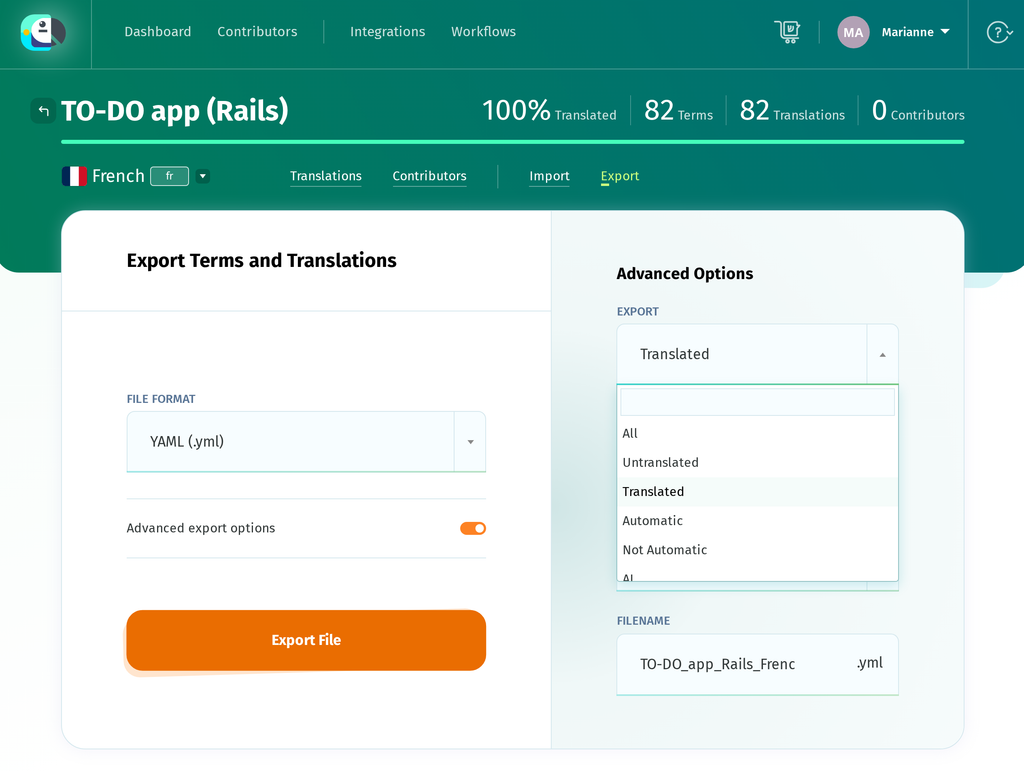
The download is named TO-DO_app_Rails_French.yml. Save it as config/locales/fr.yml. It has the same structure as en.yml, under a fr: root, and keeps the comments from en.yml:
# config/locales/fr.yml
fr:
  lists:
    list:
      tasks_left:
        one: "%{count} tâche restante"
        many: "%{count} de tâches restantes"
        other: "%{count} tâches restantes"
  date:
    formats:
      # October 9, 2026 (strftime: %B month name, %-d day, %Y year)
      long: "%-d %B %Y"
The development server picks up a new or changed locale file on the next request, so reload the page and click Français in the navbar. In production, restart the app after you deploy the new file.
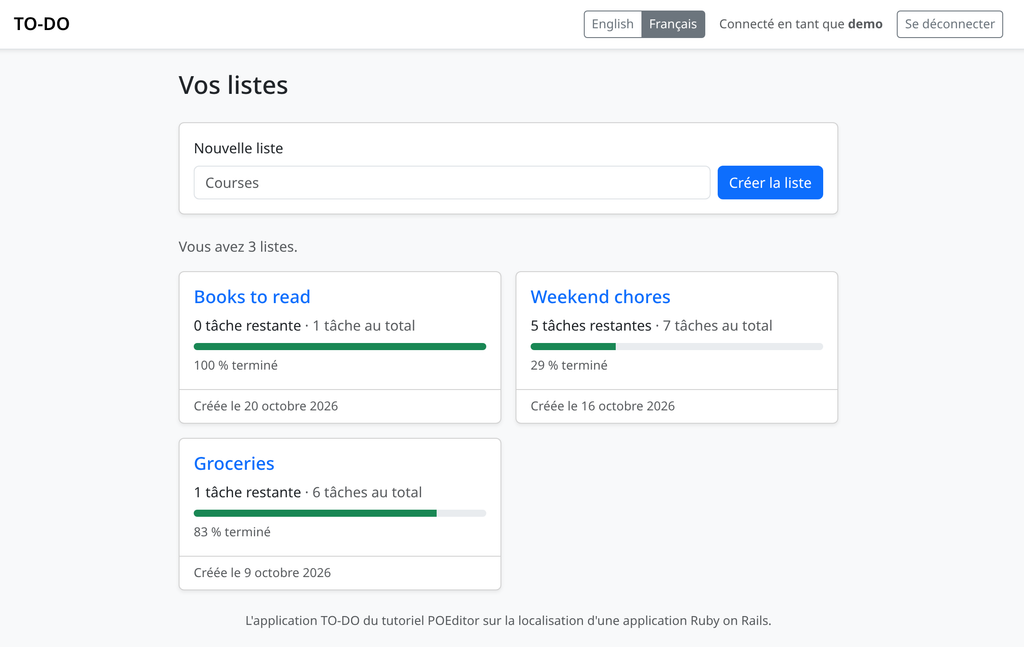
On a list page, the badge on each completed task reads Terminée while the filter tab reads Terminées, the dates follow the French formats, and a form that fails validation shows the rails-i18n message.
Wrapping up
When you add a string to the app, add its key to en.yml and import the file into POEditor again. Also import translations to a language starts switched off once the project has terms, so switch it on and choose English, or the new terms arrive without their English text.
The import adds the new terms, which show up untranslated in French, and leaves the existing translations alone, including the English text of keys you’ve reworded, unless you also switch on Overwrite existing translations. Switch on Mark strings as fuzzy in other languages as well, so the French translations of reworded keys are flagged for review.
If you’ve renamed or removed keys, POEditor follows the import with an Obsolete Terms page listing the terms that are no longer in the file, which you can tick and remove with Delete Selected. To automate this for every release, use the POEditor API, or a code hosting integration with its webhooks, to upload en.yml and download the translated files.
Create a free POEditor account and import your own en.yml to start translating your Rails app.
Ready to power up localization?
Subscribe to the POEditor platform today!For other stacks in this series, see these guides:
- Python gettext Localization: How to Translate a Python App
- Django i18n: How to Translate and Localize Your App
- CakePHP Localization: How to Translate a CakePHP App with i18n
- Node.js Localization: How to Translate an Express App with i18n-node
- ASP.NET Core Localization: How to Translate a Razor Pages App with .resx Files
Frequently asked questions
Why does a page show “Translation missing” instead of the French text?
In development, where rails new doesn’t turn on fallbacks, a key that isn’t in fr.yml appears on the page as a title-cased version of its last part, such as “Title” or “No Account”, inside a span whose title attribute names the full key, for example translation missing: fr.lists.index.title. A flash message set in a controller reads “Translation missing. Options considered were:” followed by the keys it tried, starting with one such as fr.lists.create.created. First, check whether that key exists in fr.yml. Lazy lookup builds the key from the place where t is called, so moving a string from a view into a partial, or from one controller action to another, changes the key it reads. In production, config.i18n.fallbacks = true shows the English text instead, which hides the gap, so check new pages in French in development before you release them.
How do I find keys that are missing from fr.yml?
The i18n-tasks gem compares your locale files with each other and with your code. Add gem “i18n-tasks”, group: :development to the Gemfile, run bundle install, and bundle exec i18n-tasks missing lists the keys that are in en.yml but not in fr.yml, as well as keys your code uses that neither file has. bundle exec i18n-tasks unused lists keys it can’t find in the code, but that list also includes keys Rails reads on its own, such as activerecord.attributes and the date and time formats, and some keys whose names are built at runtime, so check each one before you delete it. A key whose French value is an empty string doesn’t count as missing, and that’s exactly what an export with EXPORT set to All writes for an untranslated term when no Fallback Language is set.
How do I show “No tasks left” instead of “0 tasks left”?
Give the zero case its own key and choose between the two in the view, for example list.open_count.zero? ? t(“.no_tasks_left”) : t(“.tasks_left”, count: list.open_count). The i18n gem also reads a zero entry inside a plural key for a count of 0, but its source marks that use as deprecated and points to an explicit “0” entry instead. Neither works well with POEditor. It drops a zero entry when you import en.yml, because it keeps only the plural forms a language has and neither English nor French has a zero form, and a “0” entry makes it import 0, one and other as three separate terms instead of one plural term.
Can the app choose French for visitors whose browser is set to French?
Browsers send their users’ preferred languages in the Accept-Language header. The Rails guides read it with request.env[“HTTP_ACCEPT_LANGUAGE”] and point to the accept_language gem for headers that list several languages with quality values. Since the TO-DO app takes the language from the URL, the header can only help where the URL doesn’t decide, which here means the unprefixed English URLs, and in practice a visitor arriving at /. If you redirect those visitors to /fr, do it only once, for example by setting a cookie on their first visit, because on the home page the language switcher’s English link points to / as well and would otherwise send them back to French. A flag in the session isn’t enough here, since the TO-DO app resets the session when someone logs in.
How do I translate text stored in the database?
Rails I18n and POEditor handle the text in your code and locale files. Text that people type into the app, such as list and task names, is stored in the database and needs its own translations per record. A gem such as Mobility stores a translation for each language behind a model attribute and returns the one for the current I18n.locale, so list.name would read the French name on a French page. In the TO-DO app each user writes their own lists, so their names stay as they were typed.