 POEditor

Laravel is a PHP framework that includes routing, the Eloquent ORM, Blade templates and validation out of the box. Its thorough documentation and easy-to-learn conventions make it a popular choice for building PHP web apps.
If your app is used in different countries, offering an interface in multiple languages makes it easier for users to navigate and understand. Internationalization (i18n) prepares the code so its text and formats can change per language, and localization (l10n) supplies the translations for each one.
In this guide, we’ll translate a Laravel TO-DO app into French with Laravel’s JSON translation files and POEditor, including the framework’s own validation messages, dates and numbers, while English stays the default language.
Overview
- The TO-DO app before translation
- Wrapping strings in __()
- Generating lang/en.json
- Translating Laravel’s validation messages
- Setting the locale with middleware
- Formatting dates and numbers
- Translating the JSON files in POEditor
The TO-DO app before translation
The TO-DO app is built with Laravel 13 and PHP 8.3, and it uses Blade views and a SQLite database. You register with a username and a password, create lists, add tasks, mark them as done and filter a list by open or completed tasks. Every label, button and flash message is written in English in the Blade views and the controllers, numbers go through PHP’s number_format(), and dates are printed with Carbon’s format() in US patterns such as M j, Y. Validation errors such as “The name field is required.” come from the English language files inside the framework.
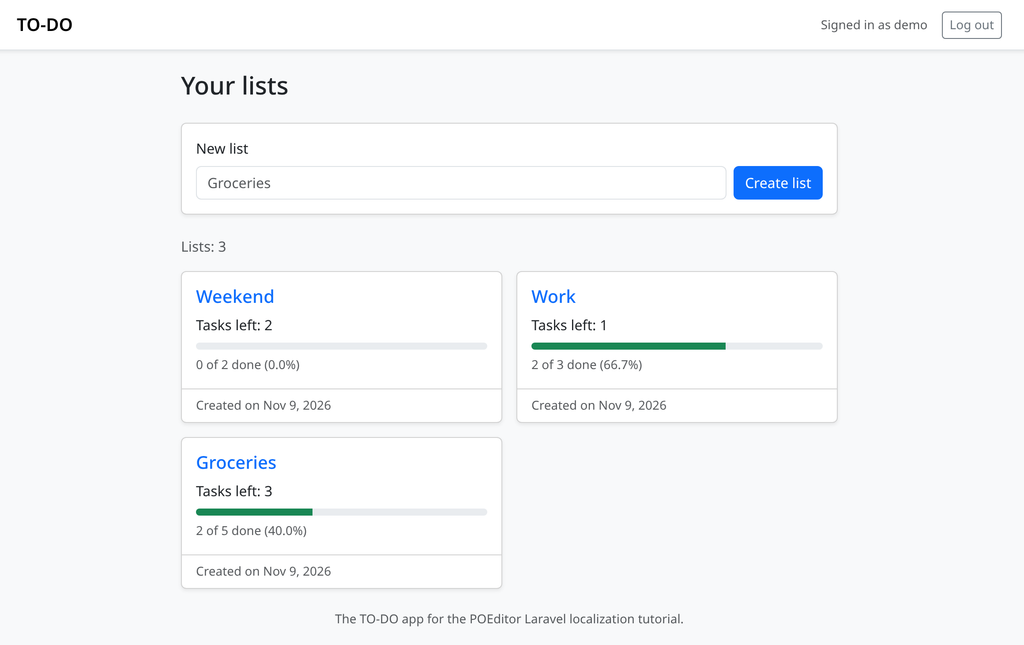
To run it, install the dependencies with composer install, copy .env.example to .env, and run php artisan key:generate, php artisan migrate --force and php artisan db:seed --force. The seeder creates a demo account with the password demo1234 and three lists. Start the app with php artisan serve and open the address it prints.
Wrapping strings in __()
To translate a string in Laravel, pass it to the __() helper. In Blade, {{ __('Your lists') }} prints the translation for the current language, escaped like any other {{ }} output, and prints the text you passed in when there is no translation for it. The @lang directive does the same lookup but doesn’t escape the result, so {{ __() }} is the safer choice wherever a translation includes something a user typed.
Here is the top of the lists page with its strings wrapped:
{{-- resources/views/lists/index.blade.php --}}
@section('title', __('Your lists'))

@section('content')
    <div class="card shadow-sm mb-4">
        <div class="card-body">
            <form method="POST" action="{{ route('lists.store') }}" id="new-list-form" class="row g-2 align-items-start">
                @csrf
                <div class="col-12 col-sm">
                    <label for="new-list-name" class="form-label">{{ __('New list') }}</label>
                    <input type="text" id="new-list-name" name="name" value="{{ old('name') }}" placeholder="{{ __('Groceries') }}"
                          @class(['form-control', 'is-invalid' => $errors->createList->has('name')])>
                    ...
                </div>
                <div class="col-12 col-sm-auto align-self-sm-end">
                    <button type="submit" class="btn btn-primary w-100">{{ __('Create list') }}</button>
                </div>
            </form>
        </div>
    </div>

    @if ($lists->isEmpty())
        <p class="text-body-secondary">{{ __("You don't have any lists yet. Create your first one above.") }}</p>
    @else
        <p class="text-body-secondary">{{ __('Lists: :count', ['count' => Number::format($lists->count())]) }}</p>
A value that changes at runtime goes into the string as a placeholder that starts with a colon, such as :count, and you pass its value in an array as the second argument. Laravel fills it in after looking up the translation, so the translator can put :count wherever the sentence needs it.
The flash messages are set in the controllers, where the original app put the user’s input straight into English sentences, as in "List \"{$list->name}\" created." and 'Task "'.$task->text.'" marked as done.'. A translator can’t reorder or re-punctuate a sentence that is assembled in code, so each message becomes one string with a placeholder:
// app/Http/Controllers/TodoListController.php
public function store(Request $request): RedirectResponse
{
    $validated = $request->validateWithBag('createList', [
        'name' => ['required', 'string', 'max:100'],
    ], [], ['name' => __('name')]);

    $list = $request->user()->todoLists()->create($validated);

    return redirect()->route('lists.show', $list)
        ->with('success', __('List ":name" created.', ['name' => $list->name]));
}
The last array gives the name field a translatable name for its error messages.
In a JSON translation file the English text is the key, so every place that uses the same English text gets the same translation. The TO-DO app shows “Done” both as a filter tab and as the badge on a finished task, and both read “Terminé” in French. When two places need different translations, give them different English text.
Generating lang/en.json
Laravel supports two types of translation files in the lang directory: PHP files that return arrays of short keys, such as lang/fr/messages.php, accessed with __('messages.welcome'), and JSON files that use the English text as the key. The TO-DO app uses the JSON files, because POEditor imports and exports them in its Key-Value JSON format. POEditor’s PHP Array format is export-only, and it writes a $LANG list of term, definition and context entries instead of the array a Laravel language file returns.
New Laravel projects don’t have a lang directory, so create an empty one. php artisan lang:publish would create it too, but it also copies Laravel’s English PHP language files into lang/en, which you don’t need here.
Laravel has no command that collects the strings from your code, so the TO-DO app uses the Translatable String Exporter package, which supports Laravel 13. Install it as a development dependency and run its export command for English:
composer require kkomelin/laravel-translatable-string-exporter --dev
mkdir lang
php artisan translatable:export en
The command searches the app and resources directories for __() and @lang calls and writes every string it finds to lang/en.json, with the string as both the key and the value. It doesn’t create the lang directory, which is why mkdir comes first. The strings it finds on the TO-DO app’s lists page include these:
// lang/en.json
{
    "Your lists": "Your lists",
    "New list": "New list",
    "Groceries": "Groceries",
    "Create list": "Create list",
    "You don't have any lists yet. Create your first one above.": "You don't have any lists yet. Create your first one above.",
    "Lists: :count": "Lists: :count",
    "No tasks yet.": "No tasks yet.",
    "Tasks left: :count": "Tasks left: :count",
    "Created on :date": "Created on :date"
}
When you run the command again later, it keeps the values that are already in the file, adds new strings and removes the ones your code no longer uses.
Translating Laravel’s validation messages
The registration form checks the username and password with rules such as required, min:3 and confirmed. Laravel builds each error from a language line, such as validation.required (“The :attribute field is required.”), and those lines come from the English validation file inside the framework. Without a French version of the validation file, error messages still appear in English on French pages.
Laravel’s translator looks in the JSON file before the PHP files for every key, validation.required included. So add the messages for the rules your forms use to en.json, under their language line names, and they go to POEditor with the rest of the strings. Copy the English text from vendor/laravel/framework/src/Illuminate/Translation/lang/en/validation.php. Rules that check a size, such as min and max, have one message per type of value, and a text field uses the string one:
// lang/en.json
    "validation.required": "The :attribute field is required.",
    "validation.string": "The :attribute field must be a string.",
    "validation.min.string": "The :attribute field must be at least :min characters.",
    "validation.max.string": "The :attribute field must not be greater than :max characters.",
    "validation.alpha_dash": "The :attribute field must only contain letters, numbers, dashes, and underscores.",
    "validation.unique": "The :attribute has already been taken.",
    "validation.confirmed": "The :attribute field confirmation does not match."
The key has to be the language line’s name: an entry keyed by the English sentence, "The :attribute field is required.", has no effect, because the validator asks the translator for validation.required, never for the sentence.
No __() call in the code uses these keys, so the next translatable:export en would delete them. The exporter keeps any key listed in lang/persistent-strings.json:
// lang/persistent-strings.json
[
    "validation.required",
    "validation.string",
    "validation.min.string",
    "validation.max.string",
    "validation.alpha_dash",
    "validation.unique",
    "validation.confirmed"
]
:attribute is the field’s name, which Laravel takes from the input’s name, so a French message would still say username. Pass translated names as the third argument of validate():
// app/Http/Controllers/Auth/RegisterController.php
$rules = [
    'username' => ['required', 'string', 'min:3', 'max:30', 'alpha_dash:ascii', 'unique:users'],
    'password' => ['required', 'string', 'min:8', 'confirmed'],
];

$attributes = [
    'username' => __('username'),
    'password' => __('password'),
];

$validated = $request->validate($rules, [], $attributes);
With “nom d’utilisateur” as the French translation of username, an empty username on a French page gives “Le champ nom d’utilisateur est obligatoire.”
Laravel’s error pages, such as the 404 and the 419 “Page Expired” page, call __() too, but their views are inside the framework. Run php artisan vendor:publish --tag=laravel-errors to copy them into resources/views/errors, where the exporter finds their strings.
Setting the locale with middleware
Laravel stores the current language in the application locale, which starts with the value of APP_LOCALE in .env and can be changed with App::setLocale(). The TO-DO app sets it on every request in a middleware. In config/app.php, define the supported languages and the names to display in the language switcher:
// config/app.php
'locale' => env('APP_LOCALE', 'en'),

'fallback_locale' => env('APP_FALLBACK_LOCALE', 'en'),

// ...

// The languages the app is translated into, each with the name the
// language switcher shows for it, written in that language.
'available_locales' => [
    'en' => 'English',
    'fr' => 'Français',
],
Create the middleware with php artisan make:middleware SetLocale. It first checks the session for the language selected by the visitor using the switcher. Without one, getPreferredLanguage() compares the browser’s Accept-Language header with the supported languages and returns the best match, or the first language in the list when nothing matches:
<?php // app/Http/Middleware/SetLocale.php

namespace App\Http\Middleware;

use Closure;
use Illuminate\Http\Request;
use Illuminate\Support\Facades\App;
use Illuminate\Support\Number;
use Symfony\Component\HttpFoundation\Response;

class SetLocale
{
    public function handle(Request $request, Closure $next): Response
    {
        $locales = array_keys(config('app.available_locales'));

        // The language picked with the switcher, or else the browser's first
        // supported language, or else the first one in the list (English).
        $locale = $request->session()->get('locale');

        if (! in_array($locale, $locales, true)) {
            $locale = $request->getPreferredLanguage($locales);
        }

        App::setLocale($locale);
        Number::useLocale($locale);

        return $next($request);
    }
}
Carbon’s Laravel service provider listens for the event that App::setLocale() fires, so dates switch language with the rest of the app. Laravel’s Number class keeps a locale of its own, which is why the middleware also calls Number::useLocale().
The middleware has to run after the session has started, since it reads the session. Add it to the web group right after StartSession, and import both classes at the top of bootstrap/app.php:
// bootstrap/app.php
->withMiddleware(function (Middleware $middleware): void {
    // ...

    // Right after the session starts, because the language is kept in the
    // session, and before the CSRF check and route model binding, so their
    // 419 and 404 pages are in the visitor's language too.
    $middleware->insertAfterInGroup('web', StartSession::class, SetLocale::class);
})
$middleware->web(append: SetLocale::class) would work for ordinary pages, but it puts the middleware at the end of the group, after the CSRF check and route model binding. An expired form or a link to a deleted list would then show its error page in English. An address that matches no route skips the web group altogether, so the TO-DO app also ends routes/web.php with Route::fallback(fn () => abort(404));, which sends unknown URLs through it.
The TO-DO app keeps the choice in the session rather than in the URL. A language in the URL, such as /fr/lists/1, means a {locale} prefix on every route and in every link the app generates, and every page of the TO-DO app other than login and registration is behind a login, so there are no public pages that need a separate address per language. The switcher links to a route that saves the language and returns to the page the visitor came from, query string included, so a filtered list stays filtered. The route file needs use Illuminate\Http\Request; at the top:
// routes/web.php
// The language switcher: keeps the choice in the session (SetLocale reads it)
// and goes back to the page the visitor was on. Other locales get a 404.
Route::get('/language/{locale}', function (Request $request, string $locale) {
    $request->session()->put('locale', $locale);

    return back();
})->whereIn('locale', array_keys(config('app.available_locales')))->name('language.switch');
whereIn() limits {locale} to the configured languages, so /language/de returns a 404. The switcher itself is a partial with one link per language:
{{-- resources/views/partials/language-switcher.blade.php --}}
<div class="btn-group btn-group-sm" role="group" aria-label="{{ __('Language') }}">
    @foreach (config('app.available_locales') as $locale => $name)
        <a href="{{ route('language.switch', $locale) }}" lang="{{ $locale }}"
          @class(['btn', 'btn-secondary' => app()->isLocale($locale), 'btn-outline-secondary' => ! app()->isLocale($locale)])
          @if (app()->isLocale($locale)) aria-current="true" @endif>{{ $name }}</a>
    @endforeach
</div>
Include it in the navbar of resources/views/layouts/app.blade.php with @include('partials.language-switcher'). In the same layout and in the published resources/views/errors/minimal.blade.php, replace <html lang="en"> with <html lang="{{ str_replace('_', '-', app()->getLocale()) }}">, so browsers and screen readers know which language the page is in.
Logging out calls $request->session()->invalidate(), which empties the session and the saved language with it. In LoginController::destroy(), read the locale before that call and put it back afterwards, so the login page that follows stays in the visitor’s language:
// app/Http/Controllers/Auth/LoginController.php
$locale = $request->session()->get('locale');

Auth::logout();

$request->session()->invalidate();
$request->session()->regenerateToken();
$request->session()->put('locale', $locale);
Formatting dates and numbers
Carbon, the date library Laravel uses, has month names and date formats for each language. format() always writes English month names, while isoFormat() and translatedFormat() use the current locale. isoFormat() also supports Carbon’s localized date formats, so the date order is handled automatically for each language without having to translate a format string. The ll format displays “Nov 9, 2026” in English and “9 nov. 2026” in French. The list page uses both LL and LT:
{{-- resources/views/lists/show.blade.php --}}
{{ __('Created on :date at :time', [
    'date' => $list->created_at->isoFormat('LL'),
    'time' => $list->created_at->isoFormat('LT'),
]) }}
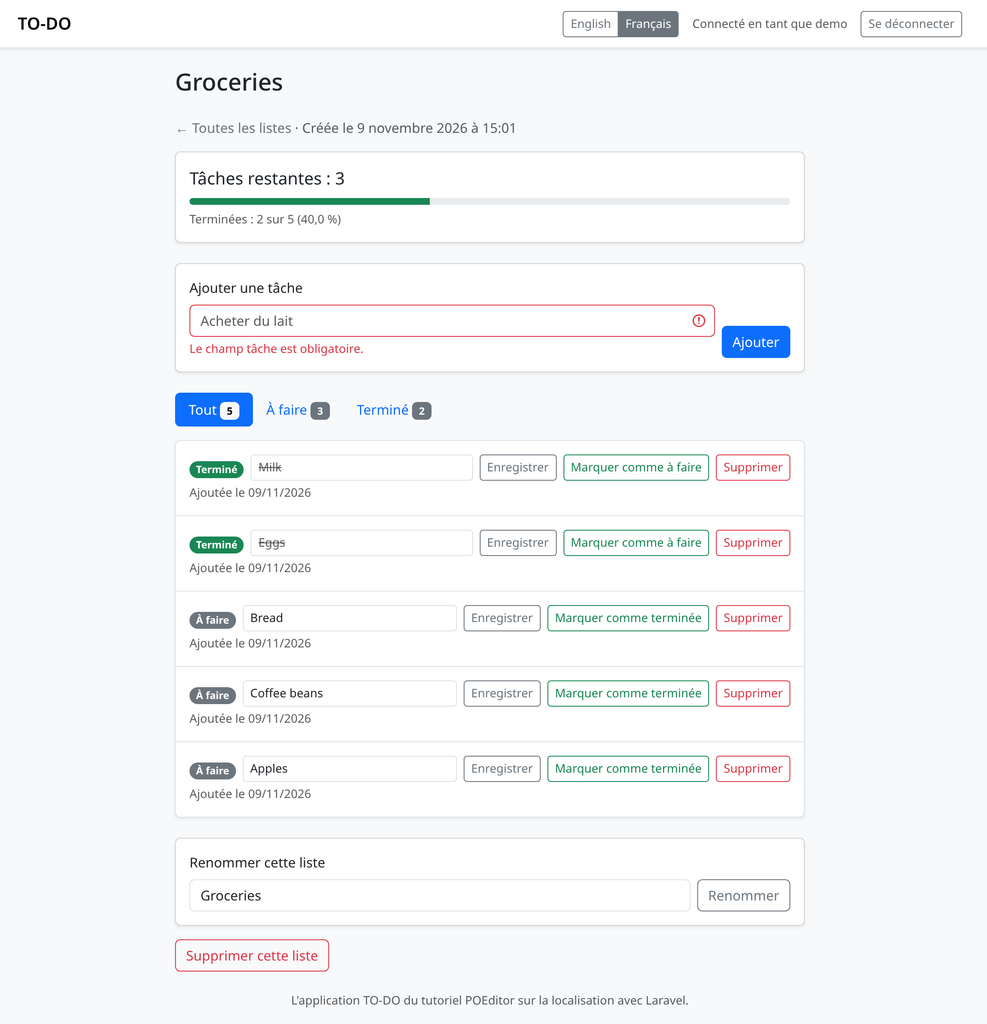
In English this reads “Created on November 9, 2026 at 3:01 PM”, and in French “Créée le 9 novembre 2026 à 15:01”. The date under each task uses L, which displays 11/09/2026 in English and 09/11/2026 in French.
Laravel’s Number class uses PHP’s intl extension to format numbers. Make sure the extension is enabled, or Number::format() will throw an exception. The progress line under each list combines three numbers:
{{-- resources/views/partials/progress.blade.php --}}
{{ __(':done of :total done (:percent)', [
    'done' => Number::format($list->done_tasks_count),
    'total' => Number::format($list->tasks_count),
    'percent' => Number::percentage($list->percentDone(), precision: 1),
]) }}
Number::percentage() takes the percentage itself, so 40 with one decimal is “40.0%” in English and “40,0 %” in French, where Number::format() also writes 1,234 as “1 234”. The French translation of the whole line, Terminées : :done sur :total (:percent), puts the numbers after a label.
Translating the JSON files in POEditor
Importing en.json
In POEditor, click the + button on the Dashboard, name the project TO-DO app (Laravel), and add English and French as its languages.
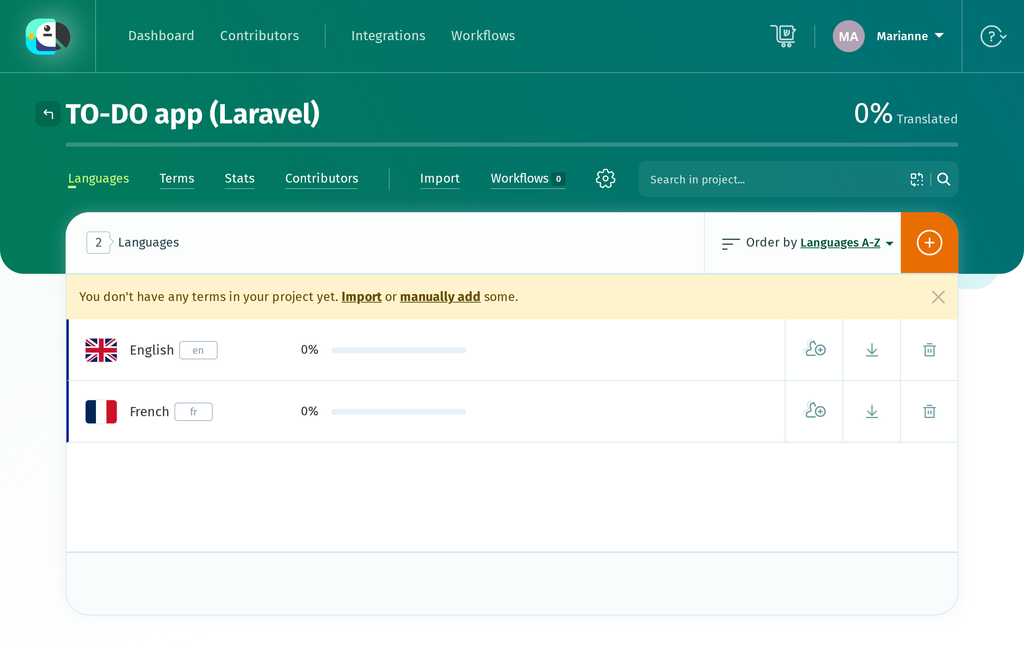
Open Import and choose lang/en.json. On a project’s first import, Also import translations to a language is already switched on, so leave it on and choose English from the list under it. POEditor detects the file format automatically, but you can also choose it manually: click set it now and choose Key-Value JSON (.json) under CHANGE FILE FORMAT. Then click Import to project.
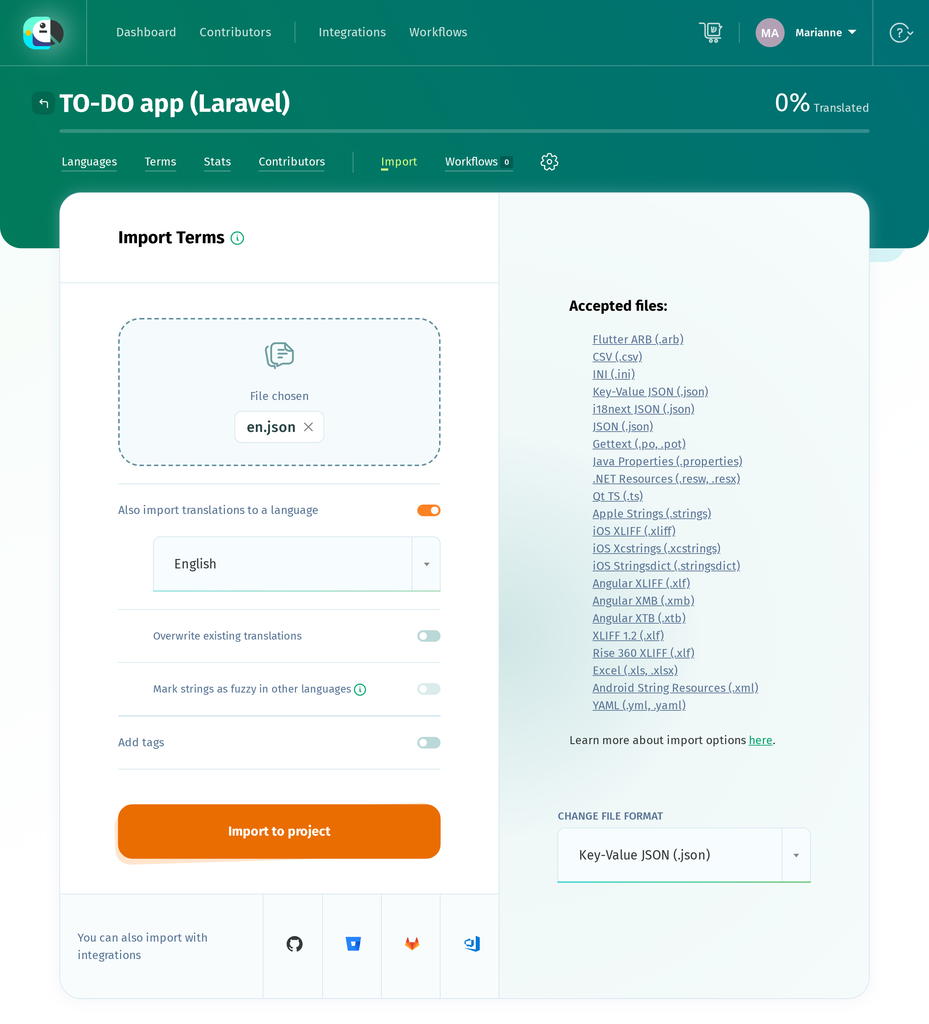
Each key becomes a term, and its value becomes the English translation. The TO-DO app’s en.json contains 81 terms, all with English translations. For most of them the term and the English text are the same sentence, but a validation.* term has its English sentence only in the English translation.
After this import the project’s Default Reference Language is still unset, so translators wouldn’t see that English text. Go back to the project page, click the gear icon to open the project settings, click Edit Details, choose English under DEFAULT REFERENCE LANGUAGE and click Save project details.
Translating into French
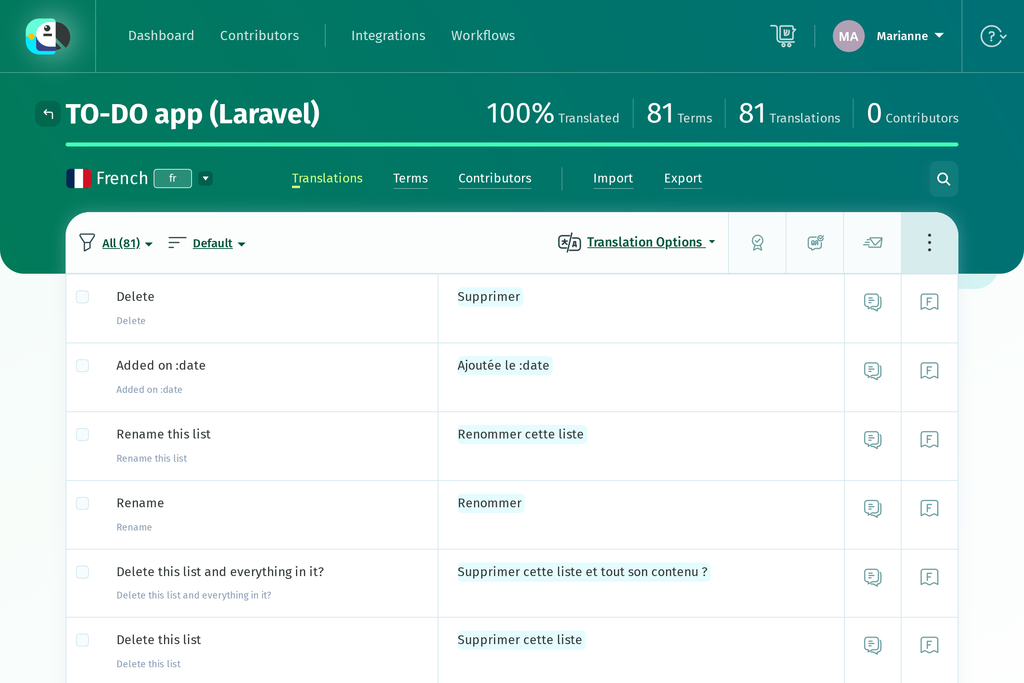
Open French and translate. Each row shows the English reference text, with the term in smaller type below it. Keep placeholders such as :name and :attribute exactly as they are, since Laravel replaces them with their values. You can move them within the sentence and adjust the surrounding punctuation to fit French, as in Liste « :name » créée.
If you want a starting point, use Automatic Translation or AI under Translation Options above the list. Both generate French translations that you can review and edit.
Exporting fr.json
Click Export on the French language page and choose Key-Value JSON (.json) as the FILE FORMAT. With EXPORT left at All, an untranslated term is written with an empty value, “”. Laravel prints the key in place of an empty translation, which for most strings is the English text, but for a validation message it’s the key itself, so a French form would say validation.required.
Until the French translations are complete, enable Advanced export options and set EXPORT to Translated. This excludes untranslated terms from the exported file. Laravel then shows English text for those missing translations. For regular strings it prints the key, which is the English text, and for validation.* entries it uses the framework’s English message, since APP_FALLBACK_LOCALE is set to en. Click Export File.
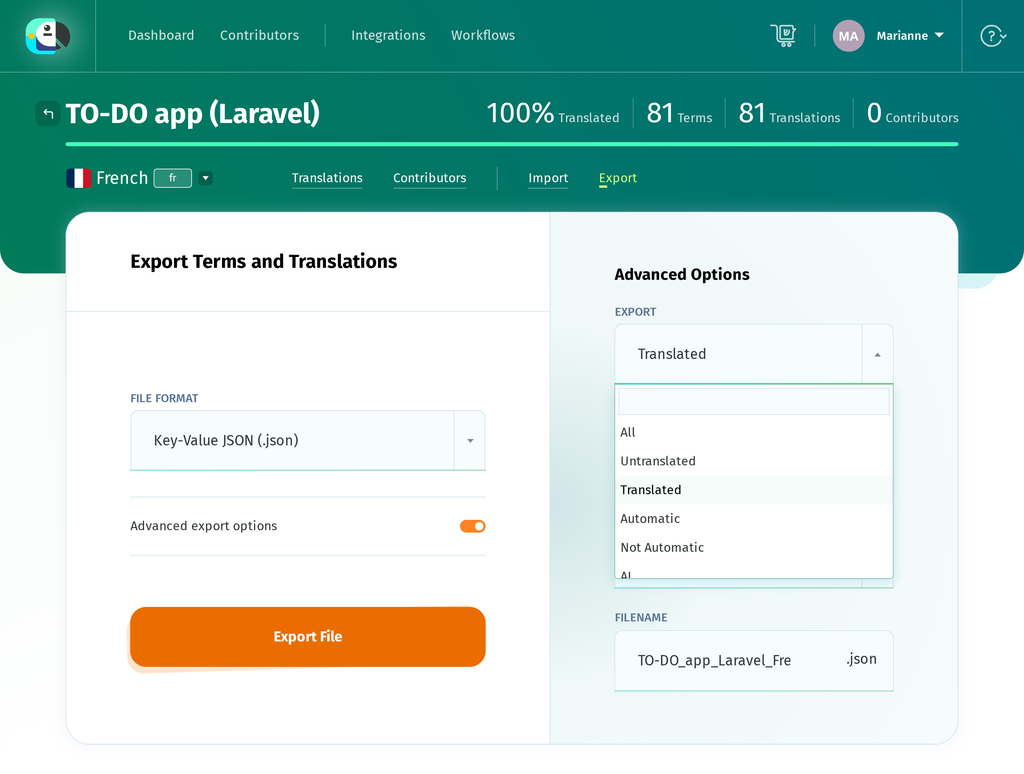
The download is named TO-DO_app_Laravel_French.json. Save it as lang/fr.json. It contains the same keys as en.json, in the same order, but with the French translations as their values. Here are a few of its entries:
// lang/fr.json
{
    "Your lists": "Vos listes",
    "New list": "Nouvelle liste",
    "Groceries": "Courses",
    "Create list": "Créer la liste",
    "Lists: :count": "Listes : :count",
    "validation.required": "Le champ :attribute est obligatoire."
}
php artisan serve uses the new file on the next request, so reload the page and click Français in the navbar.
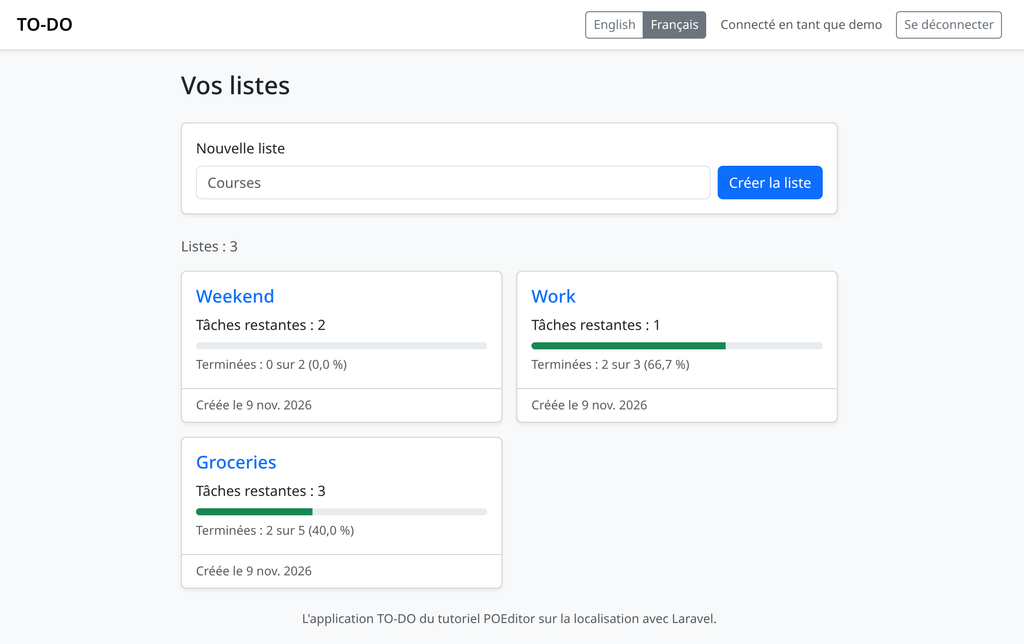
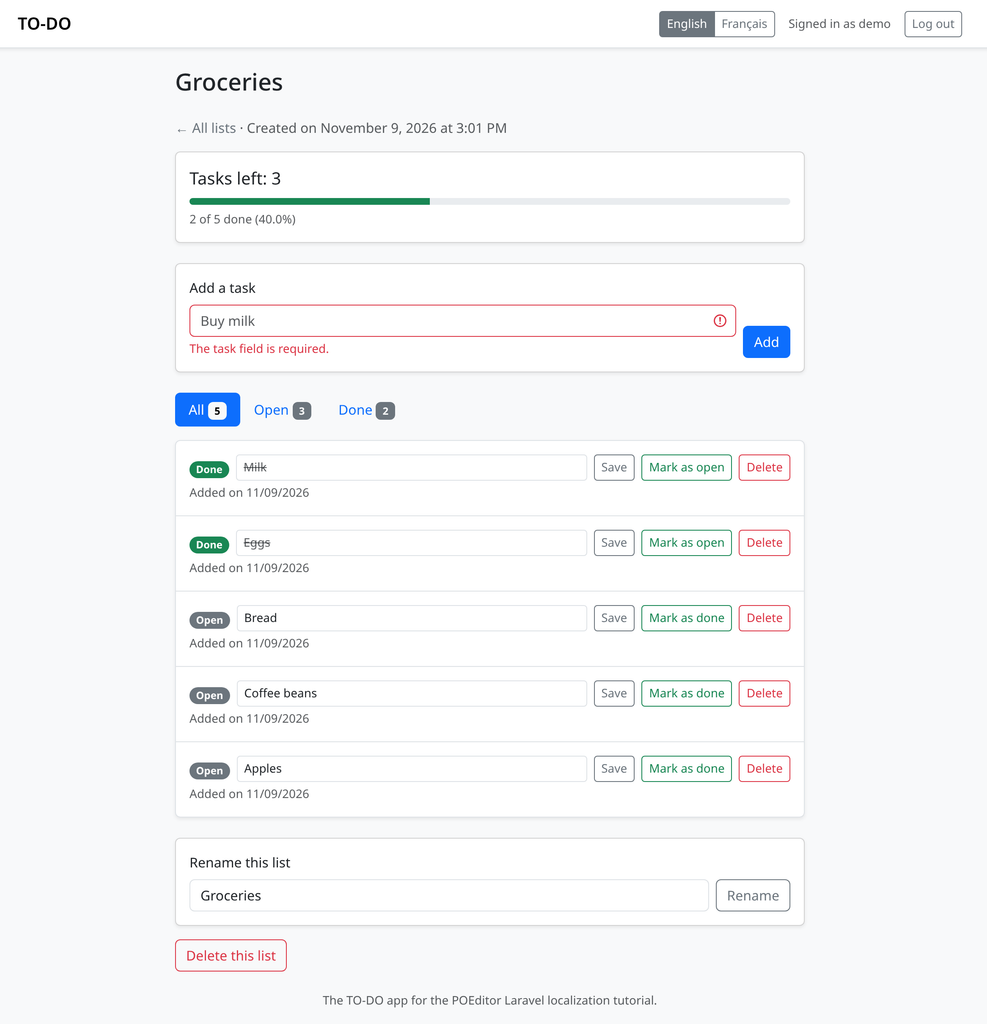
On a list page, the dates use the French formats, the filter tabs and status badges are translated, and a form that fails validation shows the French message with the translated field name. Here is the Groceries list after an empty task is submitted, first in English and then in French:
Wrapping up
When you change the app’s text, run php artisan translatable:export en again. It adds the new strings to en.json, removes the ones the code no longer uses and keeps the keys in persistent-strings.json. Then import en.json into POEditor as Key-Value JSON.
On later imports, Also import translations to a language is switched off by default. Turn it on and select English when importing, otherwise the new terms won’t have English translations. Since the English text is used as the key, changing a sentence creates a new term that has no French translation yet. The old term appears on the Obsolete Terms page after the import, where you can select it and click Delete Selected.
Translate the new terms, export French again and replace lang/fr.json. To automate this for every release, use the POEditor API or a code hosting integration to upload en.json and download the translated files.
Create a free POEditor account and import your own lang/en.json to start translating your Laravel app.
For other stacks in this series, see these guides:
- Python gettext localization: How to translate a Python app
- Django i18n: How to translate and localize your app
- CakePHP localization: How to translate a CakePHP app with i18n
- Node.js localization: How to translate an express app with i18n-node
- ASP.NET Core localization: How to translate a Razor Pages app with .resx files
- Rails i18n: How to translate a Ruby on Rails app with YAML locale files
Ready to power up localization?
Subscribe to the POEditor platform today!Frequently asked questions
Why does a French page still show some English text?
Laravel looks up JSON translations using exact keys, so __('Log In') and __('Log in') are treated as different strings. Changing the wording, punctuation or spacing in the code also creates a new key that fr.json doesn’t contain yet. When the key is missing, Laravel prints the key itself, which is the English text. An empty value, “”, gives the same result, except for a validation.* key, where the page shows the key name, such as validation.required. Run php artisan translatable:export en, import en.json into POEditor, translate the new terms and export French again. To check fr.json from the command line, php artisan translatable:inspect-translations fr --export-first adds the strings missing from it, with their English text as the value, and lists every entry whose value is the same as its key. That list also includes words spelled the same in both languages, such as “Menu”.
How do I translate Laravel’s other built-in messages?
You can translate them just like the validation messages. Laravel’s translator checks the JSON file first for any key, so a message such as auth.failed or passwords.reset can go into en.json under that key, with its English text copied from the matching file in vendor/laravel/framework/src/Illuminate/Translation/lang/en/. Add the key to lang/persistent-strings.json as well, so translatable:export doesn’t remove it, and it goes to POEditor with your other strings.
Can I use Laravel’s PHP language files with POEditor instead of JSON?
POEditor can’t import PHP files, and its PHP Array export writes a $LANG list of term, definition and context entries, which Laravel can’t load as a language file. Keep the strings you send to translators in the JSON files. If your app already uses short keys from PHP files, such as __('messages.welcome'), you can move those entries into en.json and fr.json with the same keys, because Laravel checks the JSON file for messages.welcome before it opens lang/fr/messages.php. Give each key its English text as the value in en.json; the exporter writes the key as the value for a string it hasn’t seen before, and keeps a value you’ve changed.
How do I translate the same English text in two different ways?
With JSON files the English text is the key, so __('Open') has one translation wherever it appears. When a word needs two translations, for example a button label and a status, make the two source texts different, or use a key that names the place, such as __('filters.open'), and set its English text in en.json. The exporter keeps the value you set, and with English as the Default Reference Language, translators see that text above the key in POEditor.
How do I translate text that JavaScript shows, such as a confirm() dialog?
Use @js to pass the Blade translation to the script as a JavaScript string literal, with quotes and HTML characters properly escaped. The TO-DO app’s task delete buttons use onsubmit="return confirm(@js(__('Delete this task?')))", and the exporter finds the __() call in the Blade file like any other. Laravel doesn’t provide __() in the browser, so text that lives in your JavaScript files needs a JavaScript translation library that reads the same JSON files.