 POEditor
Once an app has users in more than one country, hardcoded English strings are no longer enough: people expect labels, messages and dates in their own language. Internationalization (i18n) prepares the code so its text can change per language, and localization (l10n) supplies the translations and regional formats for each one.
In this guide, we’ll localize an Express TO-DO app with i18n-node, translate its catalog into French in POEditor, and format dates and numbers with Node’s built-in Intl API.
Overview
- Installing and configuring i18n-node
- How to choose a locale for each request
- Using __() in EJS templates and route handlers
- Handling plurals with __n()
- Writing the English JSON catalog
- Translating the JSON catalogs in POEditor
- Formatting dates and numbers with Intl
Installing and configuring i18n-node
The TO-DO app is an Express 5 application with EJS views and a SQLite database. You register with a username and password, create named lists, add tasks to them, tick them off and filter each list by open or done tasks. The text on those pages is initially hardcoded in English in the views, route handlers and validation module.
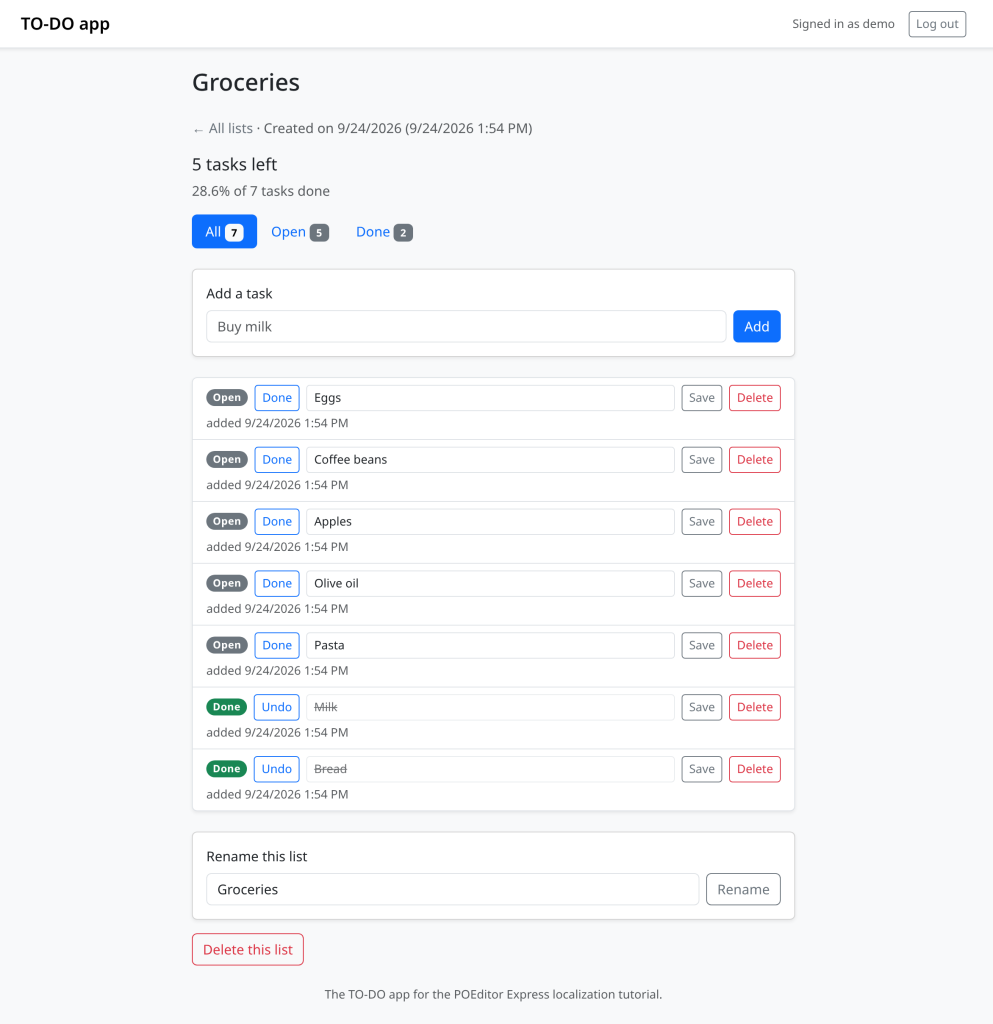
To follow along you need Node.js 22.1 or newer. Run npm install, then npm start, and open the address it prints; npm run seed creates a demo account with the password demo1234 if you’d rather skip registration, and running it again resets that account and deletes its lists.
The library is published on npm as i18n. The TO-DO app also installs Mustache, which i18n-node uses for placeholders, so we can change one of its settings. Add both with npm install i18n mustache, then create a module that configures one instance for the whole app.
// i18n.js

const path = require('node:path');

const { I18n } = require('i18n');

const Mustache = require('mustache');

const i18n = new I18n({

  locales: ['en', 'fr'],

  defaultLocale: 'en',

  directory: path.join(__dirname, 'locales'),

  // en.json is written by hand, so never add keys to the catalogs at runtime.

  updateFiles: false,

  // A key with no French translation yet shows its English text.

  retryInDefaultLocale: true,

  // No prototype, so an Accept-Language header can't match a built-in

  // property and make i18n.init throw.

  fallbacks: Object.create(null),

});

// EJS already escapes everything it prints, so stop Mustache from

// HTML-escaping {{placeholder}} values a second time.

Mustache.escape = (text) => text;

module.exports = i18n;
The catalogs are one JSON file per locale in locales/, and each entry pairs a short key such as list_created with the text for that locale. The section on the catalogs explains the two settings that go with that choice.
Register the middleware in app.js, and put it at the top of the stack together with cookie-parser, which the next section needs in order to read the lang cookie.
// app.js

const cookieParser = require('cookie-parser');

const i18n = require('./i18n');

// First, so that every later middleware and error page can translate.

app.use(cookieParser());

app.use(i18n.init);

// ...the locale middleware from the next section goes here...

app.use(express.static(path.join(__dirname, 'public')));

app.use(express.urlencoded({ extended: false }));

app.use(

  session({

    secret: process.env.SESSION_SECRET || 'change-me-in-production',

    resave: false,

    saveUninitialized: false,

    cookie: { httpOnly: true, sameSite: 'lax' },

  })

);
i18n.init gives each request its own copy of the i18n-node API, including req.__(), req.__n(), req.getLocale() and req.setLocale(). It also puts the same API in res.locals, so an EJS view can call __() without importing anything. It sits above body parsing and the session because an error in either of those goes straight to the error handler, and if i18n.init hasn’t run yet, the error page dies with req.__ is not a function.
How to choose a locale for each request
i18n.init guesses a locale from the Accept-Language header, and it can also read the visitor’s choice from a cookie or from ?lang= if you set its cookie or queryParameter option. In i18n-node 0.15.4, though, it looks those values up in a plain object, so an unknown value such as de falls back to English but some names inherited from Object.prototype get through as locale names, and one request with such a name can affect the whole process. Its header guess can also prefer a lower-ranked exact match to a higher-ranked regional one, which gives French to a browser that sends en-US,fr;q=0.9 and English to one that sends fr-FR,en. The TO-DO app therefore chooses the locale in its own middleware, which checks each source against the configured locales and uses the first match:
- The lang query parameter, as in
/?lang=fr. - The lang cookie set by the language switcher.
- The browser’s Accept-Language header.
req.acceptsLanguages()lists its languages in the browser’s order of preference, and the first one with a catalog wins, with a regional tag such asfr-FRcounting asfr. - English.
// app.js

// Pick the locale: ?lang= first, then the `lang` cookie, then the browser's

// Accept-Language header, then English. Only locales we have a catalog for

// are accepted.

app.use((req, res, next) => {

  const locales = i18n.getLocales();

  if (locales.includes(req.query.lang)) {

    req.setLocale(req.query.lang);

  } else if (locales.includes(req.cookies.lang)) {

    req.setLocale(req.cookies.lang);

  } else {

    // In the header's own order, so that `fr-FR,en` means French.

    const lang = req

      .acceptsLanguages()

      .map((tag) => tag.toLowerCase().split('-')[0])

      .find((code) => locales.includes(code));

    req.setLocale(lang || 'en');

  }

  next();

});
req.setLocale() updates req, res and res.locals together, so every translation for the rest of the request uses the chosen locale. Avoid the global i18n.setLocale() on a server, since it holds one locale for the whole process. A request that awaits a database call could end up using the locale set by another request.
i18n.init still makes its own guess from the header before this middleware runs, and in 0.15.4 some header values make it throw, because its fallbacks option is a plain object too. Setting fallbacks to an object with no prototype in i18n.js stops the throw, and the middleware then replaces whatever locale the guess picked.
The language switcher in the navbar sends the selected language to a route that stores it in a cookie and redirects back to the current page, removing any ?lang= parameter that would override the cookie.
// routes/locale.js

const express = require('express');

const i18n = require('../i18n');

const router = express.Router();

// Back to the page the switcher was on, but only on this site, and

// without a ?lang= that would override the new cookie. A path starting

// with // would be read by the browser as another site, so it is refused.

function backTo(req) {

  const origin = `${req.protocol}://${req.get('host')}`;

  const back = typeof req.body?.back === 'string' ? req.body.back : '/';

  const url = URL.parse(back, origin);

  if (!url || url.origin !== origin || url.pathname.startsWith('//')) return '/';

  url.searchParams.delete('lang');

  return url.pathname + url.search + url.hash;

}

router.post('/locale/:code', (req, res, next) => {

  const { code } = req.params;

  if (!i18n.getLocales().includes(code)) return next();

  res.cookie('lang', code, { maxAge: 365 * 24 * 60 * 60 * 1000, httpOnly: true, sameSite: 'lax' });

  res.redirect(backTo(req));

});

module.exports = router;
In the header partial, the switcher is a single form with one button per language, each posting to its own formaction, and a hidden back field with the current page’s address. The TO-DO app sets res.locals.currentPath to req.originalUrl for normal page views and to / for a page shown in answer to a form, such as an error after a failed submit, because reloading that address would ask for a page that only accepts form posts.
<%# views/partials/header.ejs %>

<html lang="<%= getLocale() %>" data-bs-theme="light">

<%# ... %>

<form method="post" class="m-0 btn-group btn-group-sm" id="language-switcher" role="group"

      aria-label="<%= __('nav_language') %>">

    <input type="hidden" name="back" value="<%= currentPath %>">

    <button type="submit" formaction="/locale/en" lang="en"

            class="btn <%= getLocale() === 'en' ? 'btn-secondary' : 'btn-outline-secondary' %>">English</button>

    <button type="submit" formaction="/locale/fr" lang="fr"

            class="btn <%= getLocale() === 'fr' ? 'btn-secondary' : 'btn-outline-secondary' %>">Français</button>

</form>
Using __() in EJS templates and route handlers
In a view, replace each piece of text with __() and its key, and print the result with <%=, which HTML-escapes it so a stray < or & in a translation can’t break the markup. It’s easy to miss strings that aren’t body text, such as title and aria-label attributes, or a confirmation message that ends up in inline JavaScript.
<%# views/lists/show.ejs %>

<span class="badge rounded-pill <%= task.done ? 'text-bg-success' : 'text-bg-secondary' %>">

    <%= task.done ? __('task_status_done') : __('task_status_open') %>

</span>

<form method="post" action="/tasks/<%= task.id %>/toggle" class="m-0">

    <button type="submit" class="btn btn-sm btn-outline-primary toggle-task"

            title="<%= __('task_toggle_title') %>"><%= task.done ? __('task_undo') : __('task_mark_done') %></button>

</form>

<input type="text" name="text" value="<%= task.text %>" required maxlength="255"

       class="form-control form-control-sm task-text" aria-label="<%= __('task_text_label') %>">

<form method="post" action="/lists/<%= list.id %>/delete"

      onsubmit="return confirm(<%= JSON.stringify(__('delete_list_confirm')) %>);">

    <button type="submit" class="btn btn-outline-danger"><%= __('delete_list_submit') %></button>

</form>
JSON.stringify() turns the translation into a quoted JavaScript string, and <%= escapes its quotes for the HTML attribute, so a French apostrophe or quotation mark can’t end the confirm() argument early.
Keys also separate words that English happens to spell the same way. The unlocalized app used Done for both the filter tab and a task’s status badge, but French needs the plural Terminées for the tab and the singular Terminée for one task, so each gets a key of its own, filter_done and task_status_done. Naming keys after where the text appears also makes them easier to find later.
Route handlers tend to hold the messages that were built by gluing strings together, such as the unlocalized app’s ‘List “‘ + name + ‘” created.’, and the fix is to give the whole sentence one key and put the name in a named placeholder.
// routes/lists.js

router.post('/lists', (req, res) => {

  const name = textField(req.body?.name);

  const error = validateListName(name, req.__);

  if (error) {

    req.flash('danger', error);

    return res.redirect('/');

  }

  const result = db

    .prepare('INSERT INTO lists (user_id, name, created_at) VALUES (?, ?, ?)')

    .run(req.user.id, name, new Date().toISOString());

  req.flash('success', req.__('list_created', { name }));

  res.redirect('/lists/' + result.lastInsertRowid);

});
The English text for that key, List "{{name}}" created., is stored in en.json. i18n-node accepts printf-style %s placeholders as well, but the named form is kinder to translators: in POEditor they see {{name}}, know what goes in the gap, and can move it to wherever French word order puts it.
The validation module has no request of its own, so calling the shared i18n instance there would use the default locale. Instead, the route passes in the request’s translate function as validateListName(name, req.__).
// validation.js

function validateRegistration({ username, password }, __) {

  const errors = {};

  if (!username) {

    errors.username = __('username_required');

  } else if (username.length < 3 || username.length > 80) {

    errors.username = __('username_length');

  }

  // ...

  return errors;

}

function validateListName(name, __) {

  if (!name) return __('list_name_required');

  if (name.length > 100) return __('list_name_too_long');

  return null;

}
Quick tip: Mustache HTML-escapes every value it puts into a {{name}} placeholder, and EJS escapes the finished string again, so a list called Rent & bills would show up as Rent & bills. The Mustache.escape line in i18n.js turns the first pass off, which is safe as long as every translation reaches the page through <%=. It only takes effect when npm installs a single copy of Mustache, so keep your version within the ^4.2.0 range that i18n-node 0.15.4 depends on.
Handling plurals with __n()
The unlocalized TO-DO app chose between task left and tasks left with an if, which assumes every language splits on “one or not one” and bakes English word order into the code. Replace each branch with req.__n(), passing the key, the number that decides the form, and an object with the values for the placeholders.
// routes/lists.js

const locale = req.getLocale();

const openLabel = req.__n('tasks_left', openCount, {

  count: formatNumber(openCount, locale),

});

const percentDone = totalCount > 0 ? doneCount / totalCount : 0;

const progressLabel = req.__n('tasks_progress', totalCount, {

  percent: formatPercent(percentDone, locale),

  count: formatNumber(totalCount, locale),

});
The forms themselves are defined in the catalog, where a plural key has one entry for each CLDR plural category. i18n-node uses the current locale’s plural rules to choose the right one. The {{count}} shown to the reader is a separate value already formatted with Intl, because with a %s placeholder i18n-node prints the raw count, and a French reader then sees 1234 tâches where they expect 1 234 tâches.
French also disagrees with English about where the singular stops. Its one category covers both 0 and 1, so an empty list reads Il reste 0 tâche, and it has a many category for exact multiples of a million, such as 1,000,000, which take de in French: 1 000 000 de tâches. i18n-node picks the right key as long as the French catalog contains it, and filling those keys is the translator’s job in POEditor.
Writing the English JSON catalog
With keys, en.json is the source of the English text, so you write it by hand and add an entry whenever you add a new key to a view or route. A plural key holds an object with the English one and other forms.
// locales/en.json (excerpt)

{

    "list_name_required": "Give the list a name.",

    "list_name_too_long": "List names are at most 100 characters long.",

    "list_created": "List \"{{name}}\" created.",

    "filter_all": "All",

    "filter_open": "Open",

    "filter_done": "Done",

    "task_status_done": "Completed",

    "tasks_left": {

        "one": "{{count}} task left",

        "other": "{{count}} tasks left"

    },

    "tasks_progress": {

        "one": "{{percent}} of {{count}} task done",

        "other": "{{percent}} of {{count}} tasks done"

    }

}
That’s why i18n.js turns updateFiles off. The option is on by default, and it adds every key it can’t find to the current locale’s catalog with the key itself as the text, so a typo in a view would put an entry such as "list_crated": "list_crated" into your hand-written en.json. With it off, a key missing from en.json shows up on the page as the bare key, which is easy to spot while you click through the app.
retryInDefaultLocale: true covers the opposite gap. When fr.json has no entry for a key yet, i18n-node looks the key up in English instead, so a string added after the last translation round shows its English text rather than list_created.
Translating the JSON catalogs in POEditor
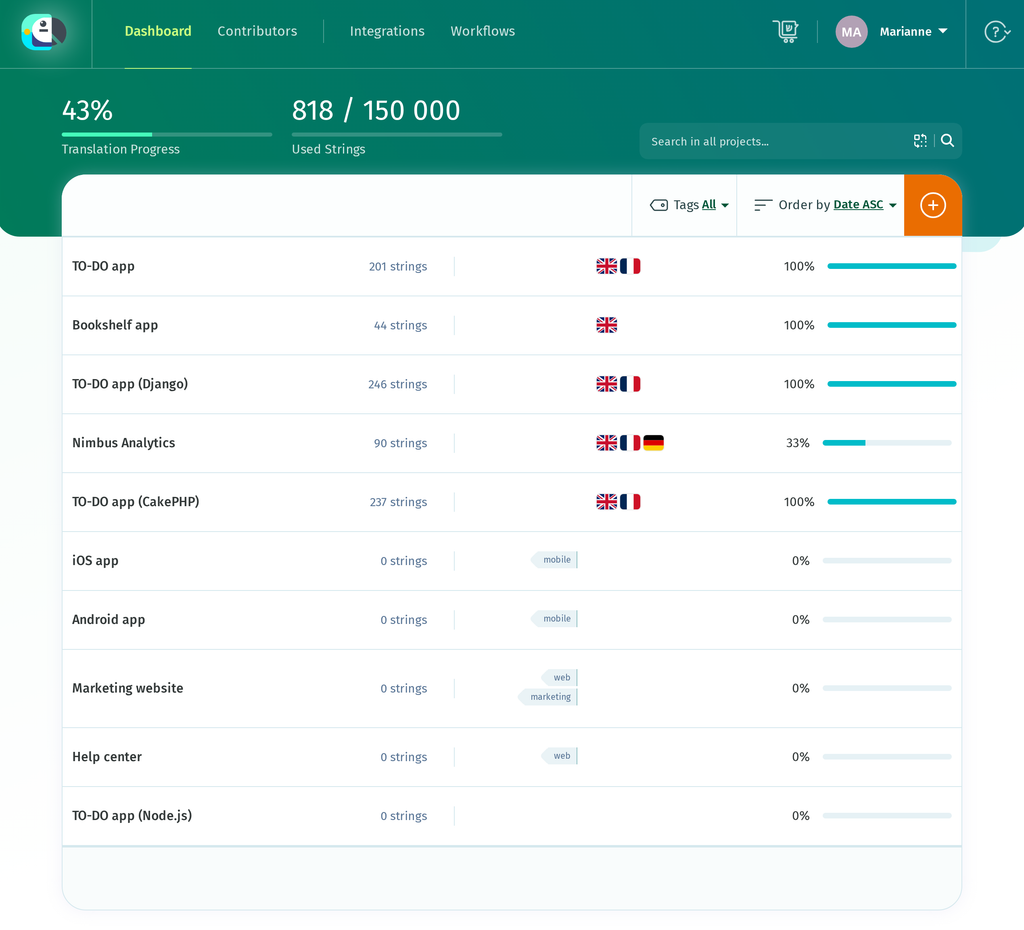
On the POEditor projects page, click the orange + button (its tooltip reads Add project), name the project TO-DO app (Node.js) in the Add Project dialog, and click Add.
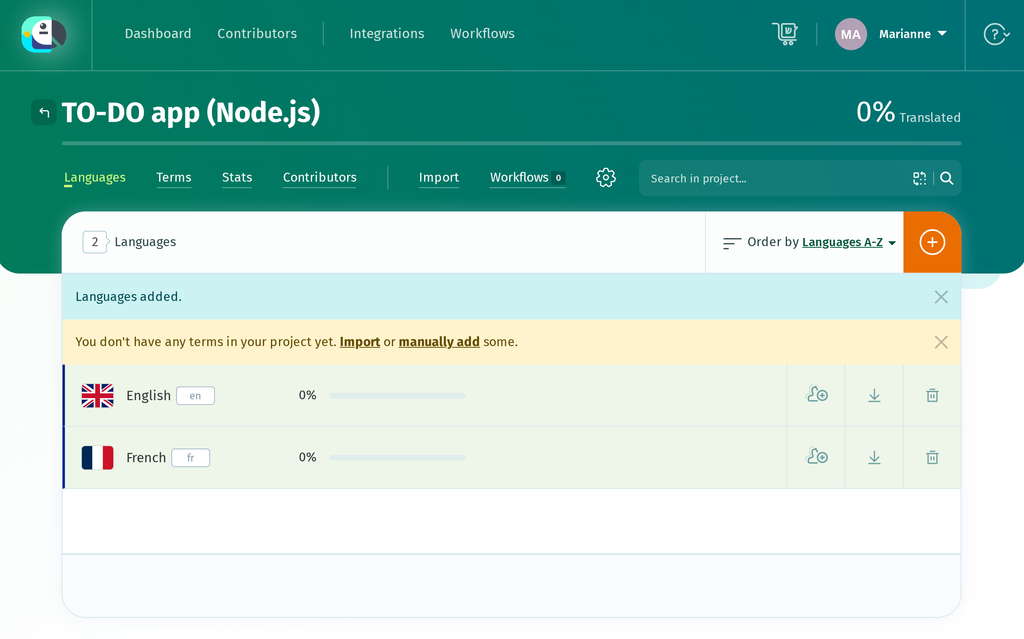
Open the project, click the + button to open Add Languages, and add English and French. Both start at 0%, and POEditor reminds you that the project has no terms yet.
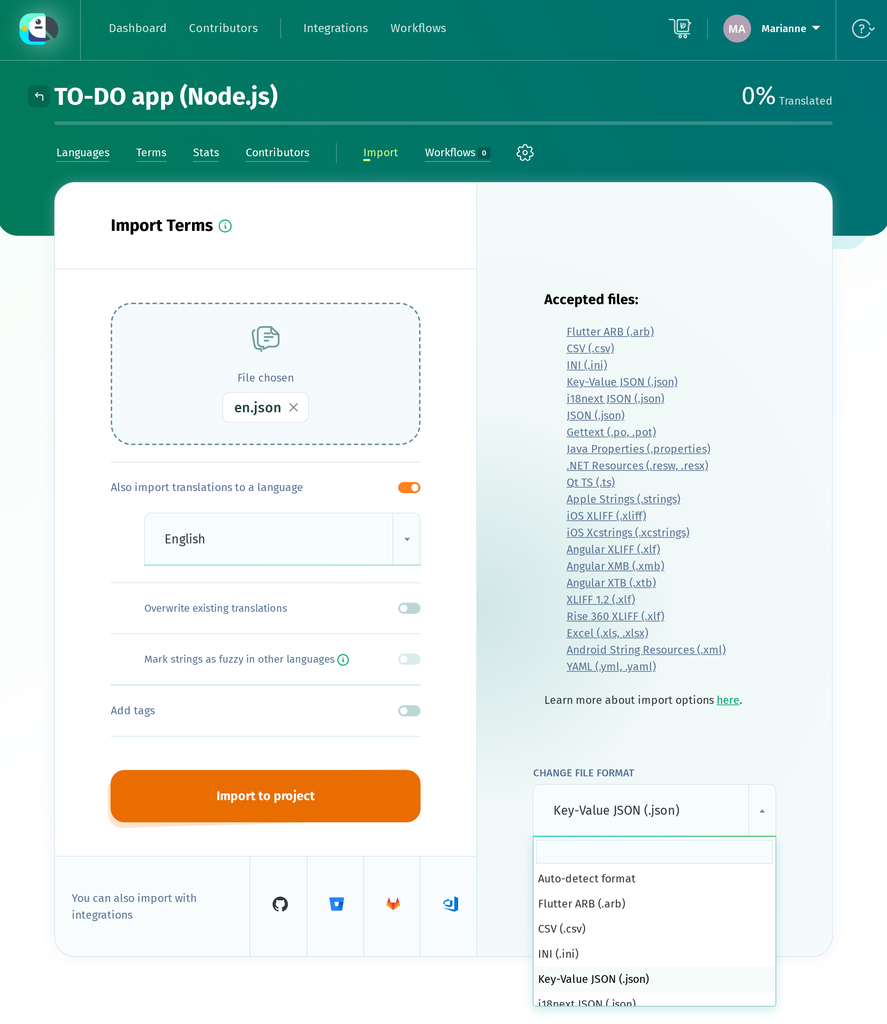
Go to Import. On the Import Terms page, choose en.json. Several file formats use the .json extension, so POEditor lets you either leave the format to auto-detection or choose the type of JSON yourself. Click set it now to show the CHANGE FILE FORMAT menu, which starts on Auto-detect format, and pick Key-Value JSON (.json), the format POEditor lists for i18n-node. Leave Also import translations to a language switched on, select English, and click Import to project.
The import reports 83 terms found: 83 terms added; 83 translations found: 83 added, 0 updated in English., and English reaches 100% straight away. Each key becomes a term and each English value its English translation, so there is no need for a separate Copy Terms to Translations step. The four plural keys become plural terms, each with a Plural: line under the term and ONE and OTHER tabs on the English side.
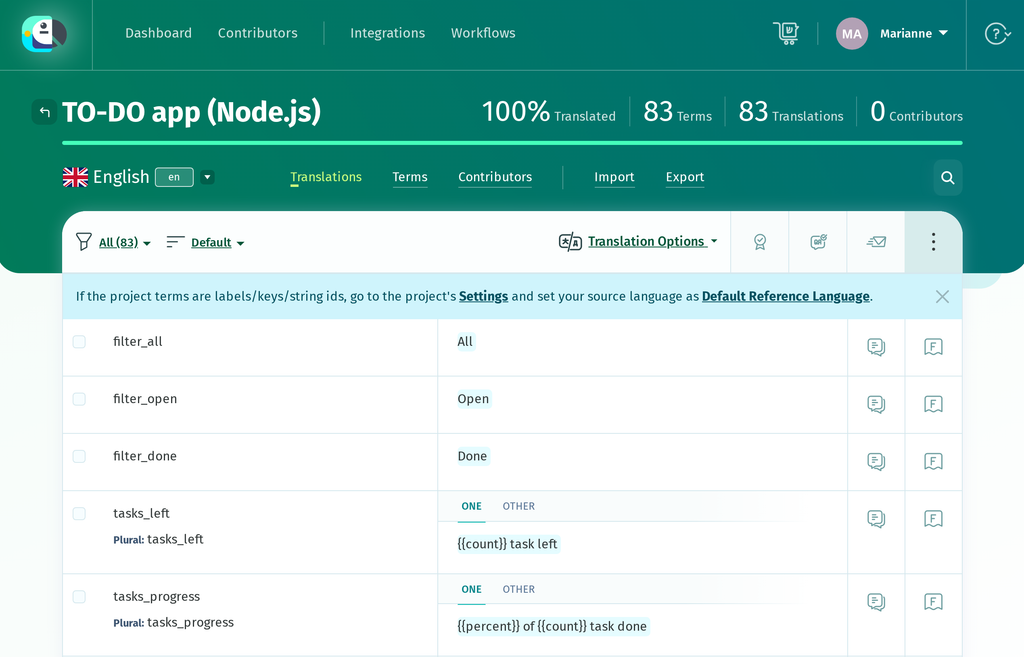
A key such as list_created tells a translator where a string belongs but not what it says, so make English the project’s default reference language if POEditor hasn’t already: click the gear icon for the project’s Settings, click Edit Details, set DEFAULT REFERENCE LANGUAGE to English, and click Save project details. The French editor then shows each term’s English text, with its key in small grey type underneath.
Now open French and translate. Keep each placeholder such as {{name}} or {{count}} exactly as written, though you can move it to wherever French word order wants it. If a translation drops or changes one, QA Checks flag it when you save.
If you would rather review a first draft than translate from scratch, you can pre-fill the French terms with Automatic Translation (Google Translate, DeepL or Azure AI Translator), which is built in, or with AI translation from providers such as OpenAI or Anthropic’s Claude once you add your own API key.
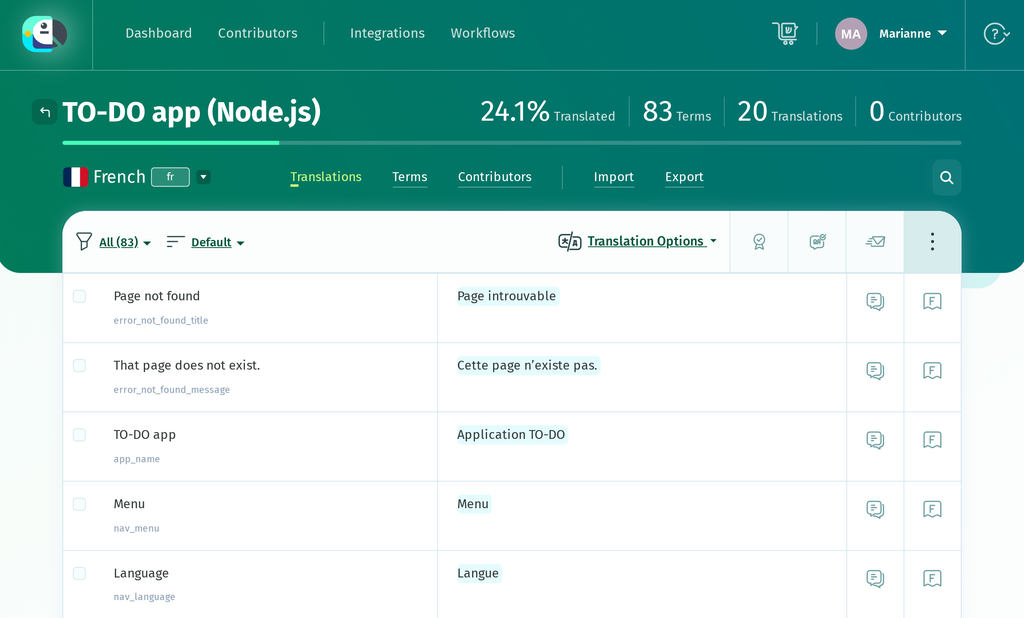
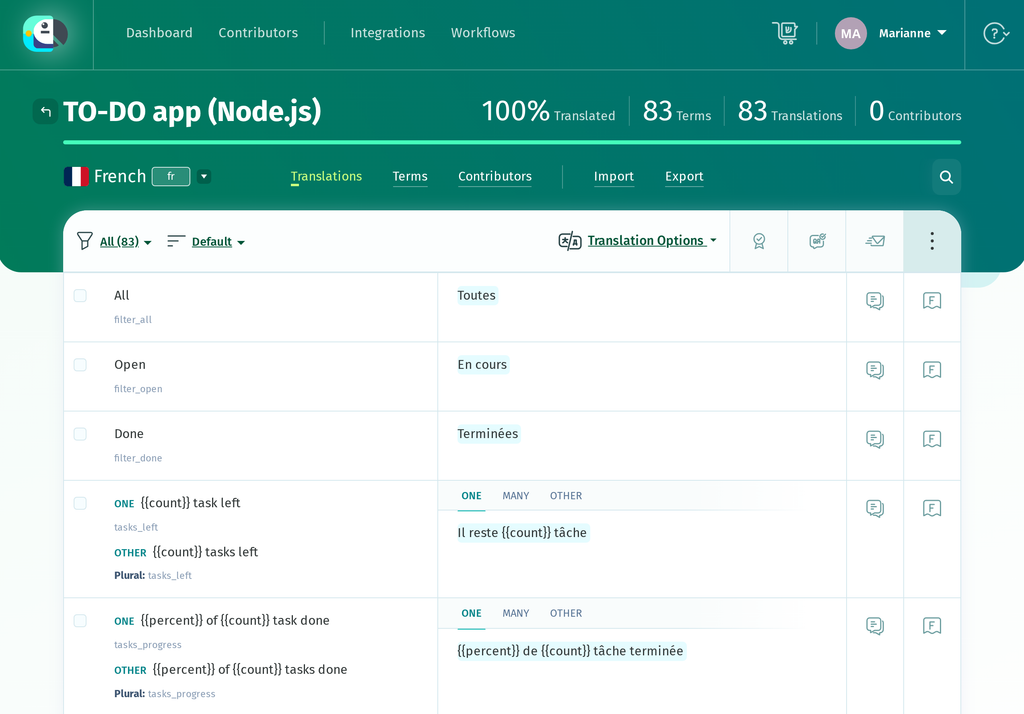
The plural terms show ONE, MANY and OTHER tabs in French, one more than in English. Fill in all three, because when many is missing, i18n-node falls back to other and prints 1 000 000 tâches without the de that French grammar needs.
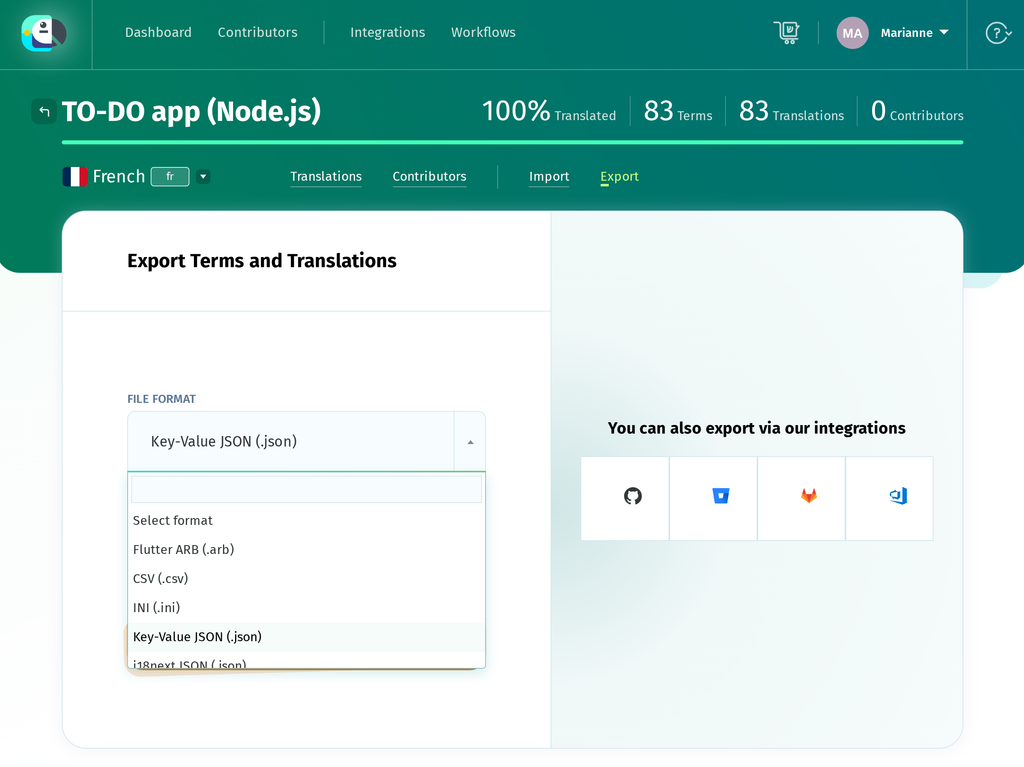
When French is done, go to Export. On the Export Terms and Translations page, set FILE FORMAT to Key-Value JSON (.json) and click Export File. If some terms are still untranslated, switch on Advanced export options first and set EXPORT to Translated. By default the file includes an empty string for every untranslated term, which the app would show as blank text, while a term missing from the file falls back to English.
Save the download as locales/fr.json. It uses the same keys as en.json, and the plural entries come back in the object shape __n() reads, now carrying the many key.
// locales/fr.json (excerpt)

{

    "list_created": "Liste « {{name}} » créée.",

    "tasks_left": {

        "one": "Il reste {{count}} tâche",

        "many": "Il reste {{count}} de tâches",

        "other": "Il reste {{count}} tâches"

    },

    "tasks_progress": {

        "one": "{{percent}} de {{count}} tâche terminée",

        "many": "{{percent}} de {{count}} de tâches terminées",

        "other": "{{percent}} des {{count}} tâches terminées"

    }

}
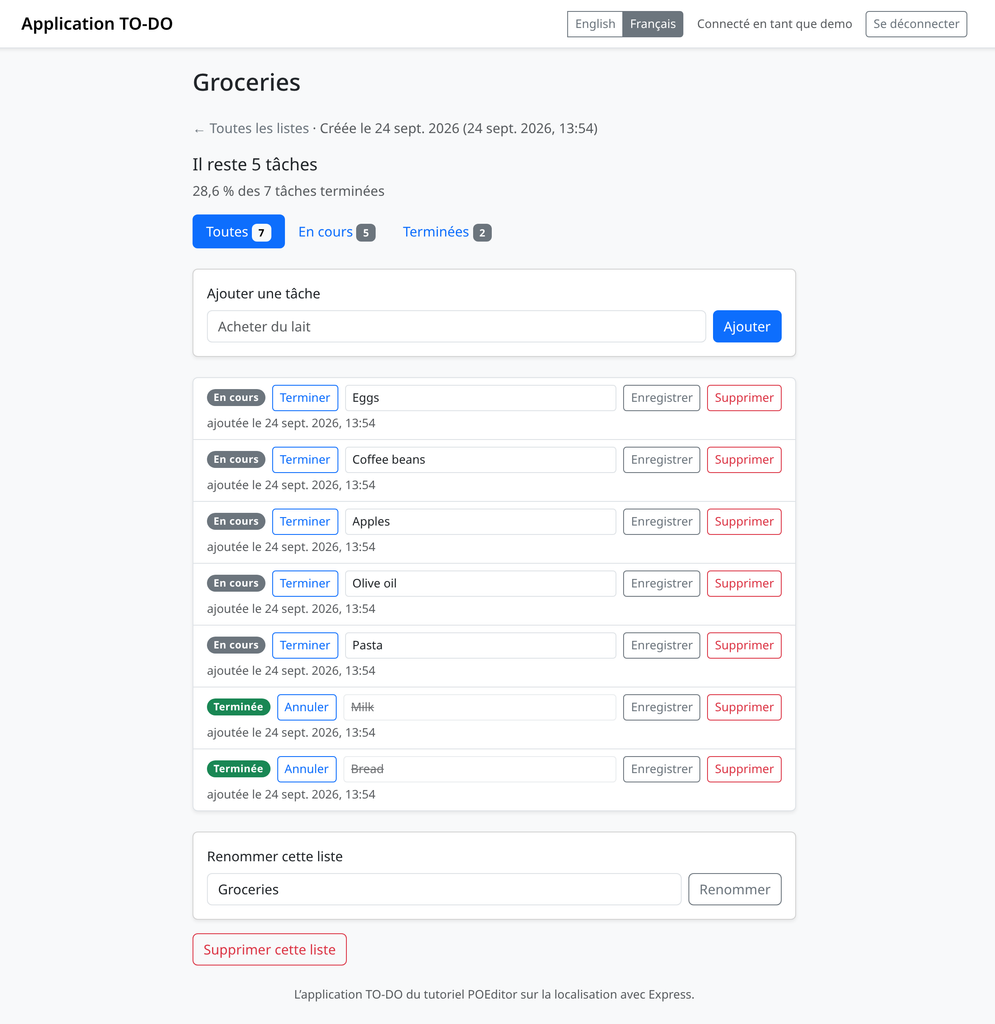
i18n-node reads its catalogs when the app starts, so run npm start again (or set autoReload: true in development to have it watch the files). Pick Français in the navbar and the list page switches over, with the count and the progress line built from the plural terms.
Formatting dates and numbers with Intl
i18n-node’s __() and __n() translate text and nothing else, so the unlocalized format.js, which built 9/24/2026 1:54 PM by hand and added thousands separators with a regular expression, would keep printing American formats inside French sentences. Replace it with the Intl formatters and pass the locale in each time.
// format.js

// 24 sept. 2026

function formatDate(value, locale) {

  return new Intl.DateTimeFormat(locale, { dateStyle: 'medium' }).format(new Date(value));

}

// 24 sept. 2026, 15:07

function formatDateTime(value, locale) {

  return new Intl.DateTimeFormat(locale, { dateStyle: 'medium', timeStyle: 'short' })

    .format(new Date(value));

}

// 1 234

function formatNumber(n, locale) {

  return new Intl.NumberFormat(locale).format(n);

}

// 0.286 -> 28,6 %

function formatPercent(fraction, locale) {

  return new Intl.NumberFormat(locale, {

    style: 'percent',

    minimumFractionDigits: 1,

    maximumFractionDigits: 1,

  }).format(fraction);

}
Official Node.js builds include full ICU data, so French month names, the comma decimal separator and the space before the percent sign work without installing anything. Route handlers pass req.getLocale() themselves, and for the views, add a middleware after the locale middleware that binds the helpers to the request’s locale.
// app.js

// Formatting helpers for the views, in the request's locale.

app.use((req, res, next) => {

  const locale = req.getLocale();

  res.locals.formatDate = (value) => formatDate(value, locale);

  res.locals.formatDateTime = (value) => formatDateTime(value, locale);

  res.locals.formatNumber = (n) => formatNumber(n, locale);

  res.locals.formatPercent = (fraction) => formatPercent(fraction, locale);

  next();

});
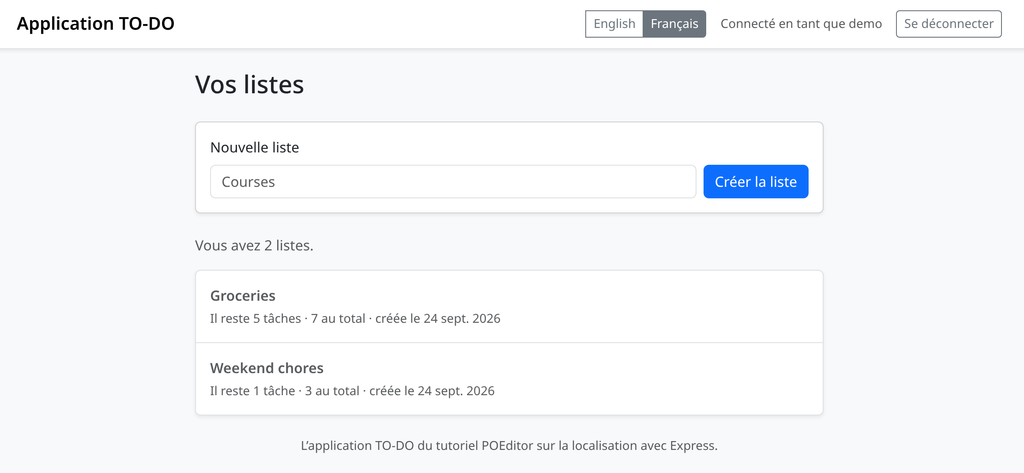
The formatted value then goes into a message as a placeholder, as in __('list_created_date', { date: formatDate(list.created_at) }), and the dashboard shows both plural forms next to French dates.
Wrapping up
The catalogs keep changing along with the app. When you add a string, add its key to en.json and import the file again the same way; the new terms arrive untranslated in French while existing ones keep their translations. After the import, POEditor also lets you delete obsolete terms, the ones whose keys you have removed from en.json.
Rewording the English text of a string leaves its key alone, so the term keeps its French translation. To bring the new English wording into POEditor, switch on Overwrite existing translations when you import, and also Mark strings as fuzzy in other languages so the French text is flagged for review.
For edits made directly in POEditor rather than through an import, the project’s settings have an option of the same name that does this for you. Once this happens every release, the POEditor API or the GitHub integration can push en.json and pull the translated files as part of your build.
Create a free POEditor account and import your own en.json to see your catalog with a translation interface around it.
For other stacks in this series, see these guides:
- CakePHP Localization: How to Translate a CakePHP App with i18n
- Django i18n: How to Translate and Localize Your App
- Python gettext Localization: How to Translate a Python App
- i18next: What It Is and Why You Should Use It
FAQ: Node.js localization with i18n-node
Is i18n-node still maintained, and how does it compare with i18next?
As of September 2026, yes. The package is published on npm as i18n, and its latest release, 0.15.4, tightened how locale names become catalog file paths and runs its test suite on Node 22 and 24. i18n-node has the narrower scope of the two: it targets server-side Node and Express, keeps JSON catalogs (flat by default) keyed by either the source text or short keys, and can write missing strings to them at runtime. i18next is a larger framework built around keys, namespaces and pluggable backends, and it runs in the browser as well as on the server. For a server-rendered Express app, i18n-node is usually enough.
Should i18n-node catalogs use keys or the English text?
i18n-node works with either. With the English text as the key, you can write __('Task added.'), let updateFiles build the catalog while you click through the app, and skip writing en.json yourself, but every rewording creates a new term, and two uses of the same English word share one translation. Keys such as task_added take a hand-written en.json and updateFiles switched off, and in return they survive changes to the English text and give each use of a word its own entry. Most JSON-based projects use keys, and POEditor imports both kinds the same way as Key-Value JSON.
How do I switch language with a URL instead of a cookie?
Read req.query.lang in your own middleware after i18n.init, check it against i18n.getLocales(), and call req.setLocale() with it, so any URL with lang=fr in its query string renders in French. i18n-node also has a queryParameter option, but in version 0.15.4 it checks the value with a plain-object lookup. An unknown value such as de falls back to the default locale, while some names inherited from Object.prototype get through as locale names. The parameter only applies to that request, so you need to include it in your links as well. If you prefer path prefixes such as /fr/lists, i18n-node won’t parse them for you, but a small middleware that reads the prefix and calls req.setLocale() does the job.
Does i18n-node format dates and currencies?
Not with __() and __n(), which translate text and choose plural forms but leave every date and number as you pass it in. i18n-node’s __mf() can format them inside MessageFormat messages; otherwise, use the Intl API built into Node: Intl.DateTimeFormat for dates and times, and Intl.NumberFormat for numbers, percentages and currencies, for example new Intl.NumberFormat('fr', { style: 'currency', currency: 'EUR' }). Format the value first, then pass the resulting string into the message as a named placeholder, since i18n-node’s %s substitution doesn’t localize numbers.
Can I use i18n-node without Express?
Yes. i18n.init is a plain (req, res, next) middleware, so it works in any framework that runs Connect-style middleware. In a script, a worker or a CLI tool with no request at all, create an I18n instance and pass the locale on each call, as in i18n.__({ phrase: 'task_added', locale: 'fr' }), and only pass locales you have configured, since with updateFiles on an unknown one makes i18n-node create a new catalog file for it. That avoids the global setLocale(), which is shared by everything running in the same process.