 POEditor
CakePHP relies on conventions to keep configuration simple. For example, if you name a table todo_lists, the framework expects the related table class, controller and template folder to follow the same naming pattern. This makes it easier to navigate an unfamiliar CakePHP project.
These conventions do not cover the language used by the application. If you are building for multiple markets, labels, buttons and messages need to be translated, while dates and numbers need to follow the conventions of each locale. Internationalization (i18n) prepares the application for translation, while localization (l10n) applies the translations and locale-specific formats.
In this tutorial, we’ll localize a CakePHP TO-DO app with English strings hardcoded in its templates and controllers. We’ll mark those strings for translation, extract them into a catalog, translate the catalog into French in POEditor, and load the translated files back into the app.
What CakePHP already handles for you
CakePHP 5 includes its i18n package and uses PHP’s intl extension for locale-aware formatting. Cake\I18n\Number and Cake\I18n\DateTime format a value according to whichever locale is active, and the framework’s own strings live in a message domain called cake, whose translations are published separately, in the cakephp/localized plugin.
CakePHP cannot know which strings in your application should be translated. The TO-DO app we’re starting from has username and password registration, a dashboard listing the account’s to-do lists, and a page per list where tasks are added, edited, filtered and ticked off. Every one of its strings is an English literal sitting in a template or a controller.
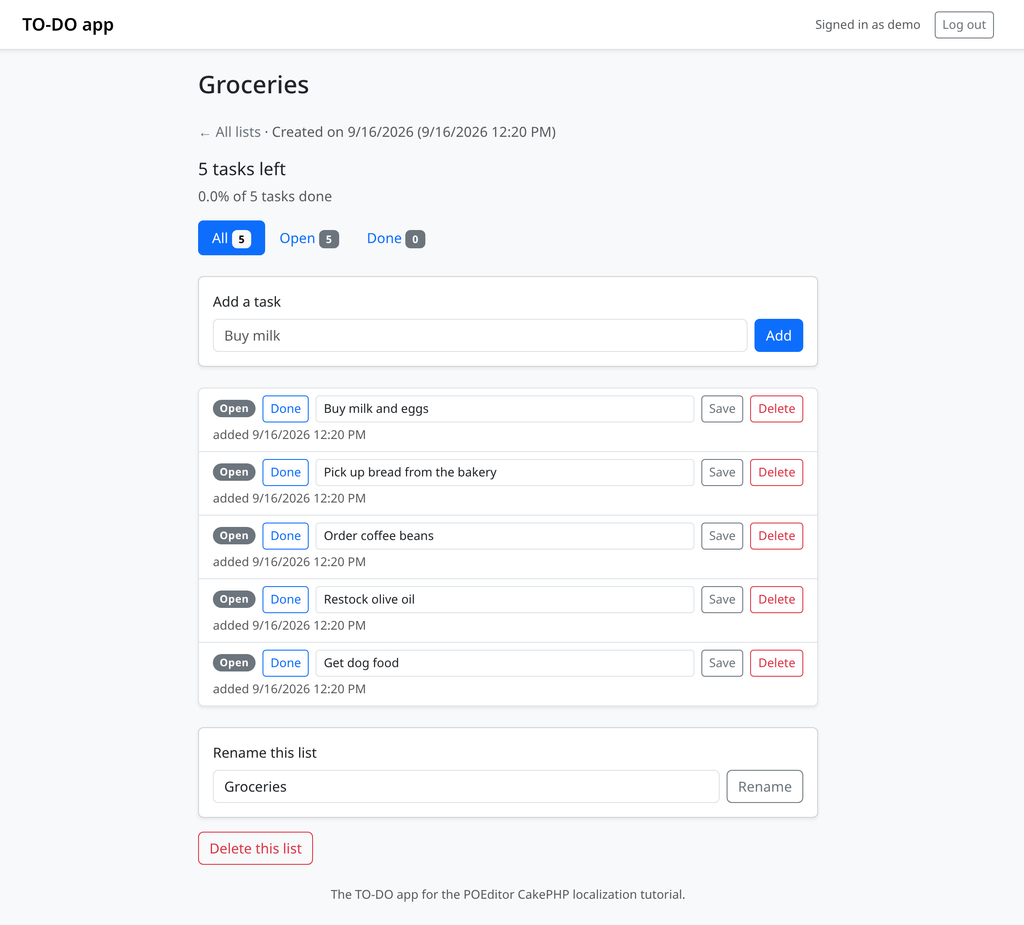
The screenshot has a second problem too. The line reading 5 tasks left comes from a hand-written if that picks between task and tasks, and the dates use format('n/j/Y g:i A'), the American convention hardcoded into the template. Neither becomes correct for a French reader just because the words around them have been translated.
To follow along you need PHP 8.2 or newer with the intl extension enabled, since current CakePHP 5 releases require both, and a CakePHP application you can edit. Install the dependencies with composer install, start the application with bin/cake server, and open the address it prints.
Setting the default locale
The locale CakePHP falls back on lives in config/app.php under App.defaultLocale, and a stock application reads it from the environment so you can override it per deployment.
// config/app.php
'App' => [
    'defaultLocale' => env('APP_DEFAULT_LOCALE', 'en_US'),
    // ...
],
That one value decides more than which translations are loaded. It also sets the default formats used by Cake\I18n\Number and Cake\I18n\DateTime, so changing it moves dates and percentages to French conventions without any translated text being involved.
Locale codes follow the ICU convention of a language and an optional region, written as en_US, fr_FR or fr_CA. A bare fr is valid too, and it is what this tutorial uses, because one catalog then serves every French-speaking region. Name the region only when you will ship a catalog that differs by region, such as a fr_CA written for Canada.
Record the languages the app ships in while you are here, because both the middleware and the language switcher need that list.
// config/app.php
'I18n' => [
    'locales' => [
        'en_US' => 'English',
        'fr' => 'Français',
    ],
],
The __() function family
CakePHP exposes its translation functions globally, so they are available in controllers, templates, table classes and anywhere else without an import. There are eight, built from three ideas that combine in a fixed order.
| Function | What it adds |
|---|---|
| __() | Translate a string |
| __d() | …from a specific domain |
| __n() | …choosing between singular and plural by a number |
| __x() | …with a context that disambiguates identical strings |
| __dn() | Domain and plural |
| __dx() | Domain and context |
| __xn() | Context and plural |
| __dxn() | Domain, context and plural |
Read the names as d for domain, x for context and n for plural. Most of your time goes in __() and __n(), and each of them returns its source string unchanged when no translation exists, so marking every string in one pass is safe and a string added after the last translation round still renders in English.
Translating templates
Start with the layout, because it wraps every page. In the TO-DO app that is templates/layout/default.php, where the brand, the navigation buttons and the signed-in line all need wrapping.
<?php // templates/layout/default.php ?>
<a class="navbar-brand fw-semibold" href="<?= $this->Url->build('/') ?>"><?= h(__('TO-DO app')) ?></a>

<span class="text-body-secondary small">
    <?= h(__('Signed in as {0}', $identity->get('username'))) ?>
</span>

<?= $this->Form->postLink(
    __('Log out'),
    ['controller' => 'Users', 'action' => 'logout'],
    ['class' => 'btn btn-sm btn-outline-secondary'],
) ?>
Translate first and escape the result, never the other way round, because escaping first would hand the translator a string full of HTML entities. Helpers such as Form and Html take their labels as ordinary arguments, so a label gets wrapped in __() like any other string.
The page templates follow the same pattern, and the strings that get overlooked are the ones that are not body text: placeholders, aria-label and title attributes, and the confirmation text on a delete button.
<?php // templates/TodoLists/index.php ?>
<?= $this->Form->control('name', [
    'label' => __('New list'),
    'placeholder' => __('Groceries'),
]) ?>

<?= $this->Form->button(__('Create list'), ['class' => 'btn btn-primary w-100']) ?>

<p class="text-body-secondary"><?= h(__('No lists yet. Create your first one above.')) ?></p>
One string stays unmarked. The username field’s placeholder reads demo because that is the account name this walkthrough asks you to type, and a value that is data rather than prose is better left out of the catalog.
Translating controllers and flash messages
Controllers hold the messages a user sees after doing something, and in the TO-DO app those were built by concatenation.
// src/Controller/TodoListsController.php
$this->Flash->success('List "' . $todoList->name . '" created.');
A concatenated message is difficult to translate because the translator does not get the complete sentence. They see List ", followed by the list name, and then " created. This also prevents them from changing the word order when the target language requires a different sentence structure. Make the whole message one string and pass the variable as a placeholder.
// src/Controller/TodoListsController.php
$this->Flash->success(__('List "{0}" created.', $todoList->name));
The {0} is ICU MessageFormat, CakePHP’s default way of interpolating arguments. The numbering allows the translator to change the word order. For example, a French translation can move {0} to a different position in the sentence. Messages with two values use {0} and {1} as their placeholders.
Page titles and anything else the controller sets get the same treatment.
// src/Controller/TodoListsController.php
$this->set('title', __('Your lists'));

$filters = [
    ['key' => 'all', 'label' => __('All'), 'count' => $totalCount],
    ['key' => 'open', 'label' => __('Open'), 'count' => $openCount],
    ['key' => 'done', 'label' => __('Done'), 'count' => $doneCount],
];
Translating validation messages and message domains
Validation messages in CakePHP live in table classes rather than templates, which makes them easy to forget until a French user submits an empty form and gets an English complaint back. In the TO-DO app they sit in validationDefault() and buildRules().
This is also where we can introduce a domain, which is a separate catalog file. Everything marked with plain __() goes into a domain called default, and __d() sends a message somewhere else.
// src/Model/Table/UsersTable.php
$validator
    ->scalar('username')
    ->requirePresence('username', 'create')
    ->notEmptyString('username', __d('validation', 'Pick a username.'))
    ->lengthBetween('username', [3, 80], __d('validation', 'Usernames are 3 to 80 characters long.'));

$rules->add(
    $rules->isUnique(['username'], __d('validation', 'That username is taken.')),
    ['errorField' => 'username'],
);
CakePHP also uses some predefined domains: the framework’s own strings are in cake, and each plugin gets a domain named after it. Your own messages are the only ones that need marking.
Keeping form errors apart from interface labels gives a translator a coherent batch of similar strings to work through, at the cost of a second file to import and keep in sync.
Plurals: __n() or ICU MessageFormat
The TO-DO app picks its singular and plural forms by hand in four places, and the dashboard is the clearest of them.
// src/Controller/TodoListsController.php
if ($listCount === 1) {
    $listCountLabel = $listCount . ' list';
} else {
    $listCountLabel = number_format($listCount) . ' lists';
}
This assumes that every language has two plural forms and that the singular is used only for one item. That is not true for all languages. Polish has four plural forms, Arabic has six, and French uses the singular form for zero.
CakePHP gives you two ways out.
__n() takes a singular message, a plural message and the count. The catalog then stores the plural forms required by the target language.
// src/Controller/TodoListsController.php
$listCountLabel = __n(
    'You have {0} list.',
    'You have {0} lists.',
    $listCount,
    Number::format($listCount),
);
ICU plural syntax puts every form inside a single message, which one translator then fills in as one string.
$listCountLabel = __('{0,plural,=0{You have no lists.} one{You have one list.} other{You have # lists.}}', $listCount);For this tutorial we’ll use __n() throughout: it is what bin/cake i18n extract writes into the catalog natively, and it is what POEditor’s plural editor is built around. We recommend keeping plural forms separate rather than using ICU MessageFormat, since separate forms are easier to work with in the translation workflow. Replace the other three manual plural branches in the same way.
Extracting the strings with bin/cake i18n extract
With the strings marked, CakePHP’s console command scans the code and writes a .pot file, which is the template catalog a translator works from.
bin/cake i18n extract --paths src,templates --output resources/locales --extract-core no --overwriteRun bare, the command prompts for each of those values. --extract-core no leaves CakePHP’s own strings out, --overwrite replaces the previous template instead of asking, and pointing --paths at src and templates avoids the reflection warnings that config produces for its migration and seed classes.
The output lands in resources/locales/, one file per domain, so our split produces two.
resources/locales/
├── default.pot
└── validation.pot
Open default.pot to see the structure of the extracted catalog.
# resources/locales/default.pot
#: ./src/Controller/TodoListsController.php:31
msgid "You have {0} list."
msgid_plural "You have {0} lists."
msgstr[0] ""
msgstr[1] ""

#: ./src/Controller/TodoListsController.php:98
#: ./templates/TodoLists/index.php:42
msgid "{0} task left"
msgid_plural "{0} tasks left"
msgstr[0] ""
msgstr[1] ""
The #: lines are source references, and the second entry carries two of them: the list page and the dashboard word their count the same way, so four call sites collapsed into three entries. Putting the whole sentence inside the message is what let them match. The msgstr values are empty because a .pot is a template: it holds the source messages and nothing else.
Extraction reads literals, so a string built at runtime and passed to __() as a variable never reaches your translator.
Translating the catalog in POEditor
Editing a .pot file by hand becomes difficult as the number of strings grows, especially when translators or other non-developers need to work on the project. POEditor gives the catalog a web interface, keeps a translation memory across your projects on paid plans, and hands back a .po file in the same format CakePHP already reads.
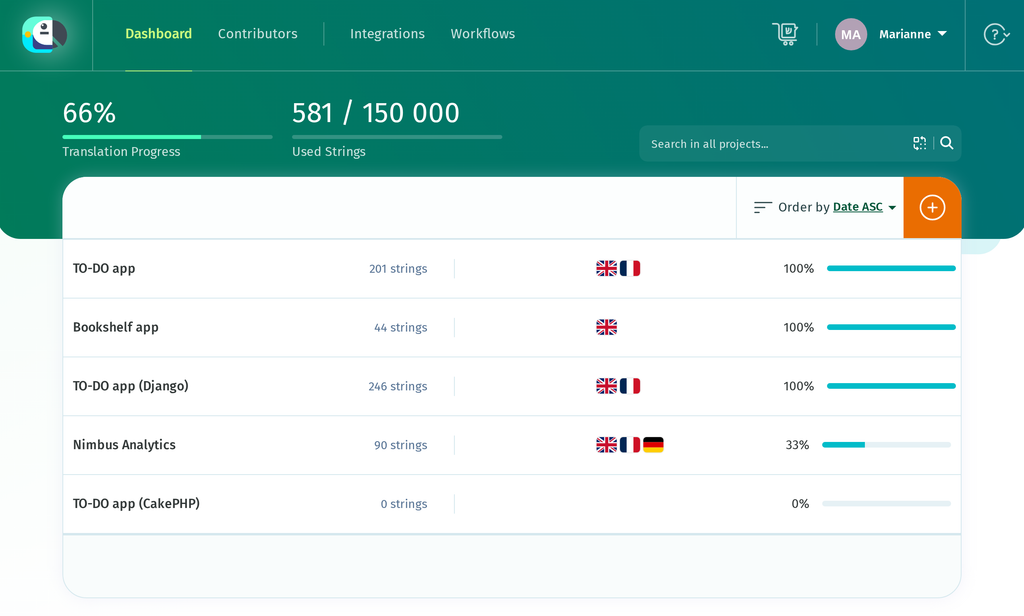
Start by creating a project for the application.
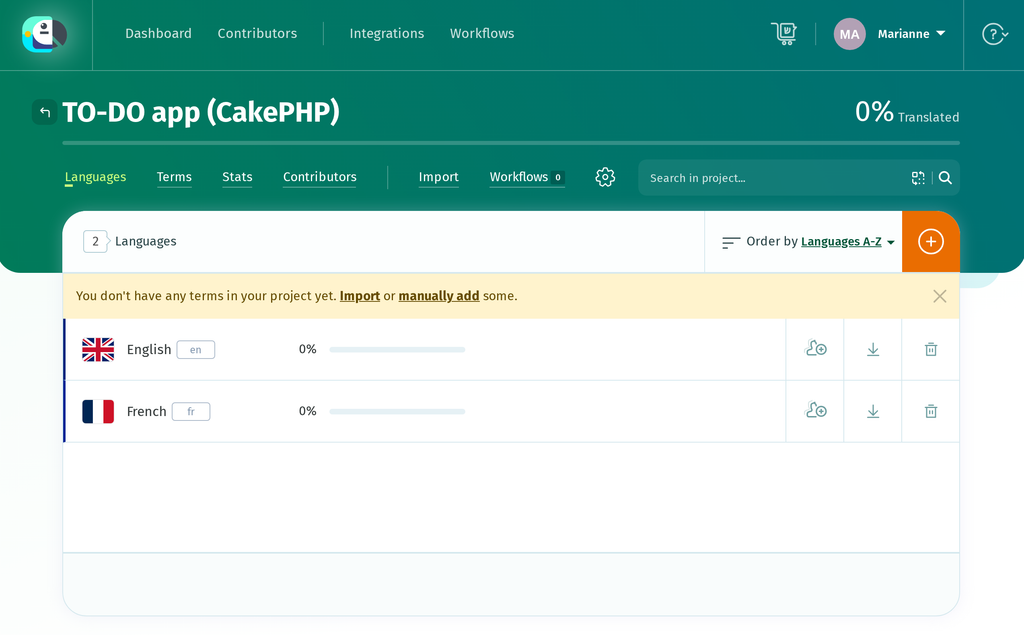
Then add the languages the app ships in: English as the source and French as the target.
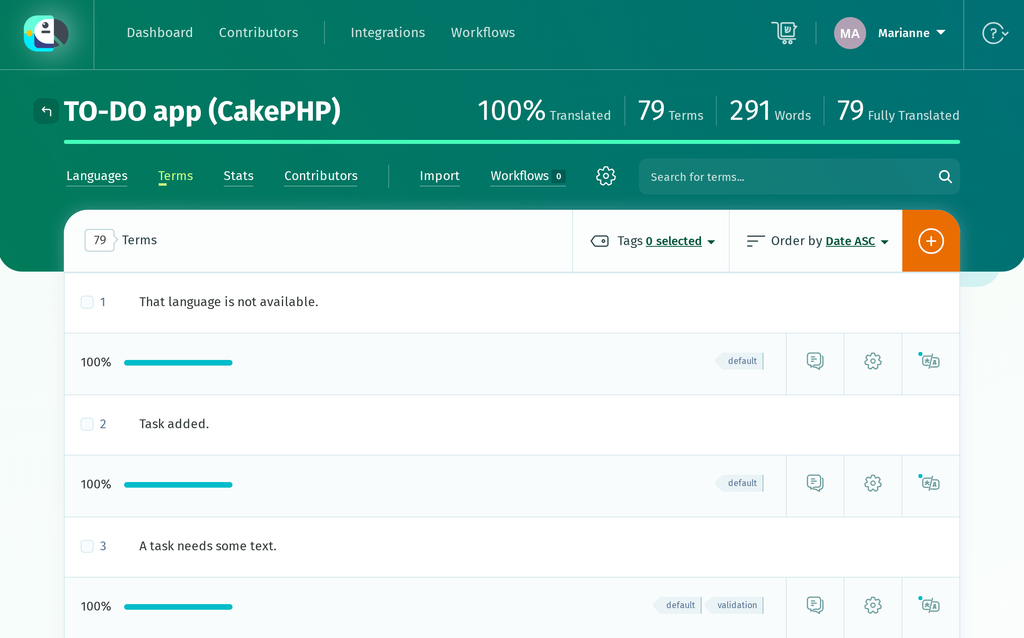
Import default.pot on the import page with Add tags switched on and the tag set to default, then validation.pot with the tag set to validation.
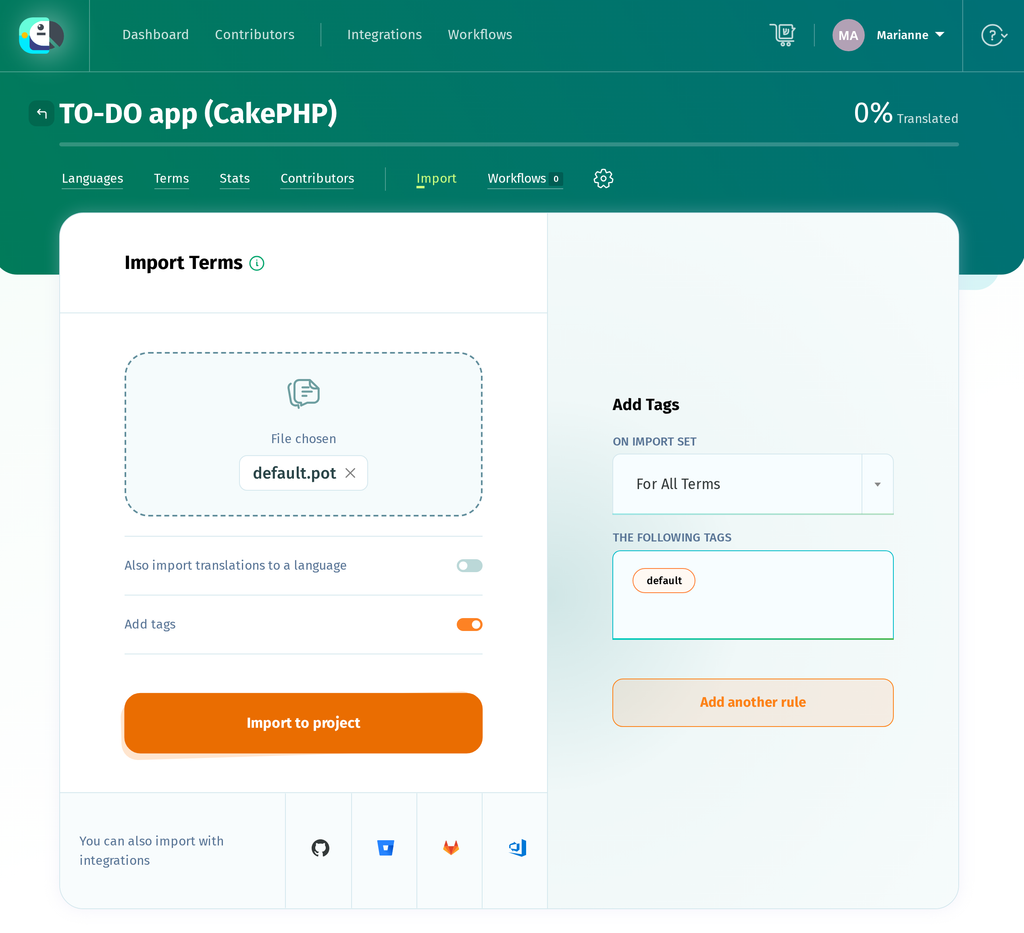
Both files land in the same project, and those tags are what let one project produce two separate catalogs again on the way out. Two strings appear in both files, and POEditor stores them once with both tags. For that to work, tag all the terms in validation.pot on the second import, not only the new ones, so the shared strings pick up the validation tag as well.
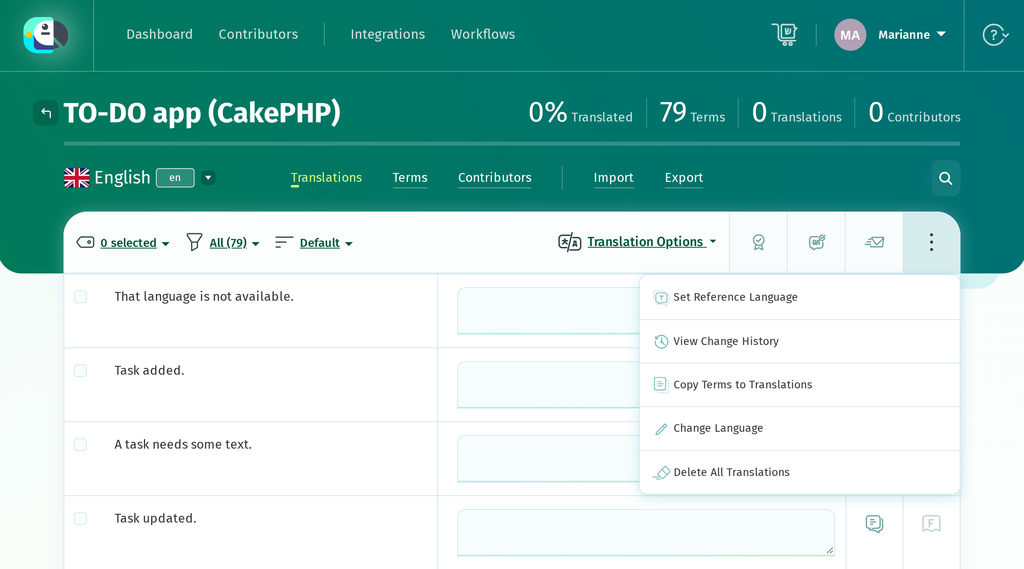
Importing a .pot creates the terms, but the file does not contain translations. As a result, the English language shows 0% translated in POEditor. Use Copy Terms to Translations to copy the English terms into the English translations so they can be used as a reference while translating into French.
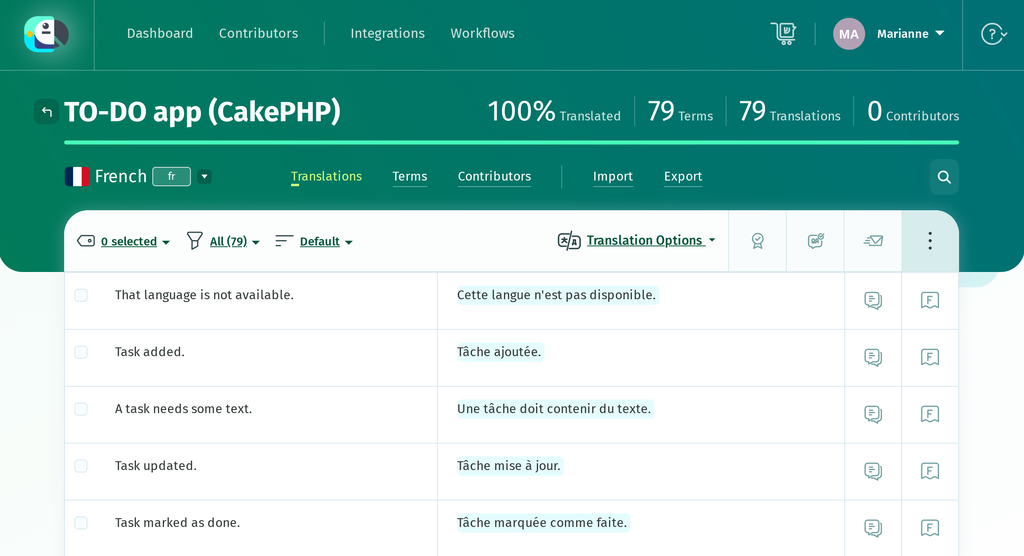
Now translate. The terms carrying {0} and {1} need their placeholders kept intact, though they can be moved wherever French word order wants them. If a translation leaves one out, POEditor shows a warning under the translation box.
If you would rather review a first draft than translate from scratch, you can pre-fill the French strings with Automatic Translation (Google Translate, DeepL or Azure AI Translator), which is built in, or with AI translation from providers such as OpenAI or Anthropic’s Claude once you add your own API key.
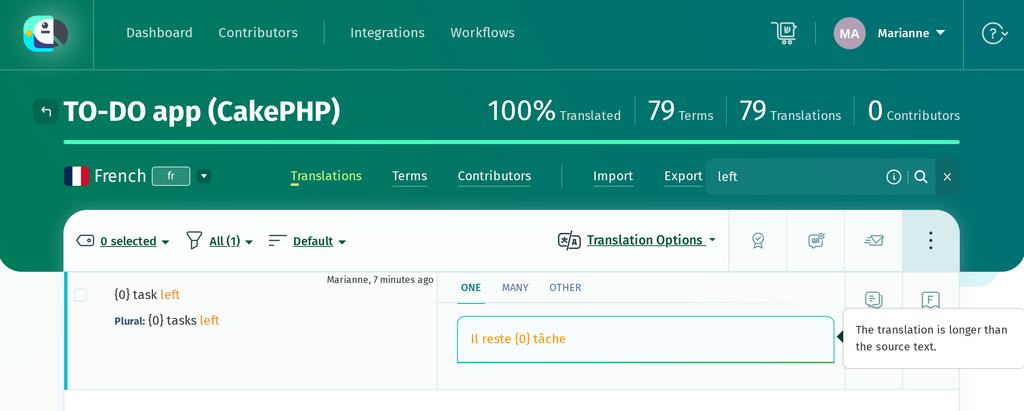
The plural terms offer a field per form, and French needs three where English needs two: the catalog carries as many forms as the target language has, not as many as the source.
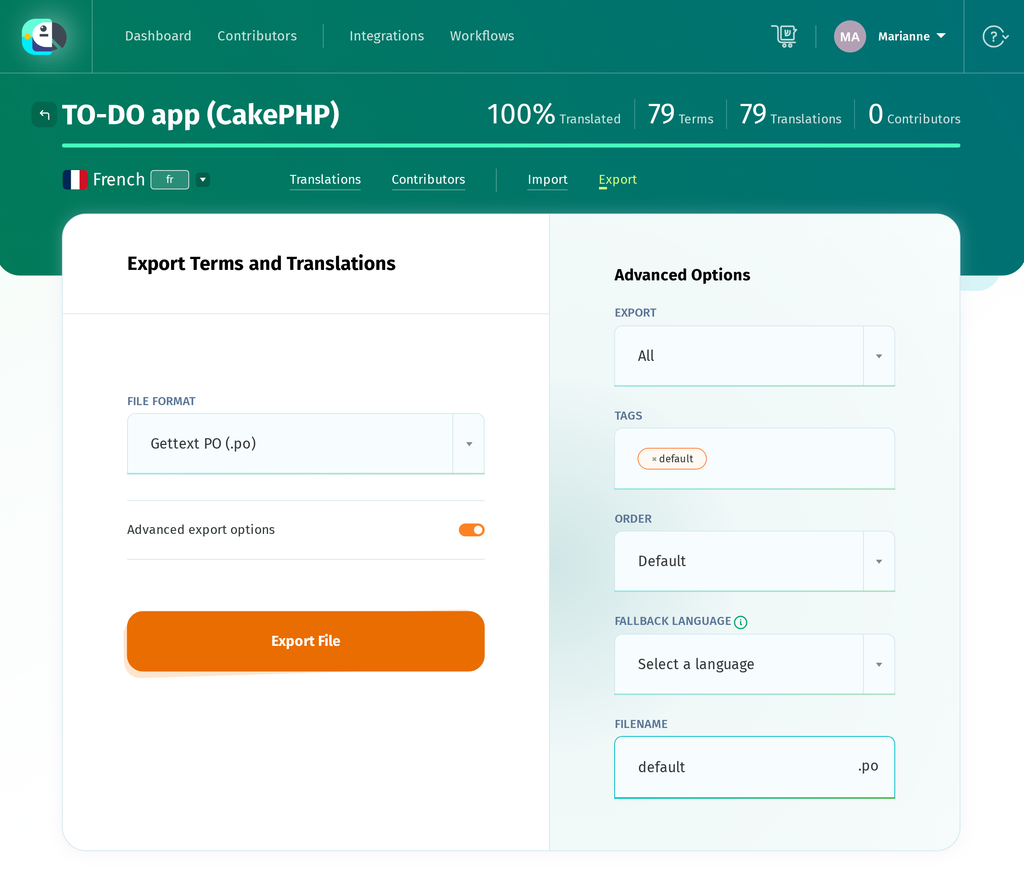
When the translations are done, export French as a .po file, once per domain. Filter the export by the default tag for the first file and the validation tag for the second, because an export with an empty tag filter returns every term in the project and would collapse your two domains back into one.
Loading the French catalog and switching language
CakePHP looks for catalogs under resources/locales/, in a folder named after the locale, with one file per domain. Copy the exported files into that directory.
resources/locales/
├── default.pot
├── validation.pot
└── fr/
    ├── default.po
    └── validation.po
There is no compile step
If you have localized a Django or a plain gettext project, this is where you would reach for msgfmt or compilemessages to turn the .po into a binary .mo. CakePHP does not need it: its message loader defaults to the .po extension and parses the file directly, so the file POEditor exports is the file the application runs on. Translations are cached aggressively, though, so clear the cache after dropping in a new catalog.
bin/cake cache clear_allFolder naming follows a fallback, and its order is worth knowing: for an fr_FR locale CakePHP looks in resources/locales/fr/ before resources/locales/fr_FR/ and loads the first catalog it finds. A single fr folder therefore covers every French-speaking region, which is why this tutorial uses one, and a fr_FR folder is only read when fr has no file for that domain.
Switching at runtime
I18n::setLocale() sets the locale for the current request. To pick one up from the browser, CakePHP ships LocaleSelectorMiddleware, which reads the Accept-Language header and matches it against the locales you allow.
// src/Application.php
use Cake\I18n\Middleware\LocaleSelectorMiddleware;

$middlewareQueue
    ->add(new LocaleSelectorMiddleware(
        array_keys((array)Configure::read('I18n.locales')),
    ));
Passing that list matters. With no list, the middleware never sets a locale at all, and with ['*'] it accepts any header, including languages you have no catalog for. Restricting it to the two languages the app ships means an unrecognised header falls back to App.defaultLocale.
Keying that list on fr rather than fr_FR is what makes it work for every French reader. Locale::lookup() shortens a requested tag but never lengthens it, so fr matches a browser asking for fr, fr-FR or fr-CA alike, while fr_FR would match only French (France) and send every other French reader to English.
The Accept-Language header is only used as the initial locale selection. To let users choose a language manually, the switcher sends the selection to a controller action, which stores it in the session.
// src/Controller/LocaleController.php
public function change(string $locale): ?Response
{
    $this->request->allowMethod(['post']);

    if (!array_key_exists($locale, $this->availableLocales())) {
        throw new NotFoundException(__('That language is not available.'));
    }

    $this->request->getSession()->write(self::LOCALE_SESSION_KEY, $locale);
    I18n::setLocale($locale);

    return $this->redirect($this->localRedirectTarget());
}
Do not name that action set(): Controller::set() already exists for passing variables to the view, so an action of that name dies with a signature clash before the page renders.
Read the stored locale in AppController::beforeFilter(). This runs after the middleware, so the session value can override the locale selected from the Accept-Language header.
// src/Controller/AppController.php
public function beforeFilter(EventInterface $event): void
{
    parent::beforeFilter($event);

    $locale = $this->request->getSession()->read(self::LOCALE_SESSION_KEY);

    if ($locale && array_key_exists($locale, $this->availableLocales())) {
        I18n::setLocale($locale);
    }
}
Watch the case. LocaleSelectorMiddleware resolves the header by calling Locale::lookup() with canonicalization on, which returns a lower-cased tag, so a region-coded entry comes back changed: a browser asking for en-US leaves I18n::getLocale() reading en_us. The translations still load, but a === comparison against your configured keys fails and the switcher shows no language as active. Compare with strcasecmp().
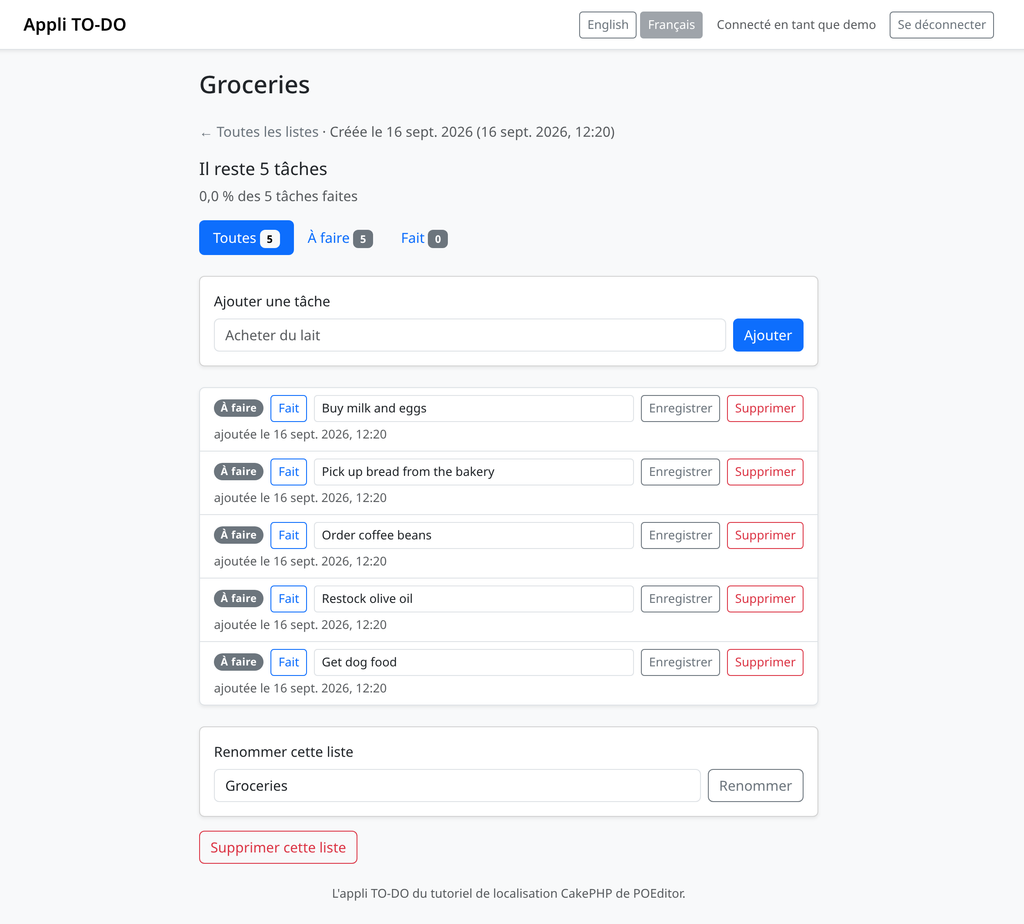
With the catalog in place and the switcher wired up, the app reads in French, and the count reads Il reste 5 tâches because __n() is choosing the form from the catalog rather than the hand-written if we deleted.
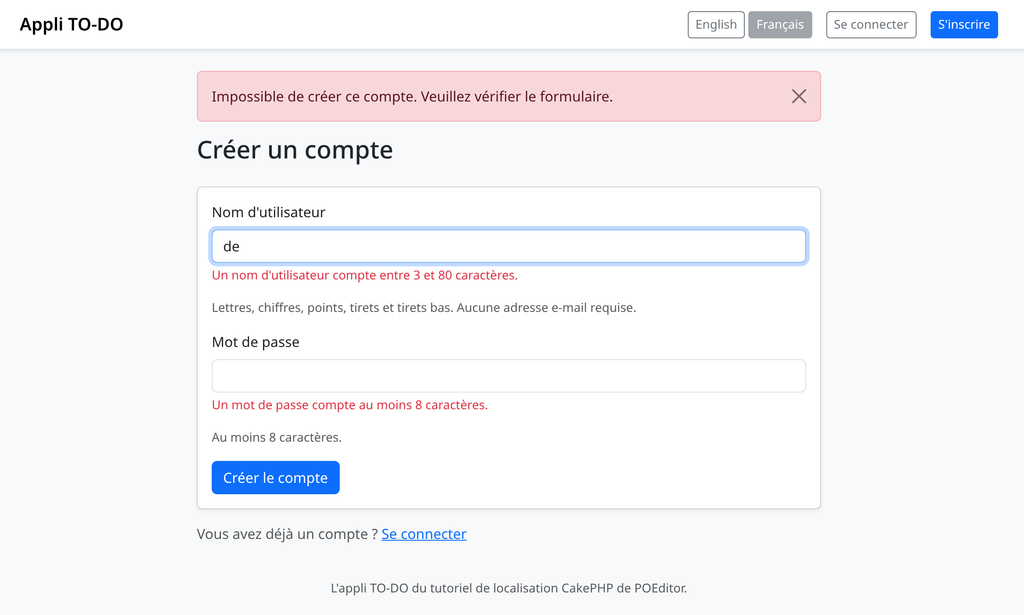
The messages from the validation domain arrive with the rest, so a form submitted with a too-short username answers in French as well.
Dates, numbers and percentages
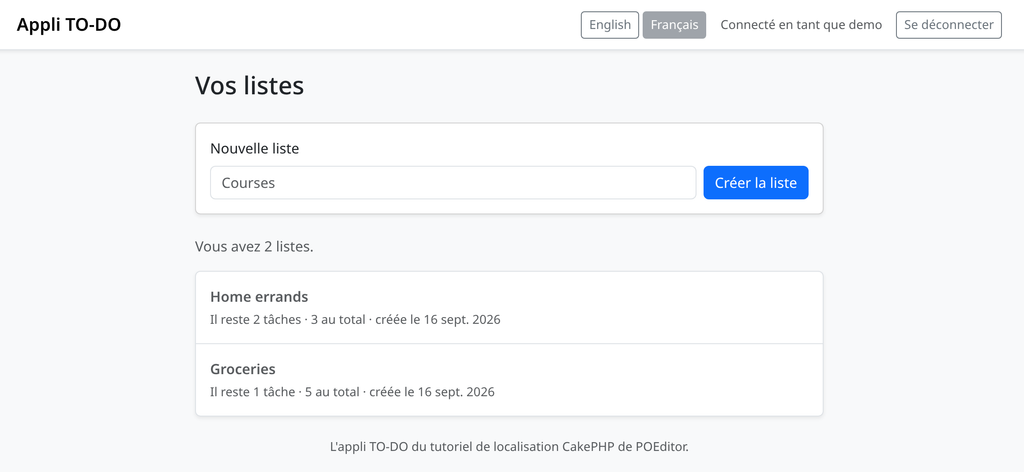
A French reader also expects 16 sept. 2026 rather than Sep 16, 2026, a comma where English puts a decimal point, and a space before a percent sign. The TO-DO app currently uses US-style formats in its templates.
// templates/TodoLists/index.php
created <?= h($list->created->format('n/j/Y')) ?>
Cake\I18n\DateTime reads the active locale, so switching to i18nFormat() or nice() gets the formatting for free.
<?php // templates/TodoLists/index.php ?>
<?= h(__('created {0}', $list->created->i18nFormat([\IntlDateFormatter::MEDIUM, \IntlDateFormatter::NONE]))) ?>
Numbers work the same way through Cake\I18n\Number, and the progress line mixes a formatted percentage into a translatable sentence.
// src/Controller/TodoListsController.php
$progressLabel = __(
    '{0} of {1} tasks done',
    Number::toPercentage($todoList->percent_done, 1),
    Number::format($totalCount),
);
In English that renders as 0.0% of 5 tasks done, and once the sentence itself is translated, as 0,0 % des 5 tâches faites in French, with the comma and the space before the percent sign applied by ICU rather than by anything in your code. The dates move the same way, and the timestamps drop AM/PM for a 24-hour clock.
The locale does not carry the time zone. I18n::setLocale() changes how a time is written, not which moment it refers to, so an application with users in several countries still needs to set a time zone per user and convert before formatting.
Translating content in the database
Everything so far has been static text in your source code, and a .po file is the right home for it. Content users create is a different problem: the TO-DO app’s lists and tasks are typed by the account that owns them, so there is nothing to translate.
Editorial content is where this changes. Category names, a product catalogue or help text stored in a table are written by you, shown to everyone, and need a version per language. CakePHP handles them with the Translate behavior, attached to a table rather than threaded through your queries.
// src/Model/Table/CategoriesTable.php
$this->addBehavior('Translate', ['fields' => ['name', 'description']]);
A find then returns the translation for whichever locale is active, and writing one means setting _locale on the entity before saving. By default the translations live in a companion categories_translations table, and the Translate behavior docs cover the shared-table alternative. Use it for content managed by your application rather than content entered by individual users.
Keeping the catalogs in sync
The catalogs need to be updated when the application changes. You can use the same extraction command to generate an updated .pot file.
bin/cake i18n extract --paths src,templates --output resources/locales --extract-core no --overwriteRe-running it picks up new strings and drops the ones you have deleted. Import the refreshed .pot into POEditor and the new terms appear untranslated while the existing ones keep their translations, so a translator only sees what changed. Terms you removed from the code stay in the POEditor project until you delete them, though. Tagging the obsolete terms on import makes them easy to find.
A message is identified by its text, so changing Give the list a name. to Please give the list a name. does not edit a term, it creates a new one and orphans the old. Every translation reverts to untranslated, which is correct behaviour for a changed sentence, but it means a wording tweak on release day puts every language back into the queue.
If you update the catalogs regularly, consider automating this process. POEditor has an API and integrations that let you push a .pot and pull finished .po files as part of a build, so the catalogs follow the code rather than trailing a release behind it.
A simpler safety net is to run the extract command in CI and fail the build when the committed .pot files are out of date. Every run rewrites the POT-Creation-Date header and the #: line references shift whenever code moves, so tell the diff to ignore those lines, for example with git diff –exit-code -I ‘^#:’ -I ‘^”POT-Creation-Date’ resources/locales. That catches a marked string nobody extracted before it ships untranslated. Note that git diff only compares files the repository already tracks, so commit a new domain’s .pot the first time it appears, or the check will never see it.
Wrapping up
The TO-DO app now marks its strings with __() and __n(), keeps its validation messages in their own domain, extracts to a .pot with a single console command, takes its French from a real translation workflow rather than a hand-edited file, and switches between English and French from the navbar. Because CakePHP reads .po files directly, shipping a new language means adding a folder and clearing a cache, with no compile step anywhere in the deploy.
Create a free POEditor account and import your .pot file to see how your own catalog looks with a translation interface around it.
If you are localizing something else in the same stack, these guides cover the same ground for other frameworks:
- Django i18n: How to translate and localize your app
- Python gettext localization: How to translate a Python app
Frequently asked questions
Does CakePHP need .mo files, or will .po do?
.po is all you need. CakePHP’s message loader defaults to the po extension and parses the file directly, so the catalog your translator exports is the one the application runs on, with no msgfmt step in your deploy. A parser for the compiled .mo format ships with the framework too, but nothing looks for those files unless you register a loader with the mo extension yourself.
Where do CakePHP translation files go?
Under resources/locales/, in a folder named after the locale, one file per domain: fr/default.po for everything marked with __(), fr/validation.po for a domain created with __d(‘validation’, …). Watch the precedence, which runs the opposite way to most expectations: for an fr_FR locale CakePHP checks resources/locales/fr/ first and loads the first catalog it finds, so a language-only folder shadows a regional one.
What is the difference between __() and __d()?
Only which catalog the string comes from. __() reads the default domain, where everything lands unless you say otherwise, and __d() takes a domain name as its first argument and reads that file instead. Splitting a domain off pays when a group of strings has its own audience or release rhythm, and costs one more file to extract, import and keep in sync.
Should I use __n() or ICU plural syntax?
__n() is the recommended option for most work: it takes a singular, a plural, and the count, bin/cake i18n extract writes it into the catalog as a native plural entry, and translation tools give it a field per form. ICU syntax packs every form into one message, but separate plural forms are easier to work with in the translation workflow. Either way, CakePHP picks the form from its built-in plural rules for the active locale, so the catalog needs as many forms as that locale uses, in the matching order.
Why is bin/cake i18n extract missing some of my strings?
Almost always because the string is not a literal. Extraction parses your source instead of running it, so __($message) with the sentence built at runtime is invisible, as is anything concatenated before the translation call. Another common cause is that the command did not scan the directory containing the string: run it with –paths src,templates, and reach for –plugin for strings inside a plugin.
Why is my translation not showing up after I add the .po file?
Start by clearing the cache, where this usually ends: run bin/cake cache clear_all and reload. If the text is still English, check the file sits in a folder CakePHP searches, remembering that fr/ shadows fr_FR/. If only some strings are missing, compare them character for character with the msgid, because a message is identified by its source text and a changed full stop is a different entry.
How do I change the language per user instead of per browser?
LocaleSelectorMiddleware reads the Accept-Language header, which is a first guess and nothing more. To let people choose, write the locale they picked to the session from a small controller action and apply it in AppController::beforeFilter(), which runs after the middleware and therefore wins. If you compare the active locale against your own list, note that Locale::lookup() canonicalizes to lower case, so en-US arrives as en_us.
Does CakePHP translate its own error and validation messages?
Its user-facing strings are marked in a domain called cake, but the translations are not bundled with the framework. They live in the separate cakephp/localized plugin, installed with Composer and loaded like any other; it also carries locale-specific validation classes for things like postcodes and phone numbers. Your own messages are never covered by it, whichever domain they sit in.
How do I translate database content in CakePHP?
With the Translate behavior, attached to the table rather than threaded through your queries. It stores translations in a shadow table named after the original, so categories gets categories_translations; a find returns whichever locale is active, and writing means setting _locale on the entity before saving. Use it for content you author and everyone sees, not for rows a user typed themselves.
How do I get a CakePHP .pot file into POEditor and back?
Import it as it is. bin/cake i18n extract writes standard Gettext, so POEditor reads the {0} placeholders, the plural entries and the source references without conversion, and exports French back as a .po file that drops straight into resources/locales/fr/. Tag each import with its domain name so one project can export default.po and validation.po separately, and use the API or a Git integration once the round trip becomes routine.